








Yes — server distance affects VPN speed, but not in the way most people assume. Distance has a big, unavoidable effect on latency, the delay before anything happens. Its effect on download speed is real but usually much smaller, and it's often outweighed by things that have nothing to do with distance at all: a crowded server, an inefficient route, a slow protocol, or weak home Wi-Fi. This guide explains exactly how distance slows a VPN down, puts real numbers on it, and shows you how to pick the server that's actually fastest for what you're doing — which isn't always the closest one.
The short answer
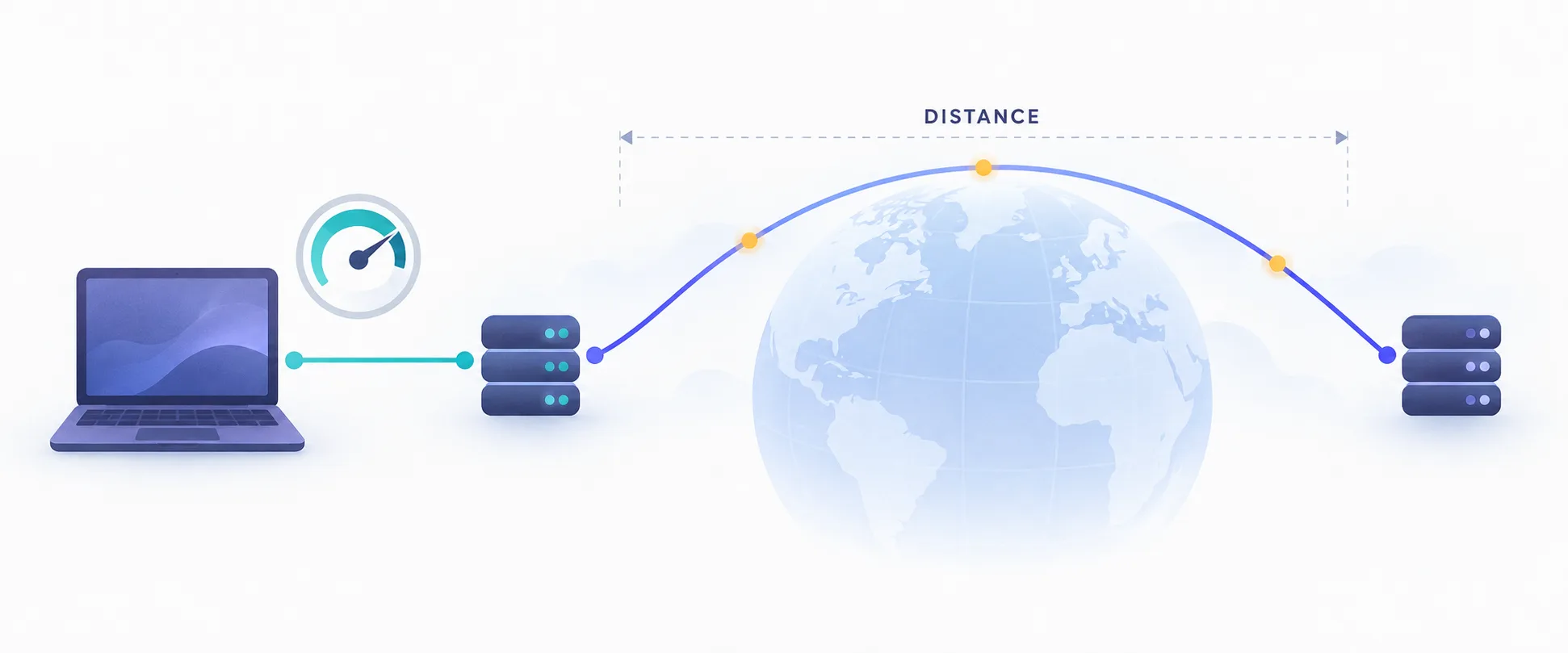
Every VPN connection adds an extra stop to your traffic's journey. Instead of travelling straight from your device to a website, your data goes to the VPN server first, then on to the site, and back the same way. The farther away that server is, the longer each round trip takes.
That extra travel time is governed by physics, so no VPN can engineer it away. A server in your own city might add only a few milliseconds of delay. A server on the other side of the world can add a quarter of a second or more to every single request. Whether you notice depends heavily on what you're doing: a 200ms delay is ruinous for online gaming, mildly annoying for web browsing, and almost invisible when a film is streaming.
Latency and speed are not the same thing
Latency (or ping) is how long a single message takes to make the round trip, measured in milliseconds. Throughput (what speed tests call download speed) is how much data flows per second, measured in Mbps. Distance hits latency hard and throughput more gently — keeping the two apart is the key to understanding everything below.
Why distance adds delay: the physics
Data travels through fibre-optic cables as light, and light in glass moves at roughly two-thirds of its speed in a vacuum — about 200,000 kilometres per second. That sounds instant, but it adds up over long distances. As a rule of thumb, every 100 km of cable adds about 1 millisecond to a round trip.
Real cables don't follow straight lines, either. They follow coastlines, railways, and undersea routes, and traffic passes through routers at each network hop, each of which adds a little processing time. So real-world latency is typically 20–50% higher than the straight-line physics would suggest.
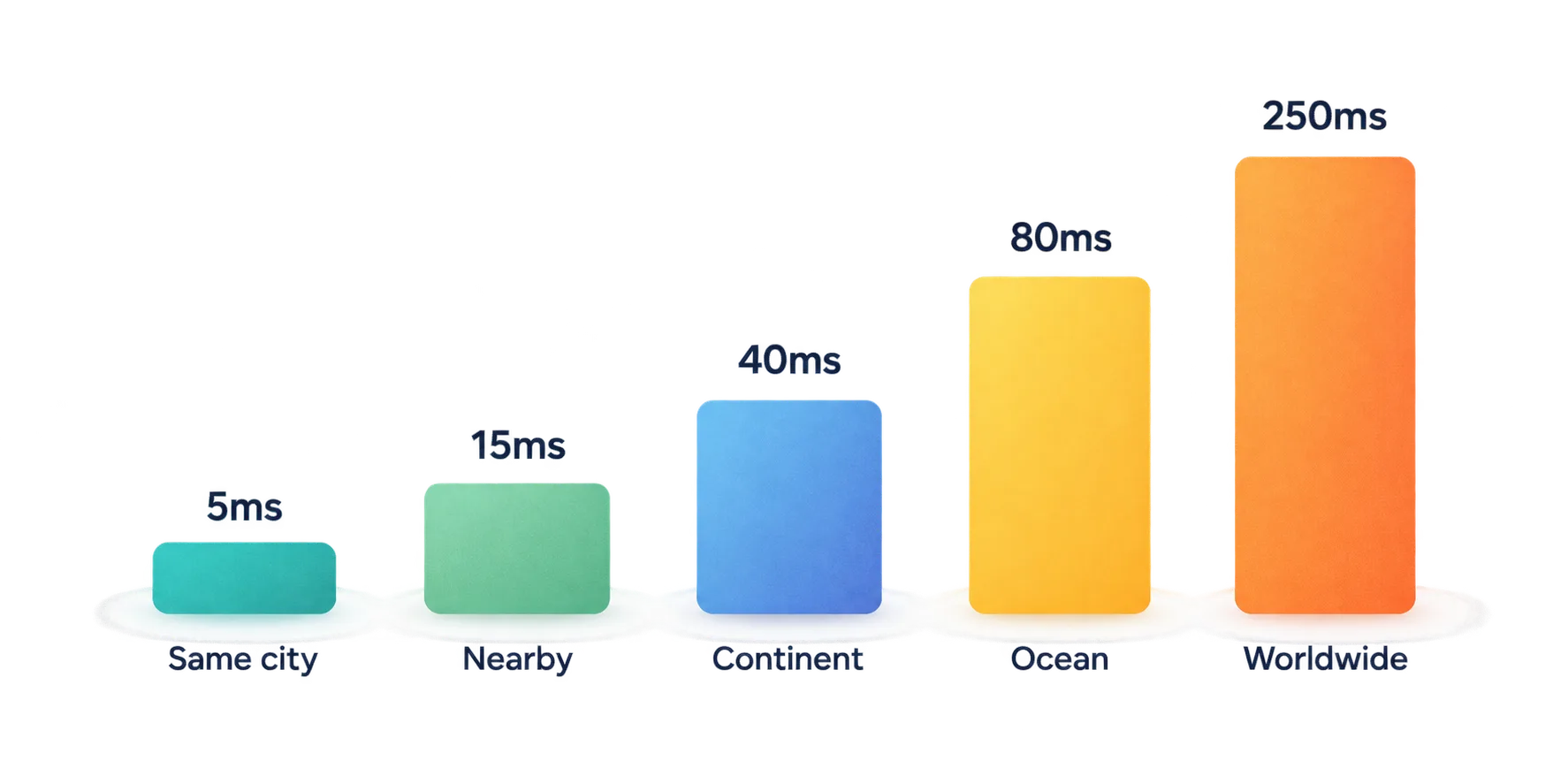
Here's what that means in practice, measured from a user in London:
| VPN server location | Approx. distance | Typical added latency | What you'll notice |
|---|---|---|---|
| Same city | <50 km | 2–10 ms | Nothing |
| Nearby country (Amsterdam) | ~360 km | 10–20 ms | Nothing |
| Across a continent (Madrid) | ~1,300 km | 30–45 ms | Slight delay in games |
| Across an ocean (New York) | ~5,600 km | 70–90 ms | Noticeable in games and calls |
| Other side of the world (Sydney) | ~17,000 km | 250–300 ms | Sluggish browsing, unplayable games |
These figures are approximate and vary with routing and network conditions, but the pattern holds everywhere: latency grows roughly in line with distance, and there's a hard minimum you can't get below.
Does distance affect download speed too?
Yes, but less than it affects latency, and the reasons are more subtle. Your download speed is capped by the slowest part of the whole path, and distance influences that in three ways.
- TCP needs acknowledgements. Most web traffic uses TCP, which waits for the other end to confirm it received data before sending more. Longer round trips mean slower confirmations, so a connection takes longer to ramp up to full speed. Large file downloads eventually get there; short page loads often don't.
- Long paths lose more packets. Every extra hop and cross-border link is another chance for congestion and dropped packets. TCP treats packet loss as a signal to slow down, and the combination of high latency and packet loss is what really drags throughput down.
- More networks, more bottlenecks. Traffic crossing an ocean passes through more providers and busier interconnections, any of which can be the slowest link on a given evening.
The practical upshot: on a clean, well-routed connection, a distant server might cost you 10–30% of your download speed, while adding hundreds of milliseconds of latency. On a congested or lossy route, the speed loss can be far larger. Distance is a multiplier on whatever problems the route already has.
The detour problem: when a far server really hurts
The worst case isn't simply a distant server — it's a distant server combined with a nearby destination. That forces your traffic into a long detour it didn't need to take.
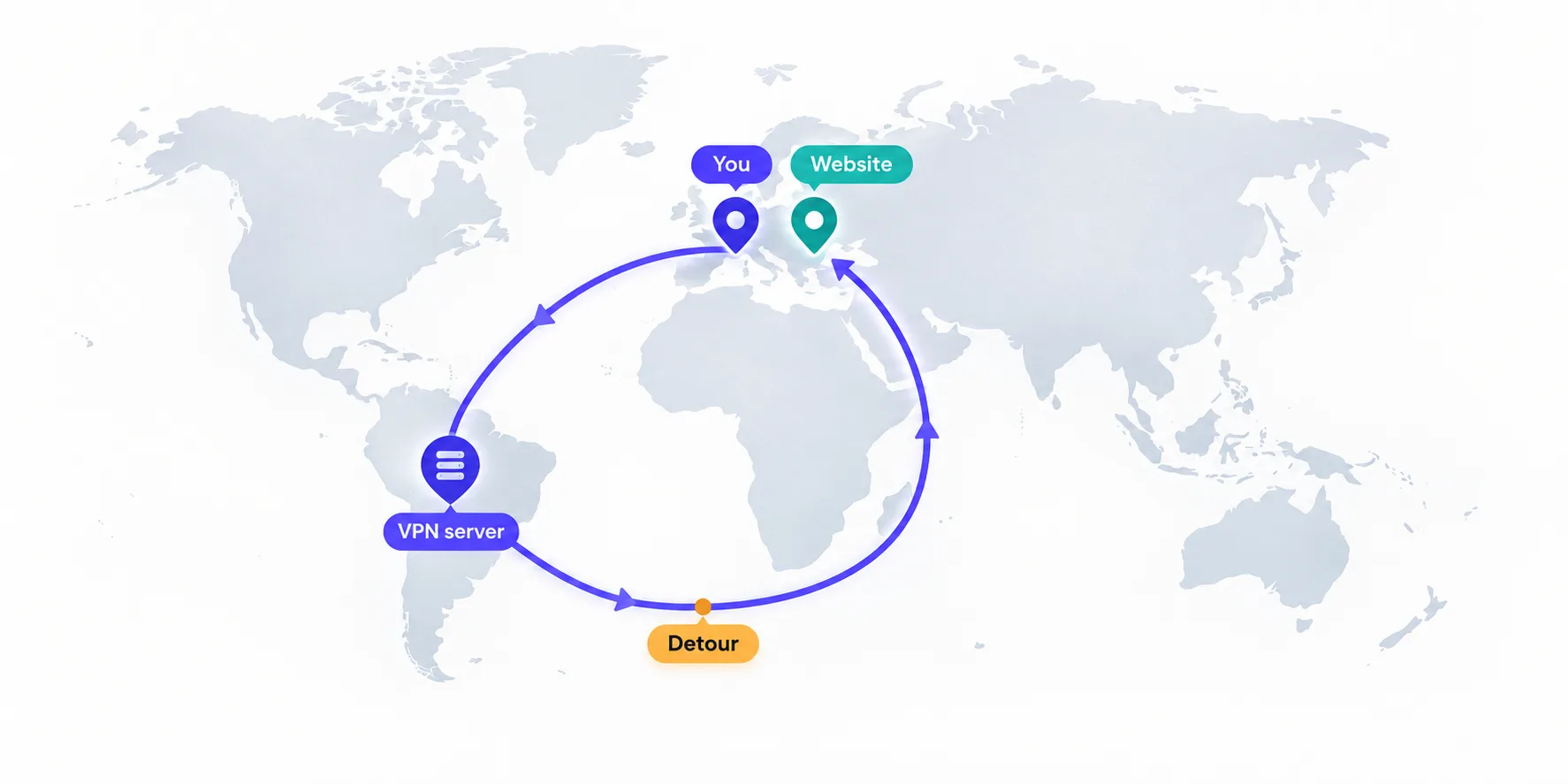
Imagine you're in Berlin, connected to a VPN server in Los Angeles, loading a news site hosted in Frankfurt. Your request crosses the Atlantic and North America to reach the VPN, then crosses them again to reach Frankfurt, and the response makes the same journey home. A trip that should take 10ms now takes well over 300ms.
The flip side is equally useful: if your destination is far away anyway, a server near the destination costs you very little. A user in London streaming a US-only service has to cross the Atlantic regardless; connecting to a New York server adds almost nothing on top, because the traffic was going that direction already.
The rule that actually picks the fastest server
Choose a server that lies on the path between you and where you're going. For everyday browsing, that means close to you. For reaching content in another country, that means close to that content. Only the detour — a server off the route — is truly costly.
What matters more than distance
People often switch to a closer server, see no improvement, and conclude the VPN is broken. Frequently distance was never the bottleneck. These factors regularly matter as much or more:
- Server load. A crowded server 50 km away can be far slower than a quiet one 800 km away. Congestion peaks in the evening, when everyone streams at once.
- The VPN protocol. Modern protocols like WireGuard are markedly faster and lighter than older OpenVPN configurations, often by more than the gap between a near and a middling server. Our WireGuard vs OpenVPN comparison covers the difference.
- Routing and peering. How well your ISP connects to the VPN provider's data centre matters. Two servers at equal distance can perform very differently because one sits on a better-connected network.
- Your local connection. Weak Wi-Fi, an old router, or a congested home network can cap your speed long before the VPN does. No server choice fixes a slow last hop.
- Your device. Encryption uses processor time. It's negligible on modern computers and phones, but older routers and budget devices running a VPN can become the bottleneck.
- Extra privacy features. Obfuscation, multi-hop routing, and Tor-over-VPN all add overhead. Routing through two servers compounds latency exactly as our guide to multi-hop proxy chaining describes.
How much distance matters for what you do
The same server can be perfect for one activity and useless for another, because each task cares about a different measurement.
| Activity | What matters most | Distance sensitivity | Server advice |
|---|---|---|---|
| Online gaming | Latency and stability | Very high | Nearest server to the game host |
| Video calls | Latency and jitter | High | Near you or near the other caller |
| Web browsing | Latency (many small requests) | Moderate | Near you |
| Streaming | Sustained throughput | Low | Near the streaming service |
| Large downloads / torrents | Throughput | Low to moderate | Uncongested, well-connected server |
Streaming is the most forgiving case. A 4K stream needs a steady 15–25 Mbps, and video players buffer several seconds ahead, so an extra 100ms of latency simply disappears. Gaming is the least forgiving: competitive players notice every 20ms, and there's no buffer to hide behind.
How to find your fastest server
- Test without the VPN first. Run a speed test and note your download speed and ping. This is your baseline — no VPN will beat it.
- Try the auto-select or "fastest server" option. Most apps choose based on current load and latency, which often beats picking manually by geography.
- Test two or three nearby candidates. Check the same test on each. Differences of 20–40% between equally close servers are common, usually down to load.
- Switch protocol before switching country. If speeds are poor, try WireGuard (or the provider's own fast protocol) before assuming the location is the problem.
- Test at the time you'll actually use it. A server that's fast at noon can be saturated at 9pm.
- Confirm where you're really connected. Our IP lookup tool shows the location your traffic appears to come from — occasionally a "local" server is routed somewhere unexpected.
Don't read too much into one speed test
Speed tests measure the path to a test server, not to the websites you use, and results swing between runs. Run each test at least twice, compare like with like, and judge on the pattern rather than a single number.
Can a VPN ever make you faster?
Occasionally, yes — and distance has nothing to do with it. A VPN can't beat physics, but it can route around problems created by your internet provider.
The most common case is traffic throttling. Some ISPs deliberately slow particular kinds of traffic, such as video streaming or peer-to-peer downloads, during busy periods. Because a VPN encrypts your traffic, the ISP can no longer see what type it is, so it can't selectively slow it. If your streams mysteriously buffer every evening but run smoothly with a VPN on, throttling is the likely explanation.
The second case is poor routing. Your ISP's default path to a particular service is sometimes congested or needlessly indirect, while the VPN provider's data centre happens to have a cleaner connection to that same destination. The traffic travels farther but through less crowded links, and arrives sooner. It's not something to count on, but it explains why a VPN occasionally improves one specific site while slowing everything else slightly.
Realistic speed loss to expect
With a good provider, a modern protocol, and a nearby, uncongested server, expect to keep roughly 80–95% of your normal download speed and add only single-digit milliseconds of latency. Most people genuinely can't tell the VPN is on.
Move to a server in a neighbouring region and you might keep 70–90% of your speed with a modest latency increase. Cross an ocean and the latency jump becomes obvious, while download speed often still holds up reasonably on a well-connected route. On the other side of the world, both measures typically suffer noticeably, and interactive activities start to feel sluggish.
If you're losing more than half your speed on a nearby server, distance is almost certainly not the cause. Look at server load, protocol, your Wi-Fi, or the provider's network quality instead.
VPNs with networks that keep you close
Because distance and load both matter, the VPNs that stay fastest tend to combine large, geographically dense server networks with a modern protocol and smart auto-selection. A few from our directory that do this well:
NordVPN pairs its fast WireGuard-based NordLynx protocol with 6,000+ servers across 111 countries, so there's usually an uncongested option close to you:

Surfshark runs WireGuard across 3,200+ servers in 100 countries on RAM-only infrastructure, at one of the lowest prices in the category:

ExpressVPN's Lightway protocol is built for fast, stable connections with near-instant reconnects, and its servers span 105 countries:

Mullvad's network is far smaller at 650+ servers, but it's lean and rarely congested, which often keeps its WireGuard speeds high despite fewer locations:

The bottom line
Server distance does affect VPN speed — dramatically for latency, more modestly for download speed. Physics adds roughly a millisecond of round-trip delay for every 100 km, so a server across an ocean will always feel slower for gaming, calls, and browsing, while streaming and large downloads are far more forgiving. But distance is rarely the whole story: server load, protocol, routing quality, and your own Wi-Fi often matter as much. The fastest server is the one that sits on the path to where you're going and isn't overloaded — close to you for everyday use, close to the content when you're reaching another country. Pick by testing rather than by map, switch protocol before switching country, and remember that the only truly expensive choice is sending your traffic on a detour around the world.
Frequently asked questions
Usually, but not always. Distance mainly adds latency, while download speed also depends on server load, protocol and routing. A crowded server nearby can be slower than a quiet one farther away, so test a few candidates rather than picking purely by map.
As a rule of thumb, about 1 millisecond of round-trip delay for every 100 km, plus extra for indirect cable routes and network hops. A server in your city adds a few milliseconds, one across an ocean adds roughly 70-90ms, and one on the other side of the world can add 250ms or more.
Yes, but less than it affects latency. Longer paths slow how quickly TCP connections ramp up and increase the chance of packet loss, which lowers throughput. On a clean route a distant server might cost 10-30% of your speed, while a congested route can cost far more.
Use the server closest to the game's host servers, since gaming is extremely sensitive to latency and jitter. For most players that means a server in or near their own region, on a fast modern protocol like WireGuard.
Pick a server close to the streaming service or the content region you want to reach. Streaming needs steady throughput rather than low latency, and players buffer ahead, so an extra 100ms of delay is effectively invisible.
Occasionally. If your ISP throttles certain traffic like video streaming, encrypting it with a VPN can prevent that selective slowdown. A VPN can also route around a congested ISP path, but it cannot beat the physical delay of distance.