











You turned on your VPN to use one app through another country. Now your whole laptop is crawling, your bank wants a security check, and Netflix thinks you moved.
Sound familiar? That's the moment people start asking about SOCKS5 vs VPN, and whether a proxy would do the job better.
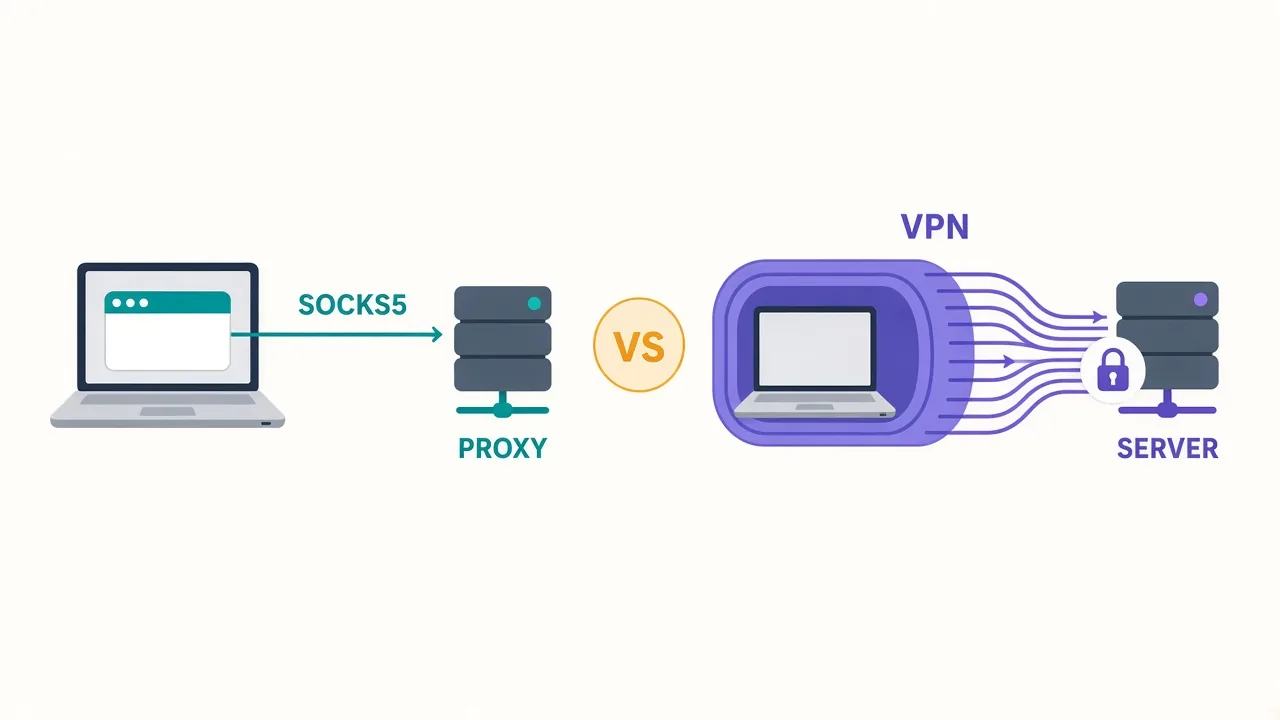
Often it would. A SOCKS5 proxy reroutes one app at a time, while a VPN reroutes and encrypts your entire device. That one difference decides which tool wins for you.
There's also a single setting that decides whether SOCKS5 quietly leaks your browsing. We'll get to it. First, here's what each one does with your traffic.
What does a SOCKS5 proxy do with your traffic?
SOCKS5 is a simple relay. An app hands its connection to the proxy server, and the server makes the connection for it.
The website sees the proxy's IP address, not yours. The protocol itself dates back to RFC 1928, published in 1996, and it hasn't changed much since.
Three things make SOCKS5 useful:
- It doesn't care what the traffic is. Web pages, chat, game data and file transfers all pass through untouched.
- It carries both TCP and UDP, so voice and real-time apps can work through it.
- It supports a username and password, so only you can use your proxy.
Here's the part that matters most. SOCKS5 only affects the apps you point at it.
Set it in Telegram, and Telegram goes through the proxy. Your browser, your email and your system updates keep using your normal connection. Our SOCKS5 glossary entry covers the jargon if you want it in one place.
And what does a VPN do differently?
A VPN works one layer lower. It installs a virtual network adapter on your device, and the operating system sends everything through it.
Every app, every background service, every DNS lookup goes into an encrypted tunnel. The tunnel ends at the VPN server, and your traffic leaves for the internet from there.
So you get two things a plain SOCKS5 proxy doesn't give you. Encryption between your device and the server, and coverage for the whole device without setting up a single app.
Modern VPNs mostly run on WireGuard, a lean tunneling protocol. As of October 2026, 24 of the 25 VPNs in our VPN directory list WireGuard support.
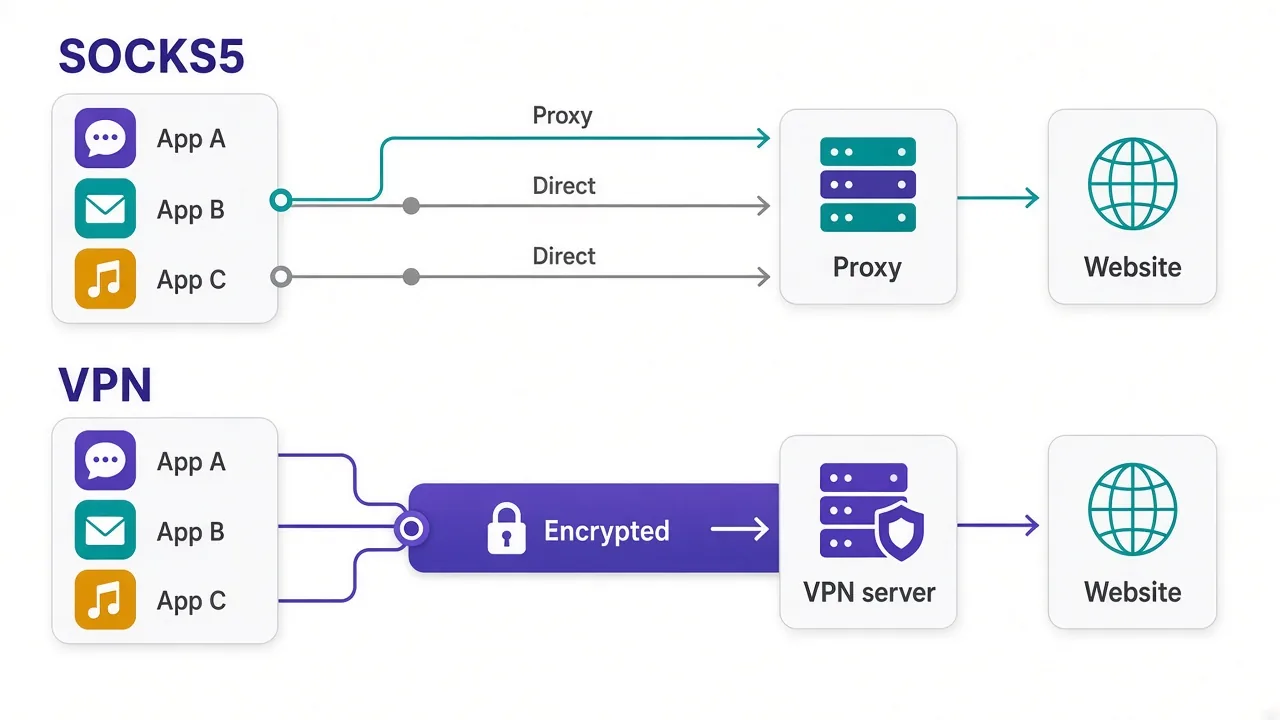
That's the whole difference in one picture. The rest of this post is about when each design helps you, and when it bites.
SOCKS5 vs VPN: how do they compare side by side?
Both hide your IP from the sites you visit. Almost everything else works differently.
| What you care about | SOCKS5 proxy | VPN |
|---|---|---|
| Encryption | None built in | Always on, device to server |
| Scope | Only apps you configure | Whole device |
| Setup | Per app, needs proxy settings | One app, one switch |
| Different IPs per app | Easy | Hard (one tunnel at a time) |
| IP types available | Datacenter, residential, ISP, mobile | Mostly datacenter server IPs |
| Protects you on public Wi-Fi | No | Yes |
| Works with apps lacking proxy settings | No | Yes |
Look at the IP row again.
It's the reason so many people who run accounts or collect data end up on proxies. We'll come back to it.
First, the myth that causes the most trouble.
Is SOCKS5 encrypted? The myth that catches people out
No.
Plain SOCKS5 doesn't encrypt anything. It's a relay, not a tunnel.
It hides your IP from the destination site. It doesn't hide your traffic from your internet provider, the café Wi-Fi, or anyone else on your local network.
Even your login travels in the open. The standard SOCKS5 password method, defined in RFC 1929, sends your username and password in clear text.
So why isn't everyone panicking? Because most of the web already encrypts itself.
When you load an HTTPS site through SOCKS5, the page content stays encrypted between you and the site. The proxy, and anyone watching your network, can see which server you're connecting to. They can't read what's on the page.
Where plain SOCKS5 is risky
Old apps that use plain HTTP, FTP or unencrypted chat send everything readable. Through a SOCKS5 proxy, they're just as exposed as without one.
That's the content. Now for the leak that has nothing to do with encryption.
The DNS setting that decides whether SOCKS5 leaks
Remember the setting from the start? It's where your DNS lookups happen.
Before an app connects to a site, it has to turn a name like example.com into an IP address. That's a DNS lookup, and it can happen on your machine or on the proxy.
If it happens on your machine, your internet provider still sees every site name you look up. The proxy hides your IP from the site, but your provider gets a neat list of where you went. That's a DNS leak.
The fix is to let the proxy resolve names for you:
- In Firefox, tick "Proxy DNS when using SOCKS v5" in the connection settings.
- In curl, use
socks5h://instead ofsocks5://. The extra "h" sends name lookups to the proxy, as the curl manual explains. - In Python's requests library, the same
socks5h://scheme does the same job.
A VPN handles this for you, as long as the app routes DNS through the tunnel. That's one of the quiet reasons VPNs feel safer for everyday use.
After you change the setting, test it. Our guide on how to check if your proxy is working walks through IP and DNS checks in a few minutes.
When does a SOCKS5 proxy beat a VPN?
So far SOCKS5 sounds like the weaker tool. For privacy on a bad network, it is.
But a lot of people aren't trying to hide from the café Wi-Fi. They're trying to control which IP one app shows the world. That's where SOCKS5 wins, and it wins clearly.
You only want one app rerouted
Say you need Telegram to connect through another country, and nothing else. With a VPN, your bank, your work tools and your streaming apps all move too.
With SOCKS5, only Telegram moves. Apps like Telegram and many torrent clients have a SOCKS5 box built into their settings for exactly this reason.
You need different IPs for different apps
A VPN gives your device one exit at a time. Every app shares it.
With proxies, each browser profile or script can use its own SOCKS5 endpoint. That's how people keep five accounts from looking like one person, often with an antidetect browser handing each profile its own proxy.
The site cares what kind of IP you have
Remember the IP row in the table? This is the big one.
VPN servers mostly sit in data centers. IP databases label those ranges as hosting or VPN traffic, and many sites treat them with suspicion. Lots of users often share one VPN exit IP, too.
SOCKS5 proxies come in more flavors. You can get a residential proxy that looks like a home connection, or a mobile IP. If you've been getting CAPTCHAs on a VPN, that's usually why. Our residential vs datacenter breakdown goes deeper.
You're automating requests
Scrapers, testing tools and scripts usually take a proxy setting in one line of code. They're built to switch proxies, not VPN tunnels.
Rotating through a pool of SOCKS5 endpoints is a normal job. Rotating a VPN connection inside a script is a headache. If that's your world, rotating proxies in Python shows how it works.
When is a VPN the better call?
Flip the question around. When does the network you're on matter more than the IP you show?
That's VPN territory.
Here's where we'd pick one without thinking twice.
- You're on public Wi-Fi at an airport, hotel or café, and you don't trust the network.
- You want your internet provider to stop seeing which sites you visit.
- You need to cover apps that have no proxy settings at all, like many phone apps and games.
- You want one switch that protects everything, with no per-app setup.
A good VPN also brings safety features a proxy doesn't have. A kill switch cuts your internet if the tunnel drops, so nothing slips out unprotected.
And if a VPN rerouting everything is your main complaint, look for split tunneling. It lets you pick which apps skip the VPN, which closes some of the gap with SOCKS5.
Quick rule
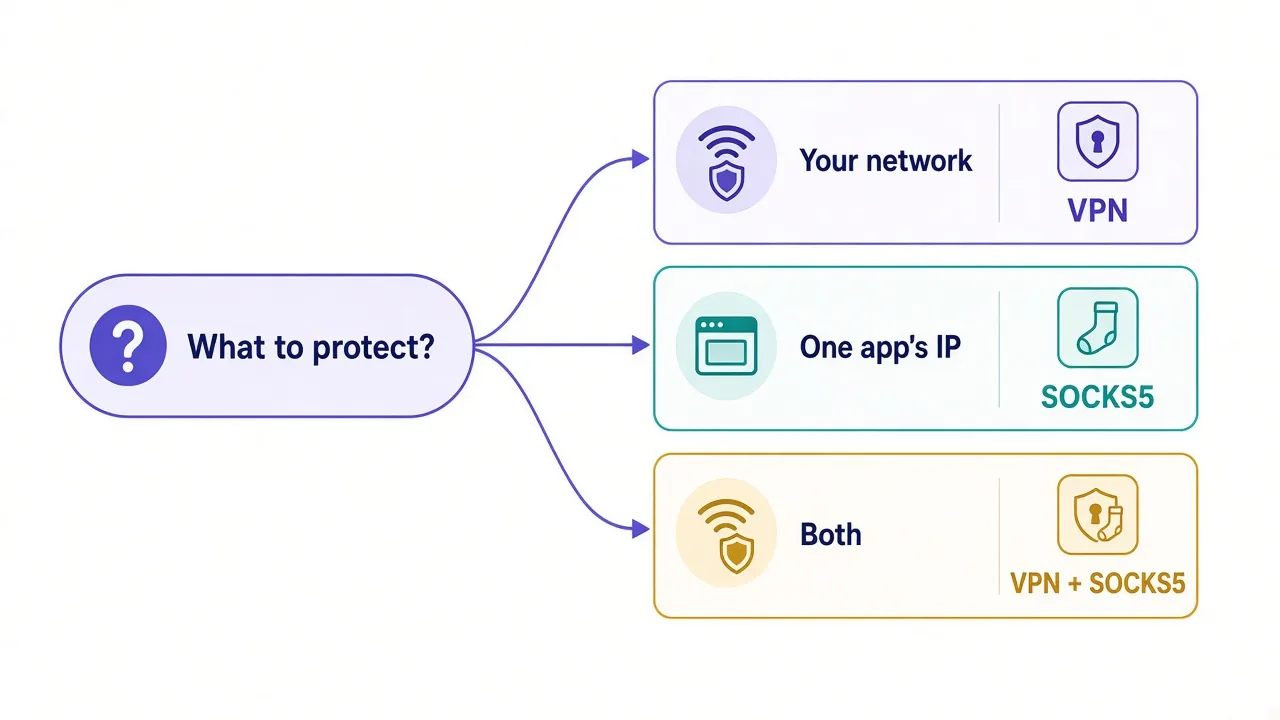
If the threat is the network around you, use a VPN. If the goal is the IP a site sees from one tool, use a proxy.
Is a SOCKS5 proxy faster than a VPN?
Usually, a little.
But speed is rarely the reason to choose one, and the gap is smaller than people expect.
A VPN encrypts and decrypts every packet. A plain SOCKS5 proxy skips that work, so there's less overhead on your side.
In practice, modern VPN protocols are light enough that most people won't notice the difference while browsing. Distance to the server and how busy it is tend to matter far more. Our piece on whether server distance affects VPN speed covers why.
Where speed does show up is scale. When a script sends thousands of requests, spreading them across many proxy IPs beats pushing them all through one VPN exit.
Can you get SOCKS5 with encryption, without a VPN?
Yes, and it's an old trick that still works well.
If you have a server you can reach over SSH, one command turns it into an encrypted SOCKS5 proxy. Run ssh -D 1080 you@your-server, and your machine opens a local SOCKS5 port on 1080.
Point an app at 127.0.0.1:1080, and its traffic travels inside the encrypted SSH connection to your server. From there, it leaves as normal traffic. The OpenSSH manual documents the -D option.
What's the catch? You get one exit IP, the server's. It's great for getting off a sketchy network with a single app, and useless for running many identities.
Some VPN subscriptions also include SOCKS5 servers alongside the VPN apps. If you already pay for a VPN, check its setup pages before you buy anything new.
Should you use SOCKS5 and a VPN together?
Sometimes.
It's less common than forum threads suggest, and it only pays off when you need both jobs done at once.
The useful version looks like this. The VPN protects your device on an untrusted network. Meanwhile, a SOCKS5 proxy inside one app controls the IP a site sees.
Your traffic goes from your device, through the VPN tunnel, to the proxy, then to the site. The site sees the proxy. The network around you sees only encrypted VPN traffic.
You pay for it with extra latency and more things to misconfigure. A proxy that refuses connections from your VPN's IP is a common snag, and some providers only allow whitelisted IPs.
Pro tip
If you stack them, use username and password auth on the proxy instead of IP whitelisting. Your VPN exit IP can change every time you reconnect.
For most people, one tool is enough. Pick the one that matches the problem, not the one with the louder marketing.
What about privacy from the provider itself?
This one gets skipped a lot. Both tools move your trust. They don't remove it.
A VPN provider can see every connection you make through its servers. That's why audited no-logs policies matter so much when you pick one.
A SOCKS5 provider sees the connections from the apps you route through it. That's a smaller slice of your life, but the same rule applies. Free proxies from random lists are the worst choice here, because you have no idea who runs them.
So whichever you pick, pay for a provider with a track record. You can compare options in our proxy directory and our VPN listings.
So, which one should you set up today?
Start with what you're protecting.
If it's you on a network you don't trust, turn on a VPN. If it's one app or one account that needs a different IP, set up SOCKS5 and turn on proxy DNS.
Still unsure how they differ in general? Our proxy vs VPN guide covers the wider picture, and HTTP vs SOCKS5 helps you pick the right proxy protocol.
Then test your setup once.
It takes five minutes, and it's the only way to know.
Frequently asked questions
No. A SOCKS5 proxy reroutes only the apps you configure and adds no encryption, while a VPN encrypts and reroutes all traffic on your device. Both hide your IP from the sites you visit.
No, plain SOCKS5 doesn't encrypt your traffic or even your proxy login. HTTPS sites stay encrypted on their own, but your network can still see which servers you connect to. Tunneling SOCKS5 over SSH adds encryption.
Usually slightly, because a plain SOCKS5 proxy skips encryption. With modern VPN protocols the gap is small for browsing, and server distance and load often matter more than the tool you pick.
Use SOCKS5 when you need one app, account or script to show a different IP without moving the rest of your device. It's also the better fit when you need residential IPs or a different IP per profile.
Yes, if your app resolves site names on your own machine. Turn on remote DNS, such as Firefox's Proxy DNS option or socks5h:// in curl, so lookups go through the proxy instead.
Yes. The VPN encrypts your device's traffic on the local network, and the SOCKS5 proxy inside one app controls the IP a site sees. Expect extra latency and use username and password auth on the proxy.