













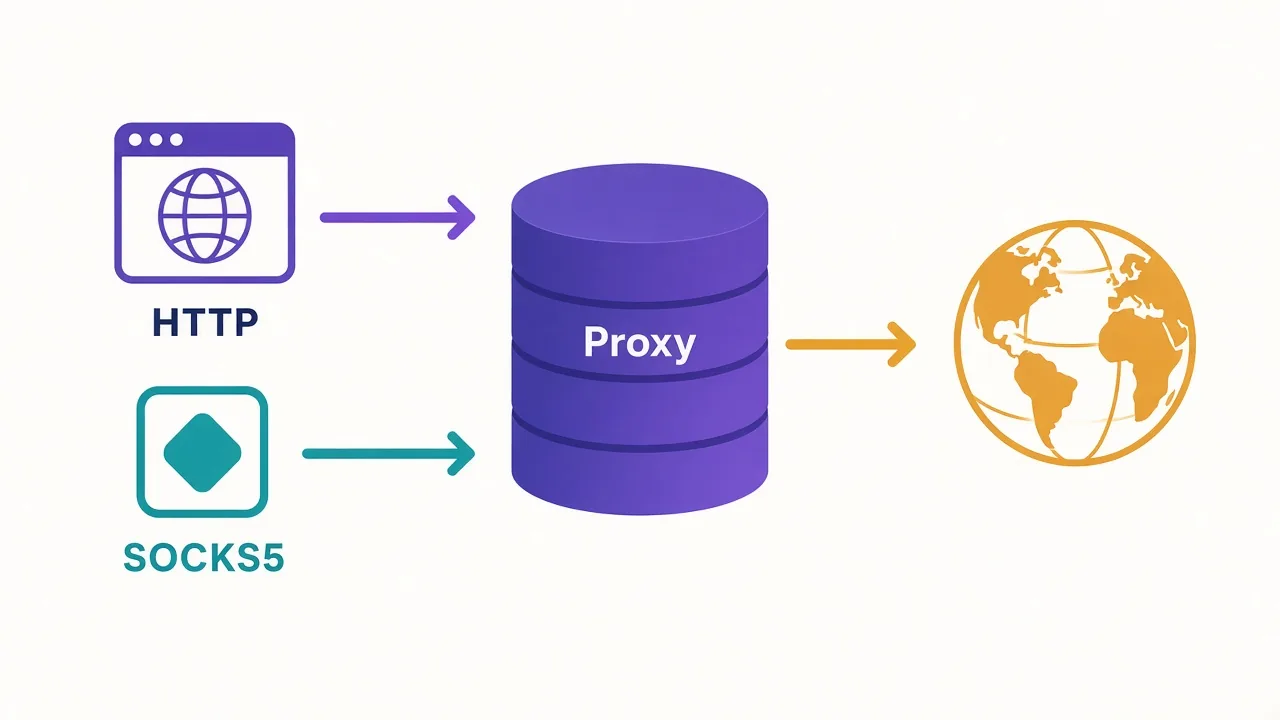
Your browser works fine on an HTTP proxy. Discord still shows your home IP. Telegram won't even offer that protocol in Settings.
Sound familiar? Most "HTTP vs SOCKS5" pages talk like you're shopping for brands. You're not.
Pick HTTP when the client speaks web requests; pick SOCKS5 when an app needs a raw TCP hop.
There's a UDP myth that sells a lot of plans, and an HTTPS auth trap that breaks scrapers overnight. We'll close both.
First, the one-line answer you came for.
What's the one-line answer?
Use an HTTP proxy for browsers and HTTP(S) scrapers. Use SOCKS5 for apps and anything that isn't web traffic.
That's the rule. The rest of this post is when it bends, and when people break it.
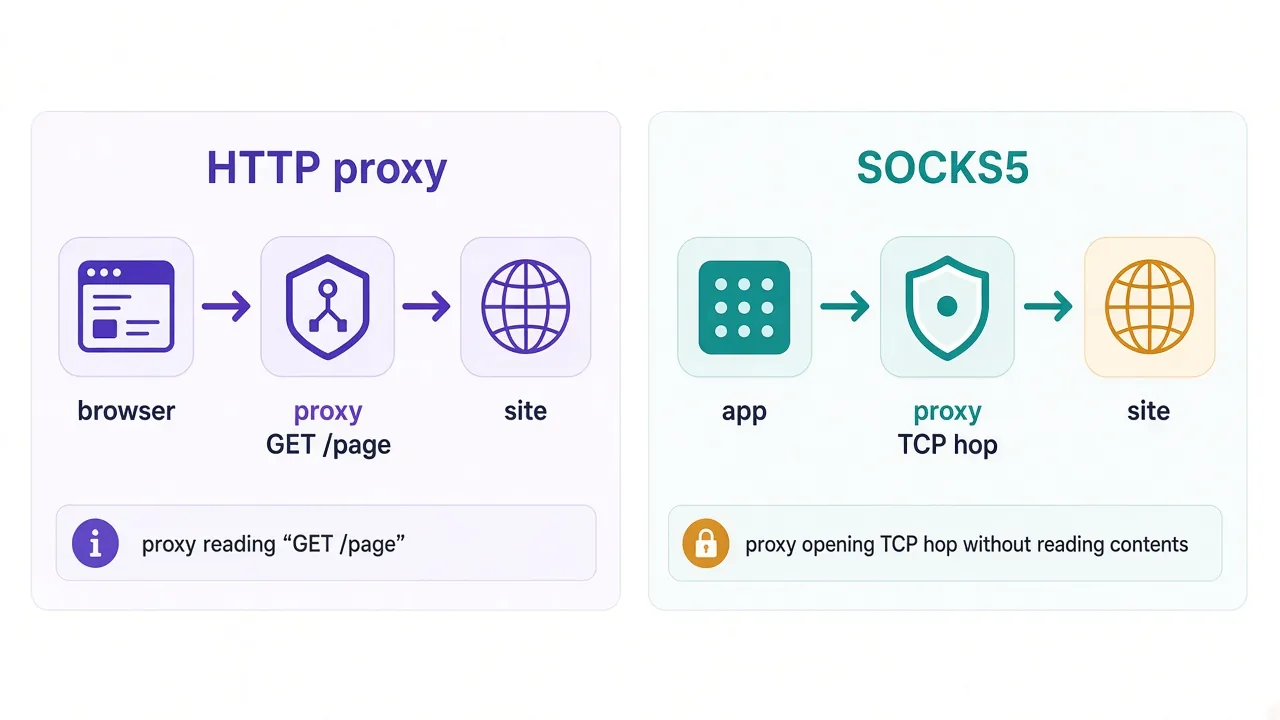
HTTP proxies understand web requests. They read methods, URLs, and headers. SOCKS5 mostly relays a TCP connection and stays out of the way.
So why does every provider sell both? Because different tools talk to the proxy differently. The protocol has to match the client, not the marketing page.
If you want the bigger picture of what a proxy even is, start with how proxy servers work. Here we stay on the HTTP vs SOCKS5 choice.
Ready for the mechanism? Here's what an HTTP proxy actually does with your request.
What does an HTTP proxy actually do?
An HTTP proxy sits between a web client and a website. Your browser or scraper sends it a normal HTTP request. The proxy forwards that request using its own IP.
For plain HTTP, the proxy can see the full URL and headers. It can rewrite them, cache a response, or block a host.
That visibility helps with filtering. It's also why you don't treat a random open HTTP proxy as private.
HTTPS is different.
Modern clients use a CONNECT tunnel. The proxy opens a TCP path to the target host and port. Then TLS runs end to end between you and the site.
The proxy still sees the destination hostname in many setups. It does not see the page content inside the TLS session, unless someone is doing TLS interception on purpose.
Why does that matter for you? Because "HTTP proxy" usually means "good at web traffic," not "only insecure HTTP." Most residential and datacenter plans labeled HTTP also handle HTTPS through that tunnel.
What they don't handle well is Discord, games, or random TCP ports. Those clients never speak HTTP to the proxy in the first place.
Quick check
If your tool's proxy field says host, port, and "HTTP" or "HTTPS," you're in HTTP-proxy land. If it asks for SOCKS5, keep reading.
Next up: the protocol that doesn't try to understand your web request at all.
What does SOCKS5 actually do?
SOCKS5 is a handshake that says: open a connection to this host and port for me. The proxy agrees, then shovels bytes both ways.
It doesn't parse HTTP methods.
Loading a page, syncing a chat app, or talking to a database? SOCKS5 mostly ignores the contents. The job is forwarding a TCP stream both ways.
That's why Telegram's built-in proxy setting expects SOCKS5.
Chat apps move long-lived connections and media, not neat page fetches. We walk through that setup in how to use a SOCKS5 proxy with Telegram.
SOCKS5 can also carry UDP in the protocol itself. That part gets marketed hard. Hold that thought. We'll be honest about what you actually get from most commercial plans later.
Auth is usually username and password, or none. Some stacks support more advanced methods. For day-to-day proxy shopping, user/pass is what you'll paste into Discord, Telegram, or a scraper.
Is SOCKS5 "better"? Only when your client needs that lower-level hop. For a browser that already speaks HTTP proxies, SOCKS5 is often optional, not magic.
When is HTTP enough for browser work?
Most of the time, yes. Chrome, Firefox, and Edge all understand HTTP and HTTPS proxies natively.
So do Playwright, Puppeteer, Selenium, and almost every HTTP library you'll use for scrapers. If the job is "fetch this URL from another IP," HTTP is enough.
Say you're rotating residential IPs for price checks. Your script sends GET requests through an HTTP proxy list. The site sees the proxy IP. You never needed SOCKS5 for that path.
What about HTTPS sites? Still fine. Your client asks the proxy to CONNECT to the host. TLS starts after that. You get a different exit IP without teaching the proxy your cookies.
When does HTTP start to feel tight? When the tool isn't a browser or HTTP client. Desktop apps with their own network stack often skip HTTP proxies entirely.
Also watch extensions and system settings. A browser proxy does not automatically cover every app on the laptop. People learn that the hard way when Slack still shows the office IP.
Rule of thumb
Browsing and HTTP scraping: start with HTTP. Only switch protocols if the client demands SOCKS5 or raw TCP fails.
Which brings us to the cases where SOCKS5 earns its keep.
When does SOCKS5 win for apps and non-HTTP traffic?
SOCKS5 wins when the thing talking to the proxy isn't doing web requests.
Telegram is the clean example. The app's Settings field expects SOCKS5. Force an HTTP endpoint there and you get rejects, flaky chats, or media that never loads.
Discord, some game launchers, and assorted desktop tools follow the same pattern. They want a SOCKS host and port. They don't want to wrap every packet as HTTP.
Scrapers can need SOCKS5 too. Not for "HTML pages," but for protocols that aren't HTTP. Think custom TCP APIs, certain WebSocket setups, or libraries that only expose a SOCKS dialer.
Picture this: your browser profile uses an HTTP proxy and looks fine. The companion desktop app ignores browser settings and leaks your home IP on every login.
That's not a "bad proxy." That's the wrong protocol for the client that actually mattered.
Need whole-device routing instead of one app? That's closer to VPN territory. Our proxy vs VPN comparison covers when a proxy hop stops being enough.
Still wondering about speed and that famous UDP claim? Next section is the honest version.
What about speed, overhead, and the UDP myth?
On paper, SOCKS5 can be a touch lighter because it doesn't rewrite HTTP.
In practice, for normal web scraping, you won't feel a protocol tax.
The exit IP, the route, and provider congestion set your latency. A slow residential node beats a "faster protocol" every time.
So should you pick SOCKS5 for speed alone? No. Pick it because the client needs it. Speed differences between HTTP and SOCKS5 on the same node are usually noise next to geography and congestion.
Now the myth. SOCKS5 can carry UDP. The protocol defines UDP associate. That's real, and it's useful for DNS-over-proxy and some real-time apps when the whole path supports it.
Here's the catch most product pages skip. Many commercial "SOCKS5" endpoints you buy for scraping or social tools are effectively TCP-only for your use case.
Your client may never open a UDP associate. The provider may not expose working UDP for that product line. Games and voice still fail even though the label says SOCKS5.
Remember that loop from the intro? This is it. SOCKS5 supports UDP in the spec. Your plan might not support the UDP path you care about. Test the real app, don't trust the badge.
Don't invent certainty
Ask the provider whether UDP associate works for your plan, then verify in the app. A SOCKS5 label is not a promise that Discord voice or a game client will route UDP cleanly.
Overhead tip: fewer hops beat protocol debates. One solid proxy near your target usually outperforms a fancy chain you don't need.
Auth and HTTPS trip people up next.
Those bugs look like "the proxy is down" when the client has the wrong scheme or a truncated password.
What auth and HTTPS gotchas trip people up?
Gotcha one: mixing protocols in the URL. http://user:pass@host:port is an HTTP proxy URL. A SOCKS client may ignore it or fail in weird ways.
Gotcha two: HTTPS proxy vs HTTPS website. People say "HTTPS proxy" when they mean "HTTP proxy that can tunnel HTTPS." Those are not always the same setting in every tool.
In browsers, "HTTPS proxy" often still means an HTTP-proxy handshake that then tunnels TLS. In some enterprise gear it means something stricter. Read the field label twice.
Gotcha three: auth encoding. Special characters in passwords break proxy URLs. If your script builds user:password@host, URL-encode the password or use the library's dedicated auth fields.
Gotcha four: IP whitelist auth. Some providers skip user/pass and allow your server's IP instead. That works until you rotate cloud instances and forget to update the allow list.
Gotcha five: DNS. With an HTTP proxy, DNS may resolve on the client or through the tunnel depending on the stack. With SOCKS5, remote DNS is often what you want so the exit IP's network resolves the name.
Why does DNS matter? Local DNS can leak the sites you're about to visit, even when the page fetch goes through the proxy. Check whether your tool supports remote DNS for SOCKS5.
And the overnight scraper failure: TLS fingerprinting and proxy headers. An HTTP proxy can add Via or related headers on plain HTTP. Prefer HTTPS targets and sane libraries so you're not advertising "I am a proxy" in clear text.
If auth keeps failing, test with a tiny curl or a known-good client before blaming the provider. Half the "dead proxies" we hear about are wrong scheme, wrong port, or a truncated password.
How should scrapers and automation choose?
Start from the library, not the pricing page.
If you use requests, HTTPX, Gooseeker-style HTTP clients, or headless Chrome with a standard proxy flag, HTTP proxies are the default path. They're documented everywhere and easy to rotate.
If your stack dials raw sockets, or the framework only ships a SOCKS connector, use SOCKS5. Fighting the framework costs more than the protocol choice.
| Job | Lean this way | Why |
|---|---|---|
| Browser automation (Playwright, Puppeteer) | HTTP | Native proxy support is HTTP-first |
| Simple HTTP(S) scraping | HTTP | Libraries speak it; rotation is easy |
| Telegram / Discord / app logins | SOCKS5 | Apps expect a TCP hop |
| Mixed HTTP + non-HTTP in one worker | SOCKS5 or both | One dialer can cover odd ports |
| UDP-heavy real-time traffic | Verify, don't assume | Label ≠ working UDP path |
Session type still matters more than protocol for blocks. Sticky sessions keep logins stable. Rotating sessions suit broad crawls. Protocol choice won't save a burned IP pool.
Also match IP type to the target. Datacenter HTTP is fine for light sites. Tough anti-bot stacks want residential or mobile exits. Again: type of IP, not HTTP vs SOCKS5, does most of that work.
Can one scraper use both? Yes. Many teams keep HTTP for page fetches and SOCKS5 for a companion app or a stubborn API. That's normal, not wasteful.
Can you use both HTTP and SOCKS5?
Yes, and you often should when different clients share one workflow.
Your antidetect browser can sit on an HTTP proxy. Telegram on the same desk can use SOCKS5 from the same provider. Same exit country, different handshake.
Some providers expose the same node on two ports: one HTTP, one SOCKS5. Others sell separate products. Check the dashboard instead of assuming one host speaks both.
Do you need both for a single browser tab? Almost never. Pick one protocol per client. Dual config is for dual clients.
Chaining HTTP into SOCKS5 "for extra anonymity" is a different topic. Extra hops add failure points. Only do it when you have a clear reason and monitoring.
For most people reading this, "both" means: HTTP where the browser lives, SOCKS5 where the app lives. Simple split. Fewer 2 a.m. surprises.
How do you pick in under a minute?
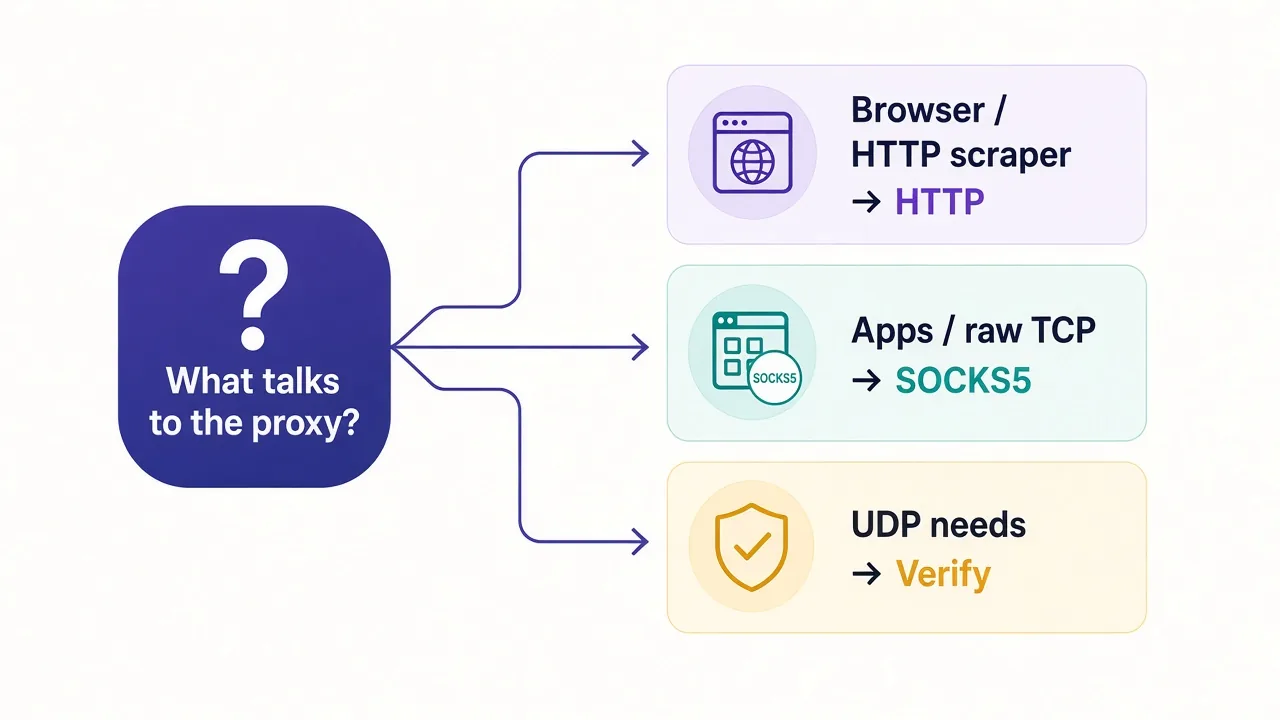
Ask what talks to the proxy. Then stop overthinking.
- Browser or HTTP scraper → HTTP proxy
- Telegram, Discord, or a raw TCP app → SOCKS5
- Both kinds of clients in one setup → use both, one per client
- Someone promised UDP voice or gaming → test UDP on that plan before you pay for a year
Still torn between two plans that offer the same protocol?
Compare exit locations, session controls, and auth options. You've settled the handshake. Network quality is the real fight.
If you need every app on the device covered, a proxy protocol tweak won't get you there. Reach for a VPN when the job is whole-device routing, not one client.
What mistakes should you avoid?
Don't buy SOCKS5 because a chart said it's "more secure."
Security depends on TLS, the provider, and your client. The SOCKS label alone doesn't encrypt your traffic.
Don't force HTTP into an app that only lists SOCKS5. You'll waste an evening on a protocol mismatch.
Don't assume UDP works. Spec support and product support are different things. We teased that earlier; treat it as a checklist item, not a slogan.
Don't ignore DNS and auth encoding. Those two quiet bugs look like provider outages.
Don't chase protocol purity while ignoring IP type and session length. A perfect SOCKS5 handshake on a banned datacenter IP still gets blocked.
And don't configure the proxy in one app, then assume every other app follows.
Proxies are usually per client. That's a feature when you want surgical routing. It's a leak when you forget the other apps.
Pick the protocol for the client.
Then pick the IP type for the target. Then test the one flow that actually matters to you.
When you're ready to compare providers by use case, start at our proxy directory. Match the listing to the job, not the loudest protocol badge.
Frequently asked questions
An HTTP proxy understands web requests and is built for browsers and HTTP(S) scrapers. SOCKS5 forwards a TCP connection for apps and other non-HTTP traffic without parsing HTTP.
Use HTTP for most scrapers and browser automation. Switch to SOCKS5 when your library or target only speaks SOCKS, or when you mix non-HTTP protocols in the same worker.
The SOCKS5 protocol can carry UDP via UDP associate. Many commercial SOCKS5 products you buy for scraping or social tools are still TCP-only for your use case—verify before you rely on it.
Not by default. Neither protocol encrypts your traffic by itself. HTTPS/TLS protects web content; trust and provider practices matter more than the SOCKS5 label.
Yes. Use HTTP for the browser and SOCKS5 for apps like Telegram on the same desk. Pick one protocol per client unless you have a clear reason to chain hops.
SOCKS5. Those apps expect a raw TCP hop in their proxy settings. HTTP endpoints often fail, connect halfway, or break media even when chat text seems fine.