










Your YouTube collector pulled view counts for 400 channels without a hitch. Around channel 401, every request came back as HTTP 429.
Sound familiar? YouTube didn't break your code. It just decided your IP had asked for enough.
Here's the quick answer. For steady, high-volume YouTube data collection, Bright Data or Oxylabs is the safe pick. Smartproxy is the best value for most teams.
But there's a question to ask before you buy any proxy for YouTube. For a lot of jobs, the honest answer is that you don't need one. We'll get to it right after the picks.
Our picks at a glance
| Provider | Best for |
|---|---|
| Bright Data | Best overall for large, steady pipelines |
| Oxylabs | Enterprise volume with hands-on support |
| Smartproxy | Best value for in-house collectors |
| SOAX | Country and city-level checks of what viewers see |
| NetNut | Fast, stable residential sessions |
| IPRoyal | Budget and bursty research projects |
| ScraperAPI | Hands-off requests with retries built in |
Prices move too often to print here. Each provider card below shows the live numbers.
Do you even need proxies for YouTube data?
Here's the question most buyers skip. Is the data you want already in the official API?
Often it is. The YouTube Data API returns titles, descriptions, view counts, like counts, comment threads, playlists and channel stats.
The free allowance is bigger than people assume. Google's docs list a default of 100 search calls a day, plus 10,000 units a day for everything else. A read that lists videos or channels usually costs 1 unit.
So say you track 2,000 known videos every morning. Each list call covers a batch of video IDs for about 1 unit. You'd barely touch your allowance.
No proxies, no blocks, and no gray areas.
Try the API first
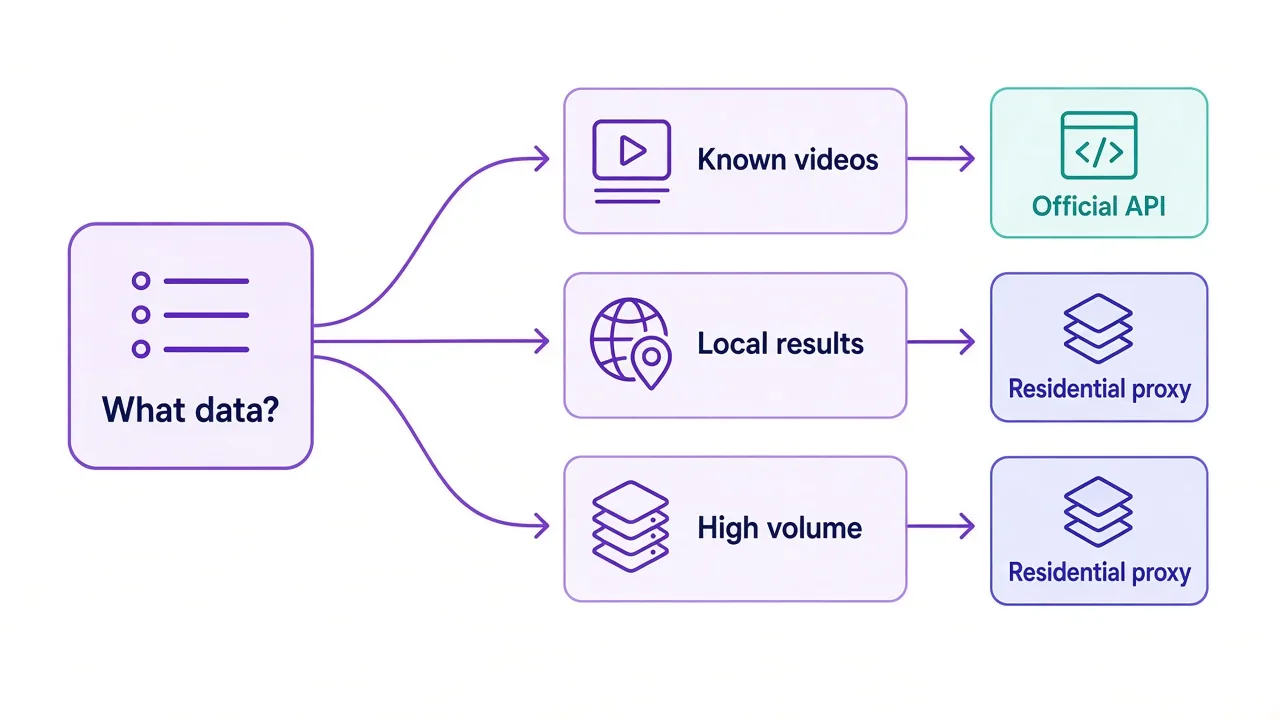
If you already know which videos or channels you need, start with the official API. Add proxies only for the gaps it can't fill.
So where are those gaps? Three come up again and again.
- You need to see what viewers in a specific country see, like local search rankings or the ads shown before a video.
- You need more searches than the daily allowance gives you.
- You need page-level details the API doesn't expose.
If one of those is you, keep reading. You need IPs that look like real viewers.
Why does YouTube block your collector so fast?
YouTube is run by Google, and it guards its pages with the same care as Google Search.
It doesn't look at one thing. It looks at where the request comes from, what kind of client sent it, and how fast the requests arrive.
The first sign of trouble is usually that 429 error. The yt-dlp FAQ describes it as the service blocking your IP for overuse. Usually it's a soft block you can clear by solving a CAPTCHA.
A soft block sounds harmless. But your script can't solve a CAPTCHA at 3 a.m., so the job stalls until someone notices.
Why does your IP get flagged in the first place? Two common reasons.
The first is ownership. Cloud servers have public IP ranges, so YouTube can see a request came from a hosting company instead of a home. Real viewers rarely watch from a data center.
The second is rhythm. Picture a thousand requests a minute from one address, all with the same headers and no cookies. That doesn't look like a person with a phone.
A proxy fixes the first problem. You still have to fix the second one yourself. We cover the habits that get IPs burned in why your proxy gets banned.
Residential, mobile, ISP or datacenter: which IPs work on YouTube?
Pick the IP type for the job, not the one with the biggest pool on the pricing page.
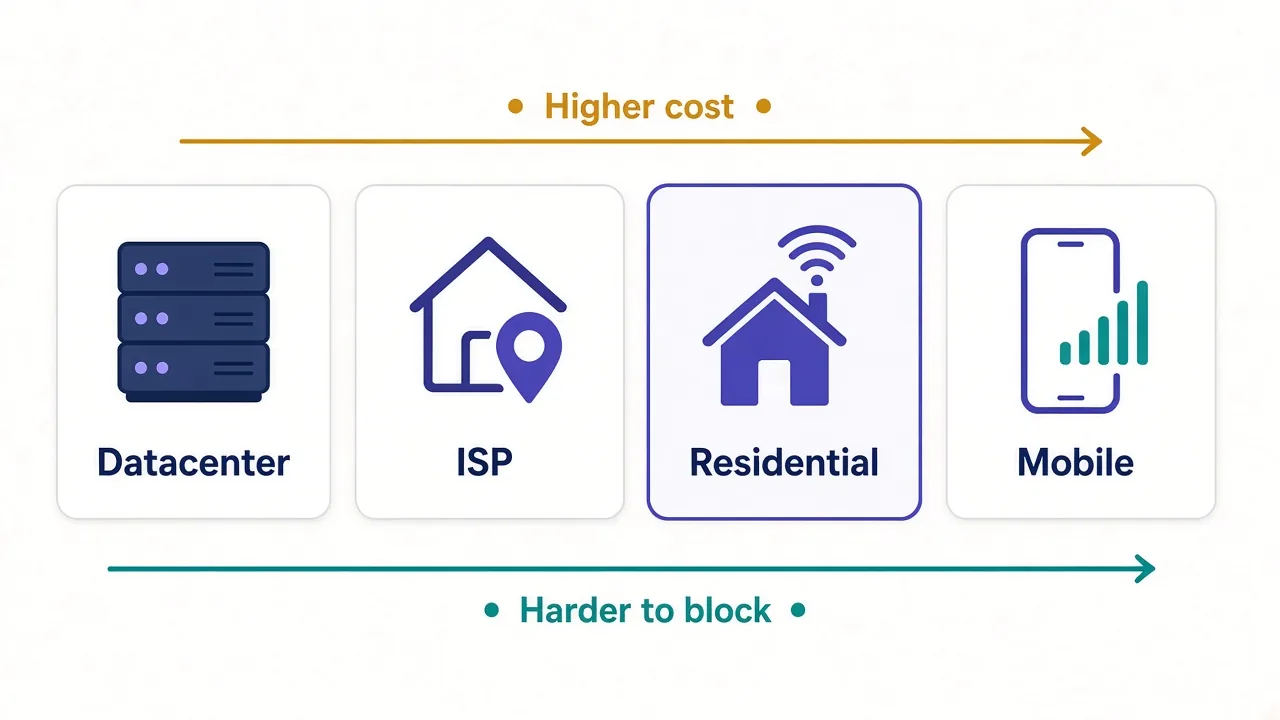
A residential proxy routes your request through a real home connection. To YouTube, it looks like someone on a laptop in Ohio or Lyon. That's why it's the default for most YouTube collection.
| IP type | How YouTube sees it | Good for | Catch |
|---|---|---|---|
| Datacenter | A server, easy to spot | Light, slow-paced checks | Gets throttled first |
| ISP (static residential) | A home address that stays put | Long sessions from one location | Small pools, priced per IP |
| Residential | A normal home viewer | Search, metadata, local results | Billed per GB |
| Mobile | A phone on a carrier network | The hardest checks, mobile-only views | Usually the most expensive per GB |
Mobile IPs are the toughest to block, because many real phones share each carrier address. But do you need that for reading public video pages? Usually not.
Save mobile for when residential stops working, or when you need to see the mobile version of results. We compare the two in mobile vs residential proxies.
One more thing to check before you buy is location. If you're comparing what viewers see in different countries, the provider has to cover those countries well.
As of October 2026, 18 of the 44 proxy providers in our directory claim coverage of 195 or more countries. Claims are a start, so test the exact countries you need on a trial before you commit.
The best proxies for YouTube data collection, ranked
Every pick below has a clear strength and an honest catch. The cards under each one show live ratings and prices.
1. Bright Data: best overall for large pipelines
If YouTube data feeds a product or a client report, Bright Data is the safest bet. It lists 72M+ residential IPs and 7M+ mobile IPs, with targeting down to city and carrier.
It also sells unblocking tools that handle CAPTCHAs and retries, so you write less glue code.
The catch is cost and complexity. It's among the priciest per GB, and onboarding includes identity checks that can slow a small account down. Our Bright Data pricing breakdown shows where the money goes.

2. Oxylabs: enterprise volume with real support
Oxylabs is neck and neck with Bright Data on scale. Its 100M+ residential pool is one of the biggest anywhere, and it's SOC 2 compliant.
Where it shines is support. When a collector stalls on a Monday morning, a dedicated account manager is worth a lot.
The downside? The starting price sits at the top of the market, and it's built for teams with steady volume. See Oxylabs pricing before you sign anything.

Premium proxies built for enterprise scraping.
3. Smartproxy: best value for most teams
Smartproxy, now rebranded as Decodo, is the one we'd hand most people first. It pairs a 55M+ residential pool with city and ASN targeting and one of the cleanest dashboards around.
Response times are among the fastest in our directory, which helps when you're crawling thousands of video pages.
It won't match the very top providers on the hardest targets, and the pool is mid-sized. For YouTube metadata, that rarely matters. Here's the full Smartproxy pricing picture.

Powerful proxies without the enterprise price tag.
4. SOAX: best for checking what local viewers see
Want to know which videos rank for a search in Manila versus Milan? That's where SOAX earns its place.
Its geo-targeting goes down to city, ISP and carrier, and it has a strong mobile network. That makes it a good fit for ad checks and local ranking research.
The catch is size. At 8.5M+ residential IPs, the pool is small, so very large parallel crawls can run thin.

Clean, ethically-sourced residential & mobile IPs.
5. NetNut: fast, stable sessions
NetNut runs an ISP-direct network, which tends to mean low latency and sessions that stay up. Its pool sits around 85M residential IPs, plus ISP, mobile and datacenter options.
That stability matters when one task spans many requests, like scrolling deep into a comment section.
Entry pricing is higher than the budget brands, and the best rates arrive only at bigger commitments.

ISP-backed residential proxies built for speed and stability at scale
6. IPRoyal: the budget pick for bursty projects
Running a one-off research project, then nothing for a month? IPRoyal suits that rhythm. Its residential traffic doesn't expire, and you can pay as you go.
It sources IPs through its own consumer app, which matters if you care about ethically sourced proxy IPs.
There's no free trial, and on heavily defended targets it can trail the premium networks. Test a small balance first.

Flexible proxies with true pay-as-you-go.
7. ScraperAPI: when you'd rather not manage proxies at all
Not every team wants to tune rotation and retries. ScraperAPI gives you one endpoint that handles proxies, retries, CAPTCHAs and page rendering.
You're billed mostly on successful requests, so a blocked attempt doesn't eat your budget.
The trade-off is control. You can't fine-tune sessions, and rendered requests cost more credits, which adds up on big jobs.

Web scraping API with automatic proxy rotation, retries and CAPTCHA handling
Rotating or sticky: which session type keeps you collecting?
Remember that 429 from the intro? Even with good IPs, the wrong session type brings it back.
Proxies come with two session modes. A rotating proxy gives you a new IP on every request. A sticky session keeps the same IP for a set time, like 10 or 30 minutes.
Which one should you use? It depends on whether the task is one request or many.
- Rotate when each request stands alone, like fetching one video page or one search result page.
- Go sticky when a task takes several steps, like paging through comments or a long playlist.
- Go sticky with a fixed country when you compare local results, so every step comes from the same place.
Why does that matter? A viewer who scrolls comments doesn't jump from Texas to Tokyo between pages. A collector that does looks odd, even on clean IPs.
We go further on this in sticky vs rotating proxies. If you write Python, our guide to rotating proxies in Python shows the code.
How do you keep YouTube from flagging your traffic?
Good IPs get you in the door. Your habits decide how long you stay.
Here's what we'd do on any YouTube collector.
- Pace your requests. Add random gaps of a few seconds instead of firing as fast as the network allows.
- Back off on a 429. Pause that IP, wait, and retry later instead of hammering it.
- Send realistic headers, including a current browser user agent and language.
- Keep cookies within a sticky session, the way a real browser would.
- Cache what you already have. Re-fetching an unchanged page burns bandwidth and attention.
Some pages need JavaScript to load fully. For those, a headless browser helps. Our guide to using a proxy with Playwright walks through the setup.
Bandwidth adds up fast
Video pages are heavy. Block images, video segments and fonts in your browser so you only pay for the data you need.
That last tip matters more on YouTube than on most sites. Residential plans bill per GB, and a page full of thumbnails can cost far more than the text you came for.
What about YouTube's terms and the law?
Now for the part most proxy lists skip.
YouTube's Terms of Service ban access by automated means, such as scrapers. The exceptions are public search engines that follow robots.txt, or anyone with YouTube's prior written permission.
The same terms ban collecting information that could identify a person, such as usernames or faces, without permission.
So what does that mean in practice? The official API is the sanctioned route, and it's the one we'd push you toward whenever it covers your data.
If you go beyond it, stick to public data and avoid personal details. Never download videos you don't have rights to, and never fake views or engagement.
Not legal advice
Scraping rules vary by country and by use. If YouTube data is central to a commercial product, talk to a lawyer before you scale.
Which YouTube jobs need which setup?
Here's how the pieces fit together for the jobs we see most.
| Your job | Start with | Session type |
|---|---|---|
| Daily stats for a known list of videos | Official API, no proxy | Not needed |
| Search rankings across countries | Residential with country targeting | Sticky per country |
| Checking which ads run before videos | Residential or mobile with city targeting | Sticky |
| Large crawls of public video pages | Residential, rotating | Rotating |
| Deep comment threads on public videos | API first, then residential | Sticky |
Ad checks are a field of their own. If that's your main job, our ad verification proxies page lists providers built for it.
For broader projects, the web scraping proxies page ranks the networks we'd shortlist.
So, which proxy should you buy for YouTube?
Start with the API, not a proxy plan.
If the API can't give you what you need, go residential. Pick Smartproxy for value, Bright Data or Oxylabs for scale, and SOAX when the country of the viewer is the whole point.
You don't need the biggest pool. You need the right IP type, the right session mode and a polite pace.
Still deciding? Compare every proxy provider we've reviewed side by side, then test your top two on a trial.
A week of small tests beats a year on the wrong plan.
Frequently asked questions
For most teams, Smartproxy (Decodo) offers the best value, while Bright Data and Oxylabs suit large, steady pipelines. Pick SOAX when you need precise country or city targeting to see what local viewers see.
Often you don't. The official YouTube Data API covers titles, view counts, comments and channel stats within a free daily quota. Proxies only help when you need local results, more searches than the quota allows, or data the API doesn't expose.
A 429 means YouTube thinks your IP is sending too many requests. It's usually a soft block that clears with time or a CAPTCHA. Slowing down and spreading requests across residential IPs helps prevent it.
Residential proxies work better for most YouTube collection because they look like ordinary home viewers. Datacenter IPs are cheaper but come from known server ranges, so they get throttled sooner on high-volume jobs.
YouTube's Terms of Service ban automated access without its prior written permission, except for public search engines. The official API is the sanctioned route, so use it wherever it covers your data and get legal advice before scaling.