













Your scraper logged in fine. Ten pages later every request came back as a stranger.
Or the other way around: you bought a big rotating pool. Then the cart dumped your items the moment the IP changed.
Sound familiar? Sticky and rotating proxies are not two products. They are two ways the same pool hands you an IP, and picking the wrong one is why "good" proxies still fail.
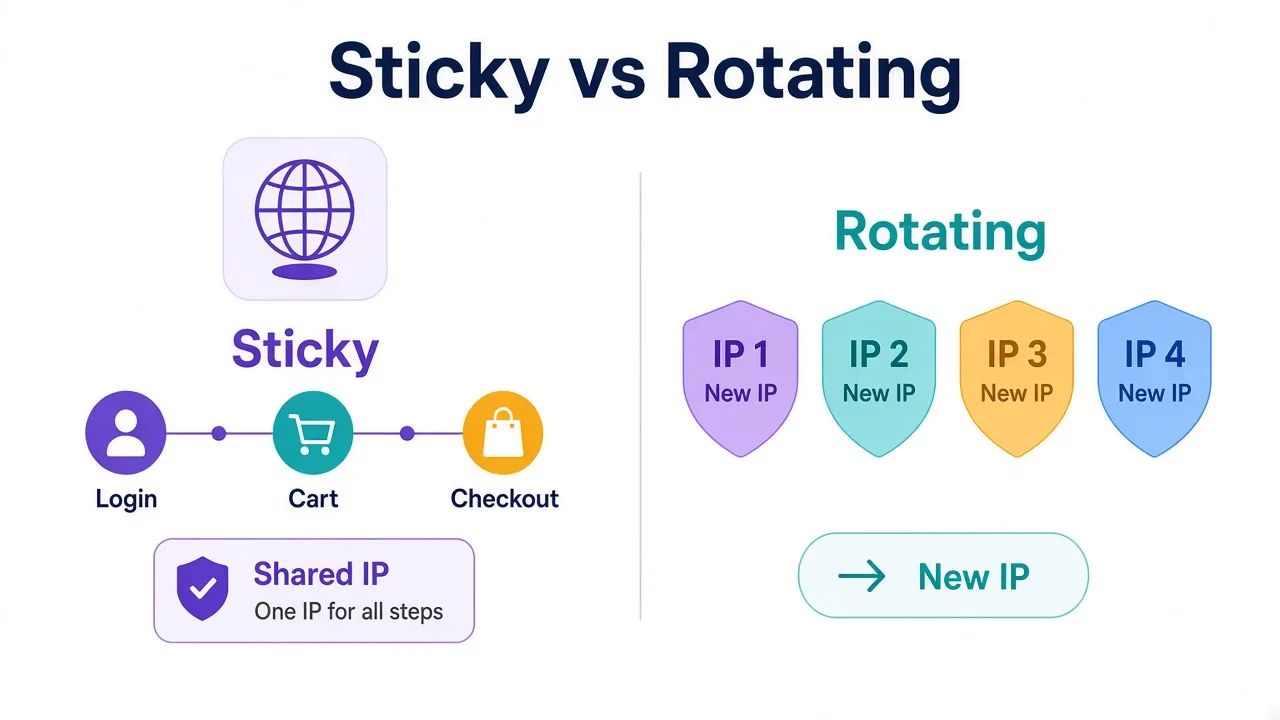
Here's the plain answer: a sticky session keeps one IP for a set time. A rotating proxy gives you a new IP per request or on a short timer.
Below: when each helps, when each burns you, and the decision rule most pricing pages skip.
There's also a third label providers use that looks like sticky but isn't quite. We'll unpack that after the basics.
What sticky and rotating proxies actually mean
Start with the request path, not the marketing name.
You send traffic to a provider gateway. The gateway picks an exit IP from a pool and forwards the request. What happens on the next request is the whole game.
With rotating proxies, that next request can leave from a different IP. Some gateways rotate every request. Others rotate every few minutes. Either way, the site sees a stream of different addresses.
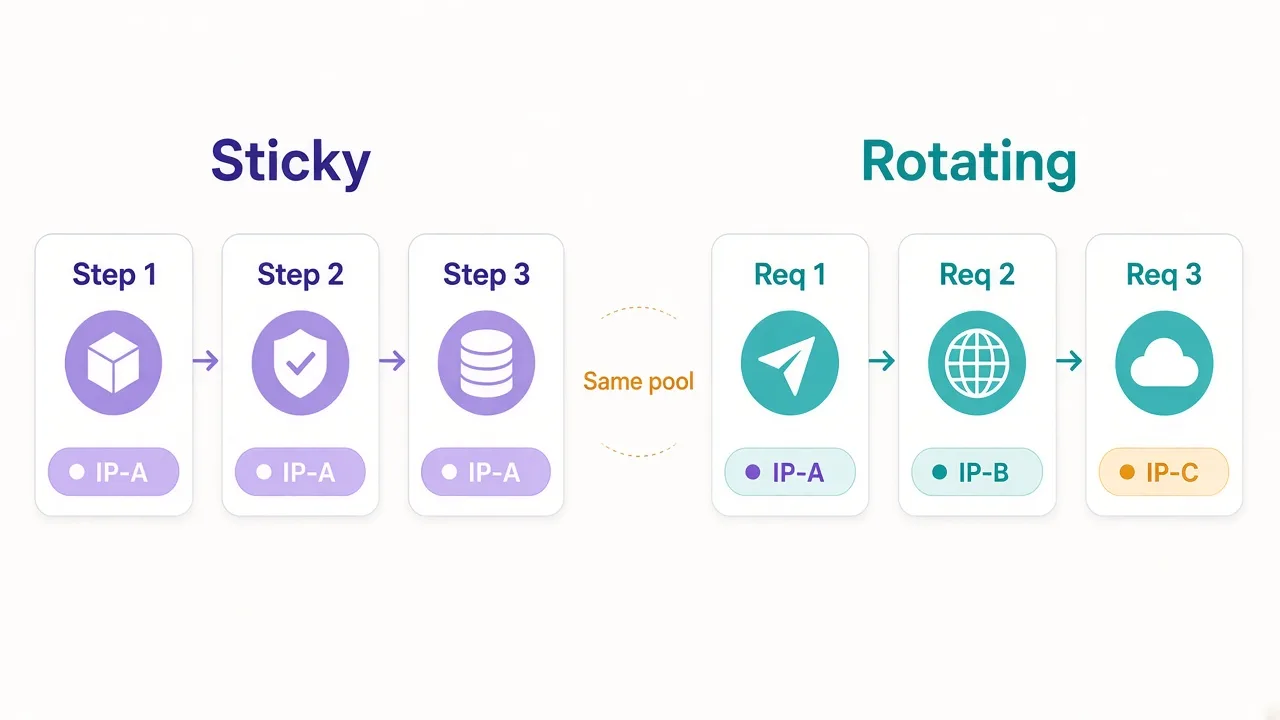
With a sticky session, the gateway pins you to one exit IP for a window you control (or the provider defaults). Ten minutes. Thirty. Sometimes longer. Inside that window, you look like one person on one connection.
Same pool. Same residential or datacenter reputation. Different session mode.
Quick labels
Sticky = same IP for a timed session. Rotating = new IP on a schedule. Static / ISP = one IP you rent for days or months, billed per IP, not a short sticky timer.
Why do dashboards mix those words? Because "static residential" and "sticky residential" both keep an IP, so sales pages blur them. Sticky is temporary continuity. Static is a dedicated address. Don't buy the wrong one for a two-hour scrape.
Why websites care which IP you keep
Sites don't care about your proxy brand. They care whether your traffic looks like one person doing a normal task.
Login, add to cart, open page two of results, then checkout. A real shopper usually keeps the same public IP through that flow. Change IP mid-way and risk checks fire: new device? stolen session? bot?
Scraping ten thousand product pages is the opposite story. One IP hammering that volume looks like abuse. Spreading the load across many exits looks closer to many shoppers.
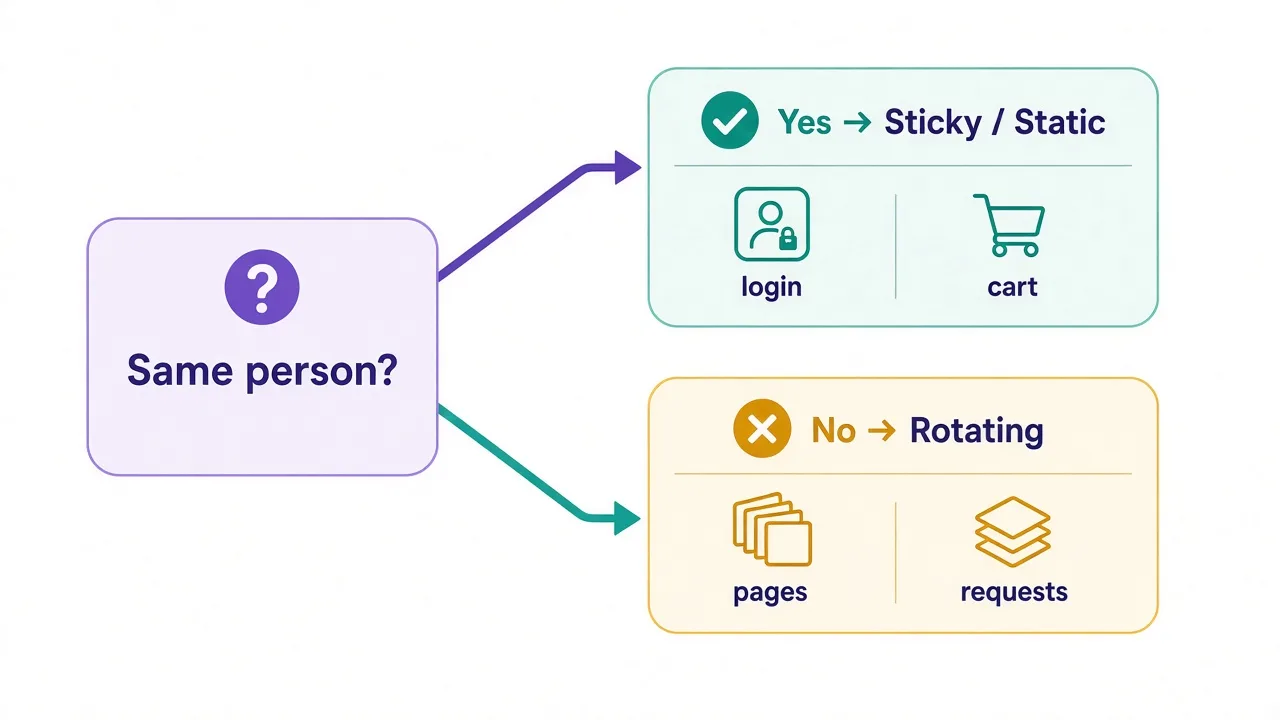
So the question is not "which mode is better?" It's "does this task expect the same person?"
Remember that line. Every use case below comes back to it.
Sticky sessions: when the same IP saves you
Sticky mode is for work that has state.
Sticky fits logins, multi-page forms, carts, and paginated dashboards that tie cookies to the IP.
It also fits warming a new social profile over an afternoon. Anything where step two must look like the same visitor as step one.
Picture a marketplace seller checking orders. You log in from IP A.
Mid-session the gateway rotates you to IP B. The site still has your cookies, but the network story changed.
Some platforms shrug. Others prompt a new challenge, drop the cart, or flag the account.
Sticky also helps when you pair proxies with an antidetect browser. The browser fingerprint stays stable. The IP should too, for that profile. One sticky session per browser profile is a common pattern.
How long do you need? Long enough to finish the flow, plus a buffer.
A checkout might need 10–15 minutes. Account setup can need 30+.
Ask whether the provider's sticky timer is soft (best effort) or hard (guaranteed until TTL).
Soft sticky is not a promise
On residential pools, the exit device can go offline. Your "30-minute sticky" may end early. Build retries that re-auth cleanly instead of assuming the IP never dies.
Rotating proxies: when a new IP every request wins
Rotating mode is for volume with independent requests.
Price checks. SERP collection. Public product pages. Availability scans. Anything where each hit can stand alone and you care more about throughput than continuity.
IP rotation spreads risk. One exit gets a CAPTCHA; the next request leaves from somewhere else. You burn fewer "trusted" IPs on work that never needed a login.
It also matches how residential pools are priced. You pay for bandwidth, not for hugging one exit. Rotation is the natural mode for that billing model.
The catch? Rotation mid-flow wrecks stateful tasks.
If your scraper logs in, then crawls with a new IP per page, you keep the cookie but lose the network identity.
Sites that bind sessions lightly will still work. Sites that don't will fight you.
So rotate for the public crawl. Stick for the authenticated part. Mixing both in one job is normal. Blindly rotating everything is not.
The mistake that burns both types
Here's the setting most people never touch: session control on the gateway.
Providers usually expose sticky vs rotate in the username string, a query param, or a port. Something like a session-abc123 token that means "keep this exit," or no token that means "pick freely."
People buy residential, leave the default on rotate, then wonder why checkouts die. Or they force sticky on a million-page crawl and wonder why one exit melts under load.
A second mistake sits next to it: sticky TTL that's too short for the job. You set five minutes. The flow takes twelve. At minute six you silently get a new IP and the site notices.
A third mistake is treating sticky like static residential. Sticky ends. Static stays until you release the IP. If you need the same address tomorrow morning for the same shop account, sticky alone won't cut it.
Remember the third label from the intro? That's it. Sticky ≠ static. Same family of "keep the IP," different product.
Sticky vs rotating for scraping
Scraping is not one job. Split it.
Public pages, no login. Prefer rotating. Keep concurrency sane per exit if the provider allows. Back off on blocks instead of pinning harder.
Logged-in scrapes. Sticky for the session that holds auth. Rotate only after you log out or when you intentionally start a new identity.
Pagination with cookies. Sticky for that crawl tree.
A new IP on page 40 of 80 is a classic silent failure. HTML still returns, but you may get a different view or a login wall.
High-volume, low sensitivity targets. Datacenter plus rotation can be enough.
When anti-bot is sharp, move to residential rotation, then add sticky only where the flow demands it.
Our residential vs datacenter breakdown covers that type choice. Session mode is the next dial.
| Scrape shape | Session mode | Why |
|---|---|---|
| Public product pages | Rotating | Independent hits; spread load |
| Search results at scale | Rotating | Volume without one hot IP |
| Account dashboards | Sticky | Same user across clicks |
| Cart / checkout tests | Sticky | State tied to one visitor |
| Long-lived shop logins | Static / ISP | Need the same IP tomorrow |
Sticky vs rotating for account work
Social, marketplaces, ad accounts, and client portals all reward consistency.
Keep one profile, one fingerprint, and one sticky (or static) IP for that profile's working window.
Rotate between profiles, not inside one profile's session.
Say you manage twenty storefronts. Twenty sticky sessions, or twenty static IPs, mapped 1:1 to browser profiles beats one rotating gateway shared by everyone. Shared rotation looks like twenty owners teleporting through the same hallway.
Mobile and residential sticky both show up here. Mobile exits can be sticky for a while, then the carrier NATs shift. Treat sticky mobile as "best effort continuity," and keep session lengths honest.
What about warmup? New accounts often need quiet, repeated activity from one place. Sticky helps the first days. Once the account is trusted, some teams still keep sticky for daily work and only rotate when creating fresh identities.
Practical mapping
One antidetect profile → one sticky session ID (or one static IP). New profile → new session ID. Never reuse a hot sticky token across unrelated accounts.
How long should a sticky session last?
Match the timer to the longest continuous flow you need, then add headroom.
- Quick login + two clicks: 5–10 minutes often works.
- Browse, filter, checkout: 15–30 minutes is common.
- Manual account work in a browser: 30–60 minutes, or static if you'll return tomorrow.
- Automated jobs that pause: prefer renewing a named sticky session over hoping a short TTL survives the pause.
Named sessions matter. Many gateways let you pass a session ID string. Same ID → same exit until TTL. New ID → new exit. That is how you run fifty sticky identities in parallel without them collapsing into one IP.
What if the provider only offers "rotate every N minutes" with no named sticky? You can approximate continuity inside that window, but you can't pin identity A vs identity B cleanly. For account work, pick a provider that exposes session IDs.
And if sticky keeps dying early? The exit went offline, the pool is thin in that city, or your TTL exceeds what the network can hold.
Narrow geo targeting can make this worse. Broader targeting, shorter sticky, or static IPs are the usual fixes.
Can you mix sticky and rotating in one workflow?
Yes. That's often the smart setup.
Example flow for a price monitor that also manages seller accounts:
- Public price pages → rotating residential.
- Seller login and order export → sticky session per shop.
- Overnight bulk catalog dump → rotating again.
You can even mix protocols. Some teams use HTTP proxies for simple GETs and SOCKS5 for browser automation. Session mode still sits on top of that choice.
Proxy chaining is a different topic. Chaining adds hops; it doesn't replace sticky vs rotate. If you chain, keep session policy clear on the hop that faces the target. Our proxy chaining explainer covers the architecture side.
The rule stays boring on purpose: rotate when requests are independent. Stick when the site should see one visitor.
How providers label sticky and rotating
Expect messy naming across dashboards.
"Rotating residential" usually means a backconnect gateway into a pool. Default is often rotate-per-request unless you add a session parameter.
"Sticky residential" means the same gateway with a timed pin. Duration options vary. Some show 1 / 10 / 30 minutes. Others take a custom TTL.
"Static residential" or "ISP" means a fixed IP assigned to you, often billed monthly per IP. It will not roam the pool.
"Mobile rotating" vs "mobile sticky" follows the same idea on carrier exits, with less control when the device drops.
Read the docs for the exact username format. Guessing from the UI label is how people ship the wrong mode into production. If two plans look identical, the session controls are often the real difference.
Directory tip
When you compare proxy providers, check whether sticky duration and named sessions are listed, not just pool size. "Millions of IPs" without session control is half a product for account work.
A simple decision rule (and the catch)
Use this when you're stuck on a pricing page:
- Does the target expect the same person across steps? If yes → sticky (or static if you need days, not minutes).
- Are requests independent and high volume? If yes → rotating.
- Does one job include both shapes? Split the job. Don't force one mode on everything.
- Is the IP type wrong for the target? Fix residential vs datacenter first, then pick session mode. Mode won't save a datacenter exit on a hostile login wall.
The catch: sticky does not hide bad fingerprints, reused cookies across accounts, or automation that clicks like a robot. Session mode only aligns the network story. Pair it with sane browser setup and rate limits.
Also, sticky can cost more in practice on metered pools if you hold exits idle. Rotating can cost more in failed checkouts if you rotate through a cart. Measure failure reasons, not only GB used.
So, which should you actually pick?
Start with the task, not the buzzword on the plan.
Logging in, carts, and client accounts — one browser profile at a time — go sticky. Graduate to static when you need the same IP tomorrow.
Public crawls and bulk checks: rotate. Mixed pipelines: split the modes instead of compromising both.
You don't need a perfect pool on day one. You need the session switch set on purpose.
Ready to shop with that rule in hand? Browse residential providers that expose sticky controls.
Or start from the full proxy directory and filter for the IP type your target actually tolerates.
Frequently asked questions
Sticky sessions keep the same exit IP for a set time so multi-step flows look like one visitor. Rotating proxies assign a new IP per request or interval, which spreads volume across the pool.
Use sticky for logins, carts, checkouts, paginated dashboards, and any browser profile that must look like one person. Set the TTL longer than the full flow, with buffer.
Use rotating for independent high-volume work such as public product pages, price checks, and SERP collection. Avoid rotating mid-login or mid-checkout.
No. Sticky is a temporary pin on a pool exit, often minutes long. Static or ISP residential is a dedicated IP you keep for days or months, usually billed per IP.
Match the longest continuous flow plus headroom: often 10–15 minutes for checkout, 30+ for manual account work. Prefer named session IDs when you run many identities at once.
Yes. Rotate for public crawls and stick for authenticated or stateful steps. Split the job by task shape instead of forcing one mode on everything.