










You set HTTPS_PROXY, ran your script, and checked the IP. It was yours.
No error. No warning. Node.js skipped the proxy and went straight out the front door.
Sound familiar?
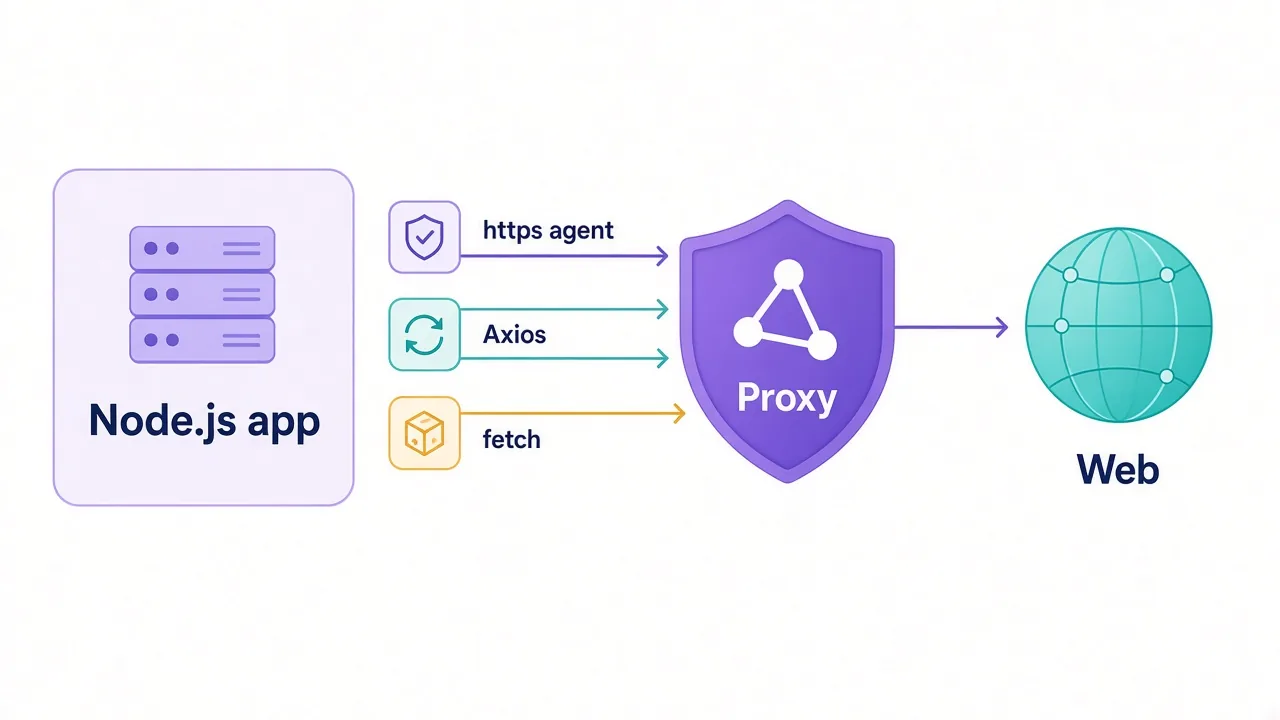
Here's the short version. To use a proxy with Node.js, you give each HTTP client an agent or dispatcher that knows the proxy address. Axios, native fetch and the built-in https module each want that in a different shape.
This guide gives you working code for all three, plus SOCKS5, rotation, timeouts and retries. There's also one missing Axios line that quietly breaks a lot of setups. We'll get to it.
Why does Node.js ignore your proxy settings?
Most command-line tools read HTTP_PROXY on their own. Node.js mostly doesn't.
The built-in http and https modules open a direct socket unless you pass them an agent. An agent is the object that decides how connections get made. The default one connects straight to the target.
Native fetch is a different engine. It runs on undici, which uses a dispatcher instead of an agent. Same idea, different name, and it ignores http.Agent completely.
Axios sits on top of the http module, so it accepts agents. It also has its own proxy option, and it reads proxy environment variables by default. That makes three ways to configure it, which is two more than you need.
So when your proxy "doesn't work", the first question is simple. Which client sent the request, and did you configure that one?
What you need before you write a line of code
Get these four things from your provider's dashboard first:
- The proxy host, such as
gate.example-proxy.com - The port, often 8080, 3128 or 1080 for SOCKS
- The protocol: HTTP, HTTPS or SOCKS5
- A username and password, or an IP allowlist
Most Node.js libraries take all of that as one URL:
http://USERNAME:PASSWORD@gate.example-proxy.com:8080
socks5h://USERNAME:PASSWORD@gate.example-proxy.com:1080
Not sure which port means what? Our guide to proxy ports covers the common ones. And if you're choosing between login and allowlist, read proxy authentication methods first.
Encode special characters
If your password contains @, :, / or #, wrap it in encodeURIComponent() before you build the URL. An unencoded @ splits the URL in the wrong place, and you get a 407 that looks like a wrong password.
Here's the helper we'd keep at the top of every project:
// proxy-url.js
export function proxyUrl() {
  const { PROXY_HOST, PROXY_PORT, PROXY_USER, PROXY_PASS } = process.env;
  const user = encodeURIComponent(PROXY_USER);
  const pass = encodeURIComponent(PROXY_PASS);
  return `http://${user}:${pass}@${PROXY_HOST}:${PROXY_PORT}`;
}
Keep credentials in environment variables or a secrets manager. Never commit them to the repo.
Here's the map for the rest of the guide:
| Client | How it takes a proxy | Package you add |
|---|---|---|
node:https | agent option | https-proxy-agent |
node:http | agent option | http-proxy-agent |
| Any of the above over SOCKS | agent option | socks-proxy-agent |
| Axios | proxy object, or agents with proxy: false | None, or an agent package |
Native fetch | dispatcher option | undici |
The built-in https module: proxying with an agent
Start here even if you'll end up on Axios. Every other approach in this guide is a variation on this one.
Install the agent package:
npm install https-proxy-agentThen pass the agent on the request:
import https from 'node:https';
import { HttpsProxyAgent } from 'https-proxy-agent';
import { proxyUrl } from './proxy-url.js';

const agent = new HttpsProxyAgent(proxyUrl());

https.get('https://api.ipify.org?format=json', { agent }, (res) => {
  let body = '';
  res.on('data', (chunk) => (body += chunk));
  res.on('end', () => console.log(res.statusCode, body));
}).on('error', (err) => console.error('Request failed:', err.message));
What's happening under the hood?
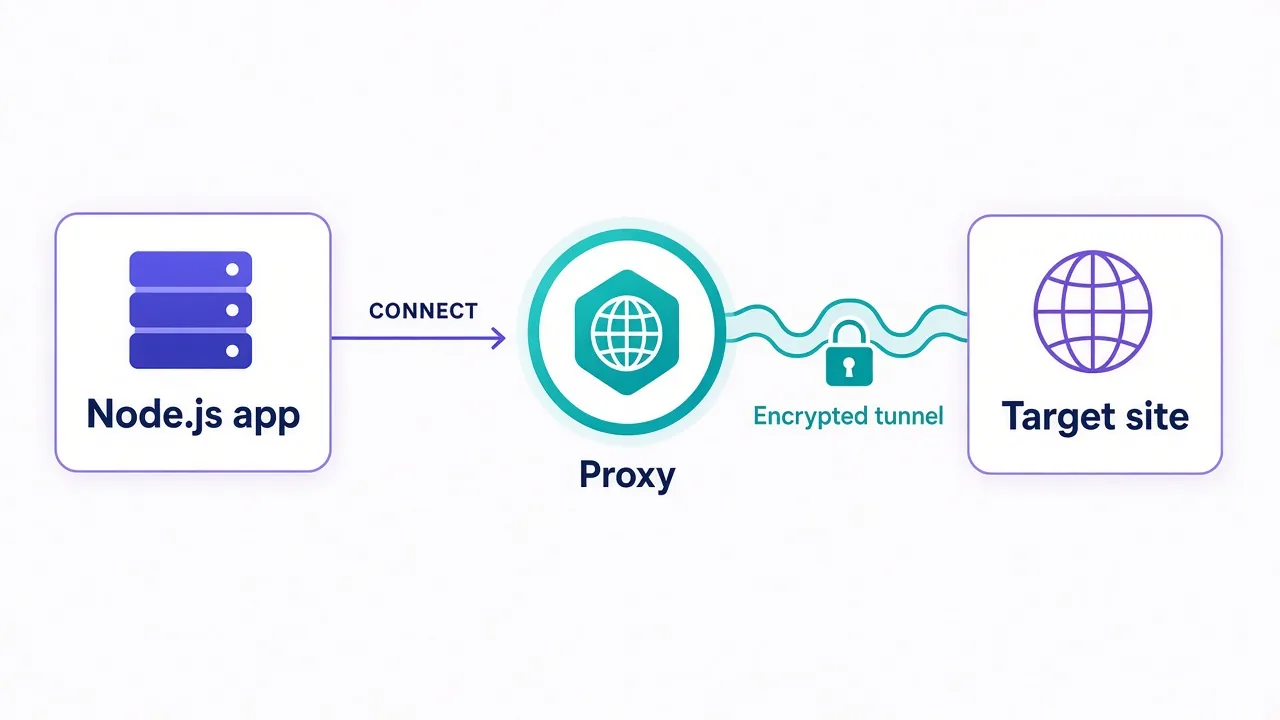
The agent connects to the proxy and sends an HTTP CONNECT request. That asks the proxy to open a raw tunnel to the target. Your TLS handshake then runs through the tunnel, so the proxy sees the hostname but not the page content.
The https-proxy-agent README also lists a headers option. Use it when a provider wants extra headers on the CONNECT request.
Calling a plain http:// URL instead? Swap in http-proxy-agent and its HttpProxyAgent class. There's no tunnel there. The proxy forwards the request as-is.
One tip saves a lot of debugging later. Create the agent once and reuse it. A new agent per request throws away keep-alive connections and makes every call slower.
SOCKS5 in Node.js, and the DNS leak most people miss
Some providers give you a SOCKS5 endpoint, usually on port 1080. Node's built-in modules don't speak SOCKS at all, so you need another agent.
npm install socks-proxy-agentimport https from 'node:https';
import { SocksProxyAgent } from 'socks-proxy-agent';
const user = encodeURIComponent(process.env.PROXY_USER);
const pass = encodeURIComponent(process.env.PROXY_PASS);
const agent = new SocksProxyAgent(`socks5h://${user}:${pass}@gate.example-proxy.com:1080`);
https.get('https://api.ipify.org?format=json', { agent }, (res) => {
res.pipe(process.stdout);
});Look closely at the scheme. It's socks5h, not socks5.
That one letter decides who looks up the domain name. With socks5://, your machine resolves the hostname and sends the proxy an IP address. With socks5h://, the proxy does the lookup for you.
Why care?
If your own resolver answers the DNS query, your network still sees every domain you visit. The target can also get a different answer than a local user would. For geo-targeted work, that's a quiet way to get the wrong country's content.
Want the longer comparison? See HTTP vs SOCKS5 proxies, or the glossary entry on SOCKS5.
How to use a proxy with Axios: the proxy option
Axios has a built-in proxy setting in Node.js. For a basic HTTP proxy, it's the shortest path:
import axios from 'axios';

const res = await axios.get('https://api.ipify.org?format=json', {
  proxy: {
    protocol: 'http',
    host: process.env.PROXY_HOST,
    port: Number(process.env.PROXY_PORT),
    auth: {
      username: process.env.PROXY_USER,
      password: process.env.PROXY_PASS,
    },
  },
  timeout: 15000,
});

console.log(res.data);
Notice the password goes in raw here. Axios builds the Proxy-Authorization header itself, so there's no URL to encode.
The protocol field describes the connection to the proxy, not the target. Use 'http' for an ordinary proxy endpoint, even when you're fetching https:// pages. Set it to 'https' only if the proxy itself listens on TLS.
According to the Axios request config docs, recent versions tunnel https:// targets with CONNECT and run TLS end to end. They send Proxy-Authorization only on the CONNECT request.
The docs flag one limit worth knowing. Axios can't send HTTP/2 requests (httpVersion: 2) through a proxy, and an explicit proxy object rejects with ERR_NOT_SUPPORT.
Put the settings on an instance so every call shares them:
const client = axios.create({
  proxy: { protocol: 'http', host: 'gate.example-proxy.com', port: 8080,
           auth: { username: 'USER', password: 'PASS' } },
  timeout: 15000,
});
The missing Axios line that breaks agent setups
Remember the line we promised at the start? Here it is: proxy: false.
You'll want the agent approach in Axios when you need SOCKS, custom CONNECT headers, or one agent shared with other code. You pass agents through httpAgent and httpsAgent:
import axios from 'axios';
import { HttpsProxyAgent } from 'https-proxy-agent';
import { HttpProxyAgent } from 'http-proxy-agent';
import { proxyUrl } from './proxy-url.js';

const url = proxyUrl();

const client = axios.create({
  httpAgent: new HttpProxyAgent(url),
  httpsAgent: new HttpsProxyAgent(url),
  proxy: false, // stop Axios applying its own proxy logic on top
  timeout: 15000,
});

const { data } = await client.get('https://api.ipify.org?format=json');
console.log(data);
Why does that flag matter? Axios reads http_proxy and https_proxy from the environment by default. Leave a stale HTTPS_PROXY in your shell and Axios can apply it on top of the agent you passed.
The result looks random. It works on your laptop, then fails in CI where a corporate proxy variable is set. The docs say proxy: false disables proxies and ignores environment variables, so your agent is the only thing in charge.
For SOCKS, drop the same pattern onto SocksProxyAgent:
import { SocksProxyAgent } from 'socks-proxy-agent';

const socks = new SocksProxyAgent('socks5h://USER:PASS@gate.example-proxy.com:1080');
const client = axios.create({ httpAgent: socks, httpsAgent: socks, proxy: false });
Native fetch in Node.js: undici's ProxyAgent
Node 18 and later ship a global fetch. It doesn't accept an agent option, because it isn't built on the http module.
Instead, you give it an undici dispatcher. The one for proxies is ProxyAgent, and it handles HTTP, HTTPS and SOCKS5 proxy URLs.
npm install undiciPer request, pass it as dispatcher:
import { ProxyAgent, fetch } from 'undici';
import { proxyUrl } from './proxy-url.js';

const dispatcher = new ProxyAgent(proxyUrl());

const res = await fetch('https://api.ipify.org?format=json', {
  dispatcher,
  signal: AbortSignal.timeout(15000),
});
console.log(res.status, await res.json());
Or route every fetch in the process through the proxy with setGlobalDispatcher:
import { ProxyAgent, setGlobalDispatcher } from 'undici';

setGlobalDispatcher(new ProxyAgent({
  uri: 'http://gate.example-proxy.com:8080',
  token: `Basic ${Buffer.from('USER:PASS').toString('base64')}`,
}));

const res = await fetch('https://api.ipify.org?format=json');
That second example shows the other way to send credentials. The token option sets the proxy-authorization header directly. The undici docs mark the older auth option as deprecated, so reach for token or credentials in the URI.
Import fetch from undici when you pass a dispatcher
Node's built-in fetch bundles its own copy of undici. Pairing it with a dispatcher from a different npm version usually works, but importing fetch from the same package removes the guesswork.
One more thing to know. Don't set a proxy-authorization header on the request yourself. The docs say ProxyAgent throws if it sees one, and you should pass it through the constructor instead.
Can Node just read HTTP_PROXY from the environment?
Yes, on recent versions, if you ask it to.
Node added built-in proxy support behind a switch. Set NODE_USE_ENV_PROXY=1, or start with the --use-env-proxy flag. Node then reads HTTP_PROXY, HTTPS_PROXY and NO_PROXY at startup.
NODE_USE_ENV_PROXY=1 \
HTTPS_PROXY=http://USER:PASS@gate.example-proxy.com:8080 \
NO_PROXY=localhost,127.0.0.1 \
node scraper.js
The Node.js HTTP docs list this as added in v24.5.0 and v22.21.0, with a stability level of "active development". It's handy for scripts and containers. For production code, we'd still configure the proxy explicitly, because a missing variable fails silently.
Stuck on an older Node release? undici has EnvHttpProxyAgent, which reads the same variables:
import { EnvHttpProxyAgent, setGlobalDispatcher } from 'undici';

setGlobalDispatcher(new EnvHttpProxyAgent());
// fetch() now follows http_proxy, https_proxy and no_proxy
A few rules hold across Node, undici and Axios:
- Lowercase variables win when both cases are set.
NO_PROXYtakes a comma-separated host list.- Axios reads these variables unless you pass
proxy: false. - Node's core
httpmodule ignores them unless you opt in.
Why bother with NO_PROXY?
Picture a service that calls both an outside site and your own database API on localhost. Without the bypass list, the internal call goes out through the proxy too.
At best that's slow. At worst it burns paid bandwidth on traffic that never needed to leave the box.
And one honest warning.
Clients don't all treat percent-encoded passwords the same way when they parse an environment variable. Say a password with symbols works in code but gets a 407 from the environment. Set it in code, or switch to a password without special characters.
Rotating proxies in Node.js: a pool or a gateway?
There are two ways to rotate IPs, and they need different code.
The first is a gateway. Many residential providers give you one hostname that hands out a new exit IP for you.
Sticky sessions (the same IP for a set time) are usually set through extra fields in the username. The exact format is provider-specific, so check their docs.
The second is a list of proxies you rotate yourself. Here's a small round-robin pool for fetch:
import { ProxyAgent } from 'undici';

const PROXIES = (process.env.PROXY_LIST ?? '')
  .split(',')
  .map((s) => s.trim())
  .filter(Boolean);

// Build each agent once so connections get reused.
const agents = PROXIES.map((url) => new ProxyAgent(url));
let next = 0;

export function pickAgent() {
  const agent = agents[next % agents.length];
  next++;
  return agent;
}
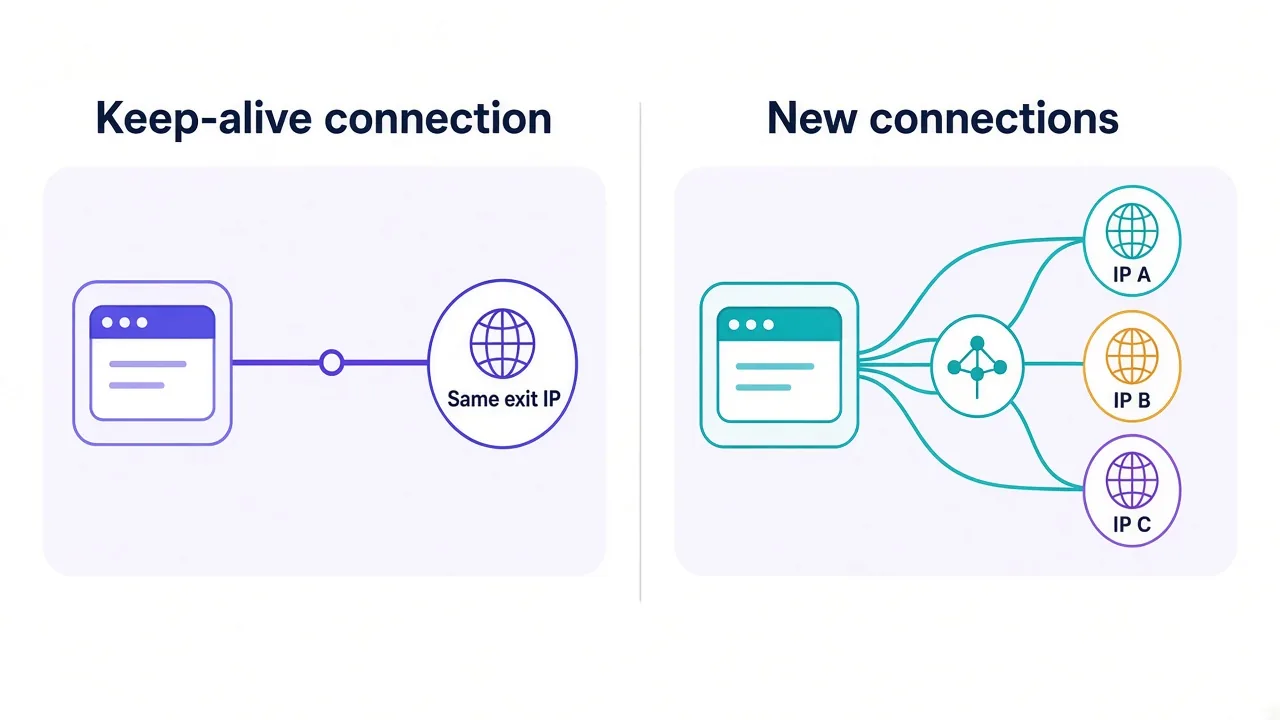
Here's the catch with gateways. They often pick the exit IP per connection, not per request.
Keep-alive reuses connections.
So a single agent can send dozens of requests down one tunnel, through one IP, while you assume each call rotates. Check the IP across a few calls before you trust the setup. If it never changes, ask your provider whether rotation happens per connection or per request.
New to how rotation works? Start with what proxy rotation is and sticky vs rotating proxies. If you also write Python, the Python rotation guide covers the same ideas.
Timeouts and retries that don't hide a dead proxy
Proxies add a hop, and hops fail. Without a timeout, a stuck proxy can hang a request far longer than you'd ever wait.
Set one on every request:
- Axios:
timeout: 15000in the config - fetch:
signal: AbortSignal.timeout(15000) node:https:req.setTimeout(15000, () => req.destroy())
Then retry the failures that might succeed on another try. Here's a retry wrapper built on the pool above:
import { fetch } from 'undici';
import { pickAgent } from './pool.js';

const sleep = (ms) => new Promise((r) => setTimeout(r, ms));

export async function fetchWithRetry(url, { tries = 3, timeoutMs = 15000 } = {}) {
  let lastError;
  for (let attempt = 1; attempt <= tries; attempt++) {
    try {
      const res = await fetch(url, {
        dispatcher: pickAgent(),
        signal: AbortSignal.timeout(timeoutMs),
      });
      if (res.status !== 429 && res.status < 500) return res;
      lastError = new Error(`HTTP ${res.status}`);
    } catch (err) {
      // A tunnel 407 surfaces as a thrown error, with details in err.cause.
      if (String(err.cause?.message).includes('407')) throw err;
      lastError = err;
    }
    await sleep(500 * 2 ** (attempt - 1)); // 0.5s, 1s, 2s
  }
  throw lastError;
}
Notice what it doesn't retry.
A 407 means bad credentials, and hammering the proxy with the same wrong password won't fix it. A 403 from the target is a judgment call. Rotating to a fresh IP can help, but retrying on the same IP rarely does.
Pro tip
Log which proxy each failure came from. One bad IP in a pool of fifty looks like random flakiness until you group errors by proxy.
Troubleshooting: the errors you'll actually see
When something breaks, the error message usually tells you which hop failed. Here's how to read the common ones:
| Error | What it usually means | Try this |
|---|---|---|
| 407 Proxy Authentication Required | The proxy rejected your login | Check credentials and encode special characters |
ECONNREFUSED | Nothing is listening at that host and port | Check the port and protocol in the dashboard |
ECONNRESET or socket hang up | The proxy or target dropped the connection | Check protocol mismatch, then retry with backoff |
ETIMEDOUT or TimeoutError | The proxy is slow, overloaded or unreachable | Lower the timeout and rotate |
| TLS or certificate errors | An intercepting proxy, or https set where http belongs | Confirm the proxy protocol field |
fetch failed | undici wrapped the real error | Log err.cause to see it |
That last one trips up a lot of people.
With native fetch, a failed tunnel doesn't come back as a response with a status code. It throws TypeError: fetch failed, and the real reason sits in err.cause. Always log the cause.
Request worked but the IP is still yours? Then the request never touched the proxy. Usually the agent went to the wrong option, such as an agent passed to fetch. It's ignored without a word.
A quick self-check helps here. Call an IP echo endpoint through the proxy and compare it with a direct call. Our guide on how to check a proxy is working walks through more checks.
Still getting blocked once traffic flows? The proxy may be fine and the target is pushing back. Why proxies get banned covers the usual reasons.
So, which approach should you use in your Node.js project?
Match the setup to the client you already use.
On native fetch, use undici's ProxyAgent as a dispatcher. On Axios, the proxy option is fine for a plain HTTP proxy. Switch to agents with proxy: false the moment you need SOCKS or shared settings.
Whatever you pick, add a timeout and log err.cause. Then check the exit IP before you trust it.
Don't have a proxy yet? Browse the proxy providers in our directory and compare them side by side.
Ten lines of setup, and Node finally goes where you send it.
Frequently asked questions
Pass a proxy object with protocol, host, port and auth in the Axios request config. For SOCKS or shared agents, set httpAgent and httpsAgent to proxy agents and add proxy: false so environment variables don't interfere.
Yes, through undici. Create a ProxyAgent with your proxy URL and pass it as the dispatcher option, or install it for every request with setGlobalDispatcher. The built-in fetch ignores the http.Agent option.
Only if you opt in. On Node v24.5.0 and v22.21.0 or later, set NODE_USE_ENV_PROXY=1 or use the --use-env-proxy flag. Axios reads proxy variables by default, while core http and fetch don't.
Use the socks-proxy-agent package and pass the agent to the https module or to Axios as httpAgent and httpsAgent. Prefer the socks5h:// scheme so the proxy resolves DNS instead of your machine.
A 407 means the proxy rejected your credentials. Check the username and password, and URL-encode special characters such as @ or : with encodeURIComponent. With fetch, the 407 appears inside err.cause.
Either use a provider's rotating gateway or keep a list of proxy URLs and pick one per request. Build each agent once and reuse it, and confirm the exit IP changes, since keep-alive can reuse one connection.