











Your scraper was fine on a cheap datacenter IP. Then the target got serious, and every request came back 403.
Or maybe you did the opposite. You paid for residential bandwidth on a soft site that never needed it.
Sound familiar? Residential vs datacenter proxies isn't a quality contest. It's a fit contest.
Use datacenter when the site barely fights back. Use residential when it does.
You'll learn how to tell which case you're in. We'll also cover the session setting that still gets people banned after they pick the "right" type.
What actually makes an IP residential or datacenter?
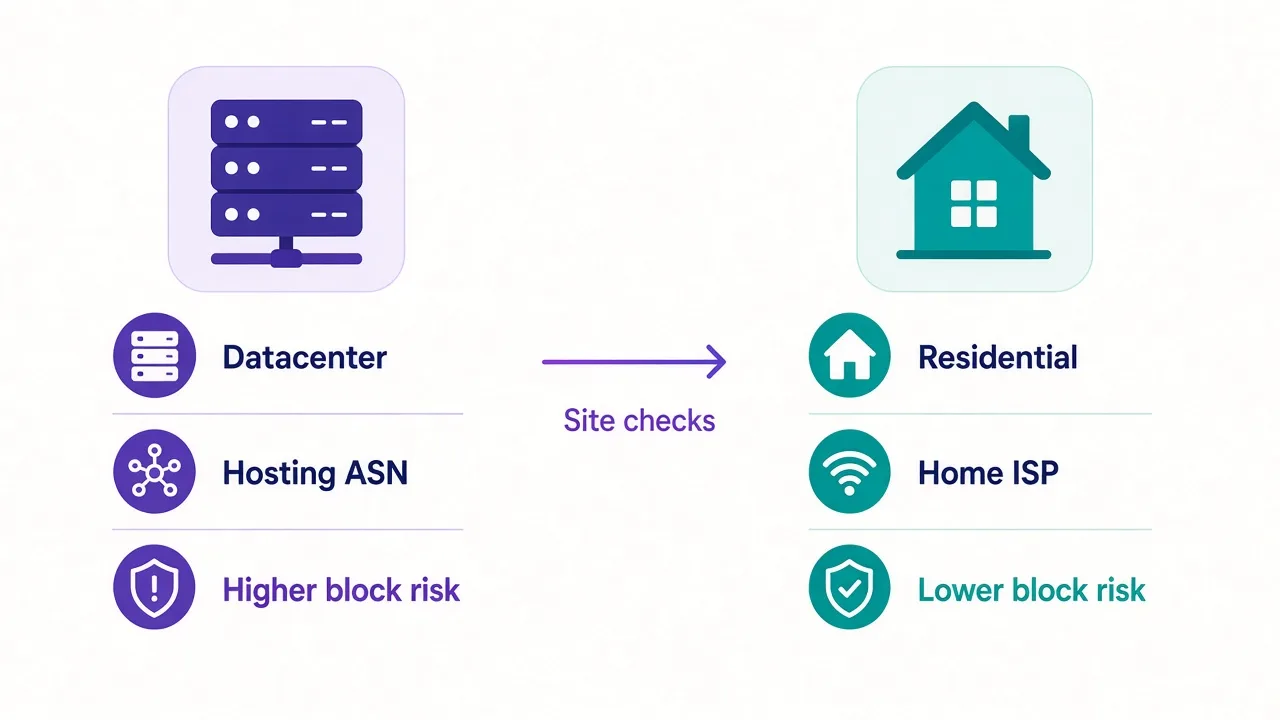
A datacenter proxy is an IP from a hosting company or cloud range. Think AWS, DigitalOcean, or a dedicated proxy rack.
There's no home router behind it, and no ISP customer on the other end — just a server.
A residential proxy routes through a real household connection. The IP belongs to a consumer ISP like Comcast, BT, or Jio.
Websites see "ordinary home user," not "cloud VM."
That one difference drives almost every trade-off below: speed, price, block rate, and how you should run sessions.
Quick definitions
Datacenter = server IP. Residential = home ISP IP. ISP (static residential) sits in between: a residential-looking IP on a more stable host. We will come back to that third option.
Curious why a site can tell them apart in milliseconds? That's next.
Why do websites treat them so differently?
Sites don't "feel" your traffic. They look up facts about your IP.
ASN and WHOIS data show who owns the range. Hosting ASNs are public. So are most consumer ISP ranges.
Reputation databases add history. Shared datacenter IPs often carry spam or scrape marks, while fresh residential IPs look quieter — until they don't.
So a login from a known AWS block on Instagram or Amazon can trip checks before your first click. The same login from a home Comcast IP looks normal.
Is that fair? Not always. Plenty of legit tools run from datacenters, but platforms still treat those ranges as high risk because bots love cheap, fast IPs.
Here's the part most buyers miss: the IP type is only half the story, and behavior is the other half.
Blast 10,000 requests a minute from a "trusted" residential IP and you will still get blocked. Crawl politely from a clean datacenter IP on a soft target and you may never see a CAPTCHA.
So which type should you default to? Start with what the target actually checks, not the biggest number on a pricing page.
Speed, cost and pool size: the honest trade-offs
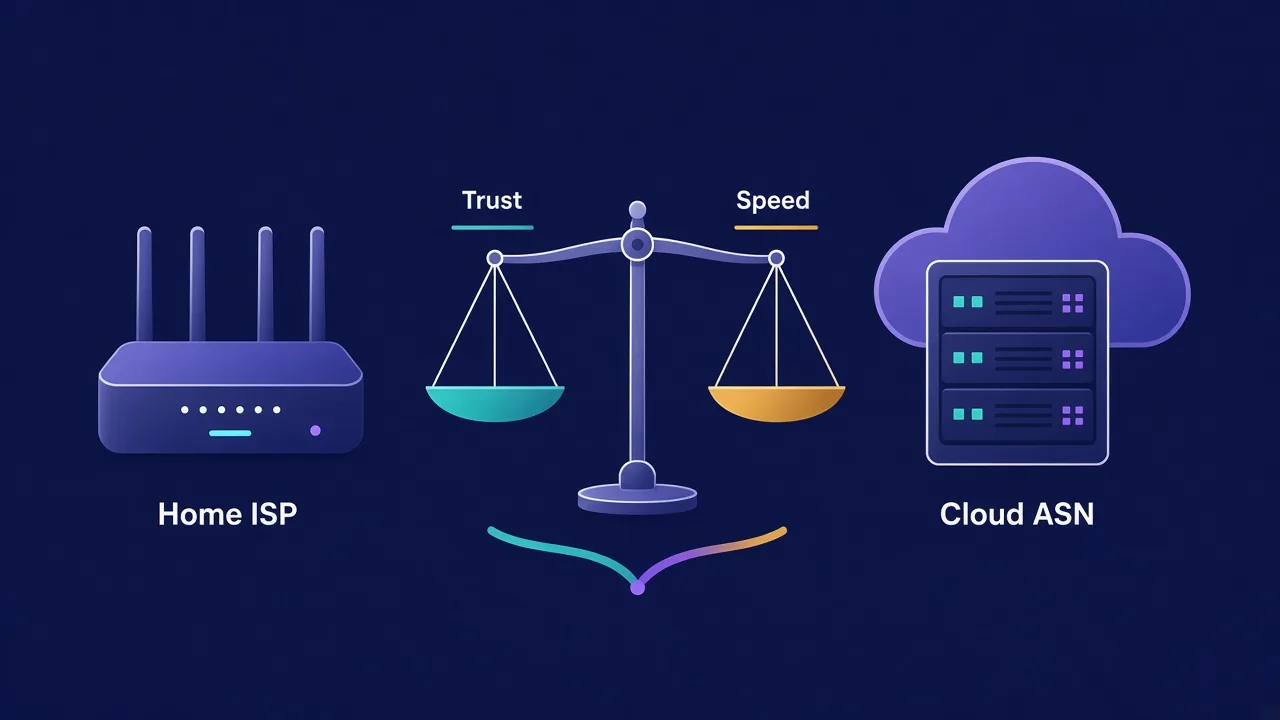
Datacenter proxies win on raw speed because the path is short: you to a nearby rack to the target.
Residential traffic often hops through a peer device on consumer broadband, so latency rises and throughput varies with that home connection.
Price follows the same split. As of September 2026, our directory lists 14 published datacenter providers. Starting prices sit around $0.40–$1.00 per IP (about $0.63 on average).
Residential is sold mostly by the gigabyte. Across 28 published residential listings, starting prices run about $0.85–$8.00 per GB, averaging near $2.93/GB.
That's not a lab benchmark. It's what providers publish in our directory today, and it drifts.
Pool size marketing is louder on residential. "Tens of millions of IPs" sells well, but useful geography and sticky session quality matter more than the headline number.
All 14 of those datacenter providers also offer residential in the same directory, so you can often buy both from one account. That helps when you want a cheap pass for soft pages and residential only for the hard ones.
| Factor | Datacenter | Residential |
|---|---|---|
| IP source | Hosting / cloud ASN | Consumer ISP |
| Typical speed | Very fast | Good, more variable |
| Typical price shape | Per IP / month | Per GB |
| Directory start (Sep 2026) | ~$0.40–$1.00 / IP | ~$0.85–$8.00 / GB |
| Block risk on hard targets | High | Lower if used well |
| Best first use | Soft sites, bulk crawl | Logins, social, tough e-com |
Numbers help, but they don't pick for you. Your target does.
When datacenter proxies are the right call
Honest take: a lot of people overbuy residential when they don't need it.
If the site has weak bot defenses, datacenter is faster and cheaper. You keep the budget for volume instead of burning GB on pages that never cared.
Good fits for datacenter:
- Public pages with light rate limits
- Internal tools and QA that only need a stable egress IP
- High-volume crawls on soft domains
- SEO rank checks on sites that rarely fingerprint
- Cheap parallel jobs where a few bans are fine
Say you pull product titles from a small retailer that returns HTML to anyone. A datacenter pool with basic rotation is enough, and paying residential rates there is waste.
Another tell: the site never asks for a CAPTCHA when you hit it from a VPS. If a plain cloud IP already works, start there and save residential for later.
Inside datacenter, shared and dedicated matter. Shared is cheaper and noisier; dedicated costs more and keeps other customers off your IP.
For noisy public crawls, shared is fine. For anything tied to a login you care about, dedicated (or a different type) is safer.
Rule of thumb
If a normal cloud VM can fetch the page without drama, try datacenter first. Upgrade only when blocks show up.
When does that rule break? Social logins, sneaker drops, ticket queues, and big marketplaces. Those sites invest in IP intelligence, and cheap hosting ranges are on the naughty list.
Still tempted to force datacenter on Instagram? Read the next section before you burn a week on bans you could've avoided.
When you actually need residential
Residential earns its keep when the target treats datacenter ASNs as hostile by default — and many big platforms do.
Classic cases:
- Account logins on social or marketplaces
- Ad verification that must look local
- Price and availability checks on Amazon-class sites
- Any flow that ties trust to a "home" IP reputation
Picture ten client shops on one marketplace. Each shop needs its own clean path. A shared datacenter IP makes them look like one operator. A residential sticky session per shop looks closer to ten real people.
Does residential guarantee success? No. Bad fingerprints, a reused cookie jar, or insane request rates still get you flagged. The IP just removes the loudest red flag.
Want provider shortlists built for those jobs? See our guides on best residential proxy providers and proxies for Amazon scraping.
One more catch: residential bandwidth adds up fast on media-heavy pages. Cache what you can, request only the HTML you need, and watch the GB meter like rent.
Quality also varies by how the pool is built. Ethical providers document consent for peer networks; sketchy ones don't. That isn't only a values issue — abused pools get burned faster, so your success rate drops too.
Ask how the provider sources IPs, how long sticky sessions can last, and what happens when a peer drops mid-job. Vague answers are a signal you shouldn't ignore.
Remember that tease from the intro about a setting that still gets people banned? Here it comes.
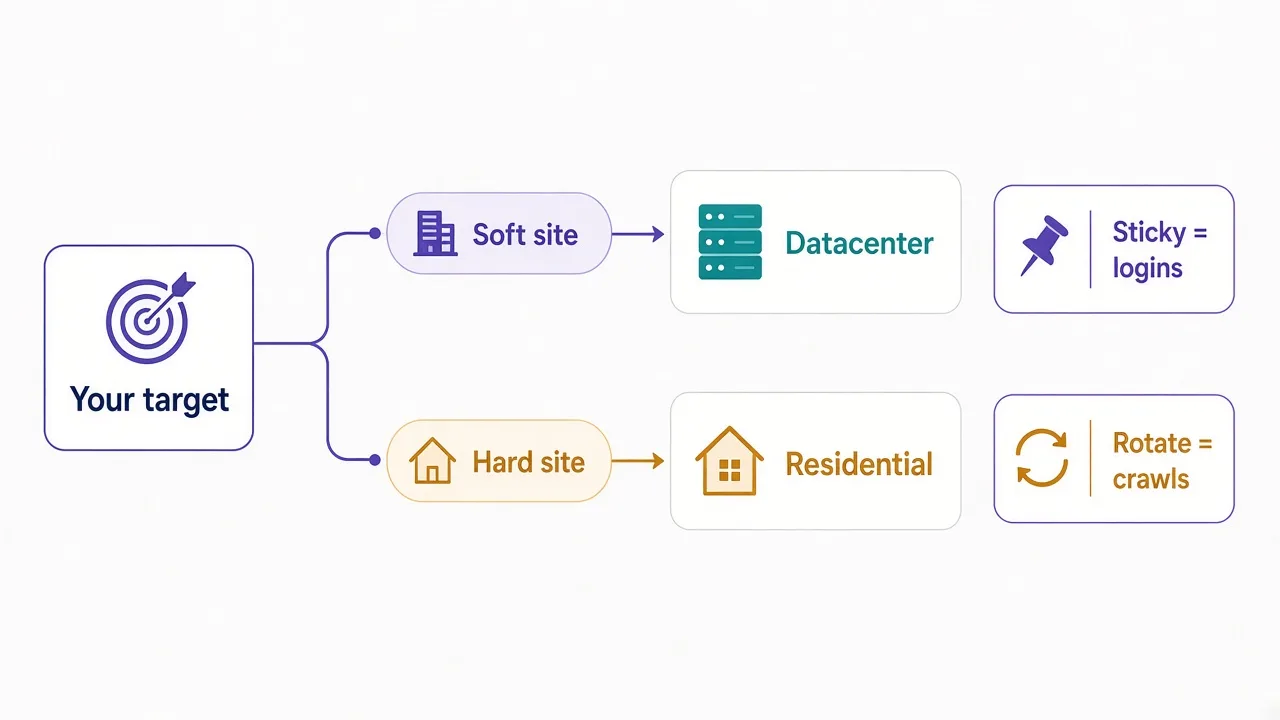
Sticky or rotating: the setting that decides bans
IP type is the headline, but session type is the plot twist.
Rotating means a new IP often, sometimes every request. It's great for broad crawls and bad for logins that expect one home for the whole session.
Sticky (sometimes called a sticky session) keeps the same IP for a set window, like 10 or 30 minutes. That's what you want when cookies, carts, or 2FA assume continuity.
So which should you pick for your job?
Logging in, managing an account, or walking a checkout? Go sticky on residential and keep that identity steady.
Scraping thousands of public URLs? Rotate, and match the aggressiveness to how hard the site pushes back.
People buy residential, leave rotation on default, then wonder why the account page kicks them mid-flow. The IP looked fine; the identity hopped mid-session.
Want the deeper mechanics? What is proxy rotation walks through how providers hand out IPs over time, request by request.
Common mistake
Upgrading to residential without changing session mode. If the job needs one continuous identity, sticky isn't optional.
Close the loop: that "setting most people never touch" is session type. Fix it before you blame the provider or the pool size.
What about ISP proxies? The third option
Most "residential vs datacenter" posts stop at two columns, but real buying has a third.
ISP proxies (also called static residential) use IPs registered to ISPs but hosted more like datacenter gear. You get a residential-looking ASN with stabler performance and longer holds than peer networks.
They usually cost more per IP than plain datacenter, and they bring less chaos than pure peer residential. In our directory, ISP-style listings often start around a few dollars per IP per month, not per GB.
When do they shine in practice?
- Long-lived accounts that need the same IP for days
- Workloads that hate peer churn
- Cases where rotating residential is overkill but raw datacenter gets blocked
They aren't magic. Hard targets still fingerprint browsers and behavior. But if your pain is "datacenter banned, residential too jumpy," ISP is the middle lane.
Browse the wider catalog on DriftProxy proxies and filter by type when you're ready to compare live listings.
Side-by-side: which wins for what?
Use this as a cheat sheet, not a scoreboard that crowns a forever winner.
| Job | Lean toward | Why |
|---|---|---|
| Soft public crawl | Datacenter + rotate | Speed and price |
| Hard e-com scrape | Residential + careful rotate | ASN trust |
| Social / shop logins | Residential + sticky | Stable identity |
| Long-lived multi-account | ISP / static residential | Same IP, home ASN |
| Bulk SEO checks | Datacenter first | Volume; upgrade if blocked |
| Ad verification by city | Residential | Local ISP look |
Protocol still matters too. HTTP proxies fit most scrapers, while SOCKS5 fits apps that want a general TCP tunnel. If you're still picking a protocol, read HTTP vs SOCKS5 proxies.
And if you're weighing a proxy against a full-device VPN, that's a different question. Start with proxy vs VPN.
Notice a pattern? Target first, task second, and price last.
Mistakes that waste money on the wrong type
Most bad buys look obvious in hindsight, even though they feel smart in the checkout flow.
First mistake: matching the marketing story, not the target. "Residential = unblockable" sells, and it's also false under heavy rate limits or messy fingerprints.
Second mistake: buying a huge residential plan for a job that's 90% soft pages. You pay peer prices for traffic a $0.50 IP could handle without drama.
Third mistake: sharing one sticky IP across unrelated accounts. Sticky means stable for one identity; it isn't a free pass to stack ten shops on one address.
Fourth mistake: ignoring geo. A US residential IP on a site that expects a local carrier can still look odd. Match country, and city when the product needs it.
Fifth mistake: never testing a cheap path first. Ten minutes with datacenter on a sample of URLs beats a month of overpaying for the wrong pool.
Which of those are you closest to right now? Fix that before you renew another plan you don't need.
How to decide in five minutes
Skip the brochure copy and run this checklist once before you buy.
- Can a plain VPS fetch the page without blocks? If yes, try datacenter.
- Does the flow include login, checkout, or account state? Prefer residential sticky (or ISP).
- Is the target a major platform with real anti-bot spend? Budget residential.
- Do you need the same IP for days, not minutes? Look at ISP / static residential.
- Is bandwidth heavy (images, video)? Measure GB before you commit to residential.
Still unsure? Split the job. Use datacenter for the easy list pages, and reserve residential for the detail pages or logins that fail on hosting IPs.
That hybrid pattern is why so many of the 44 published providers in our directory sell more than one type. You should use more than one type too when the workload mixes soft and hard paths on the same project.
Budget tip
Don't put 100% of traffic on your most expensive pool. Route by difficulty, and your invoice will thank you.
One last honesty check. Free proxies and mystery "unlimited residential" deals often recycle abused IPs. Cheap is fine; opaque isn't. Prefer providers that state pool type, geo coverage, and session controls in plain language.
So, which one should you actually use?
Start with your target, not the price tag on the landing page.
If the site barely fights back, datacenter IPs do the job for pennies. If it's Amazon, Instagram, or a sticky login flow, go residential and keep sessions sticky. Need days on one home-looking IP? Look at ISP.
You don't need the biggest pool number on the pricing page. You need the type that matches the checks in front of you.
Ready to compare live options? Browse proxy providers on DriftProxy, or jump to residential picks when the hard targets win the argument.
Frequently asked questions
Datacenter proxies use hosting or cloud IPs. Residential proxies use real household ISP IPs. Sites trust residential ranges more and block many datacenter ASNs faster.
No. Residential is better for hard targets and logins. Datacenter is faster and cheaper for soft public pages. Fit beats brand prestige.
Use datacenter when a normal cloud IP already works: light crawls, soft sites, QA egress, and high-volume jobs where some blocks are acceptable.
Use residential for social or marketplace logins, tough e-commerce checks, and any flow that flags hosting ASNs. Pair logins with sticky sessions.
ISP proxies are residential-looking IPs hosted more like datacenter gear. They suit long-lived accounts that need one stable home ASN without peer churn.
Both matter. IP type affects trust. Session type keeps identity stable. Logins need sticky; broad crawls usually want rotation.