









Routing your traffic through one proxy hides your IP from the destination — but it doesn't hide it from the proxy. That single operator sees both who you are and where you're going, which makes them a single point of failure for your anonymity. Proxy chaining is the answer to that problem: instead of one hop, you route through two, three, or more proxies in sequence, so no single server in the path ever knows both ends of the connection. This guide explains how multi-hop proxy architecture actually works, the protocols that support it, the real latency cost, how it compares to multi-hop VPNs and Tor, and how to build a chain yourself.
What is proxy chaining?
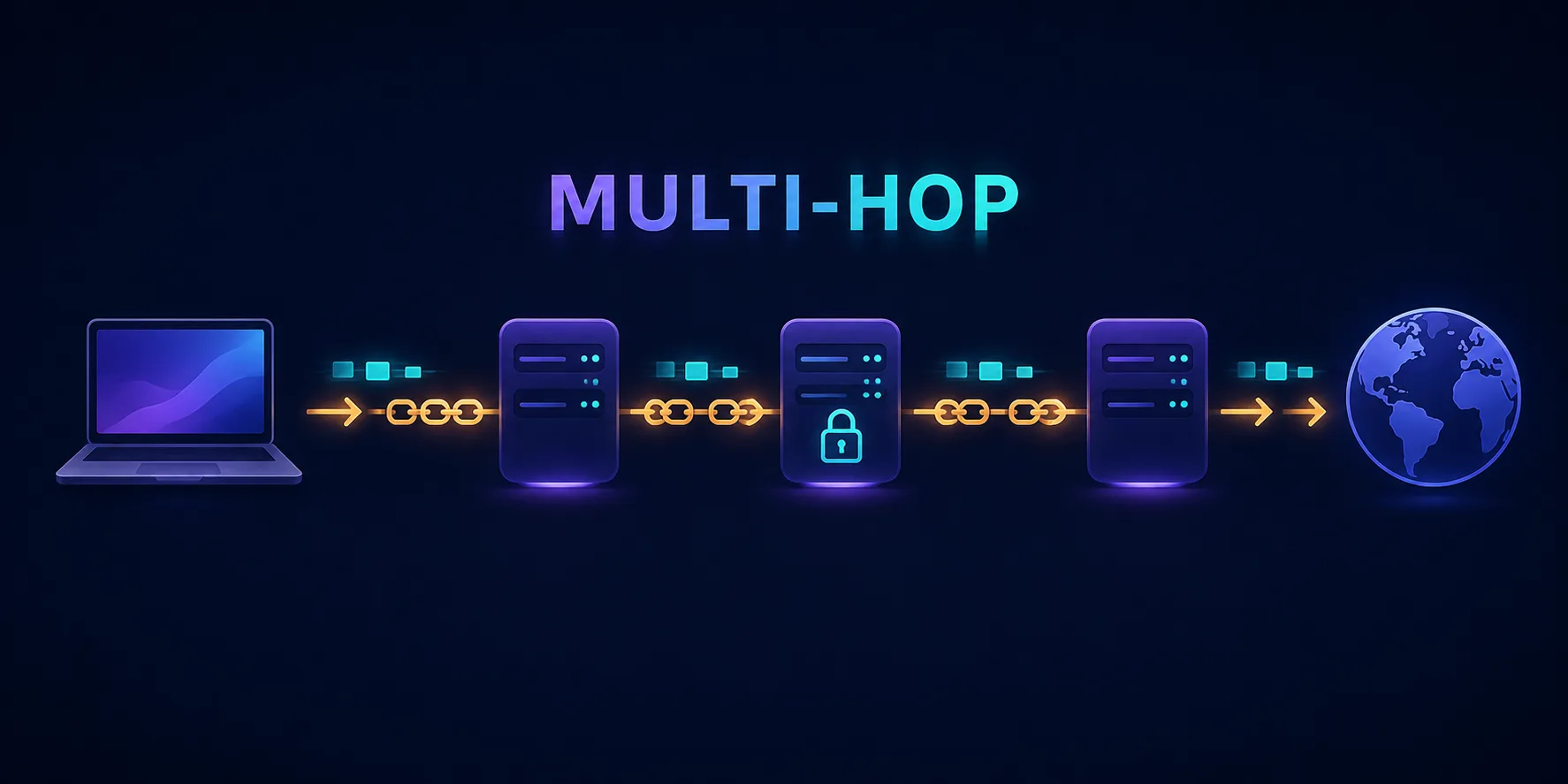
Proxy chaining (also called a proxy chain, cascading proxies, or multi-hop proxying) is the practice of sending your traffic through a sequence of proxy servers before it reaches its destination. Each proxy forwards the request to the next one in the chain, and only the final proxy — the exit node — actually talks to the target website.
The security value comes from knowledge fragmentation. In a single-proxy setup, that one server knows your real IP and your destination. In a chain, the first proxy knows who you are but not where you're ultimately going; the last proxy knows the destination but not who you are; the middle hops know neither. An adversary would need to compromise or subpoena every hop in the chain, ideally simultaneously, to reconstruct the full path. If you're new to the basics, our guide on how proxy servers work covers the single-hop foundation this builds on.
How proxy chaining works
Mechanically, a chain is just nested forwarding. Your client is configured to connect to Proxy 1. But instead of asking Proxy 1 for the target website, it asks Proxy 1 to connect it to Proxy 2. It then asks Proxy 2 to connect to Proxy 3, and so on, until the final hop is instructed to fetch the actual destination.
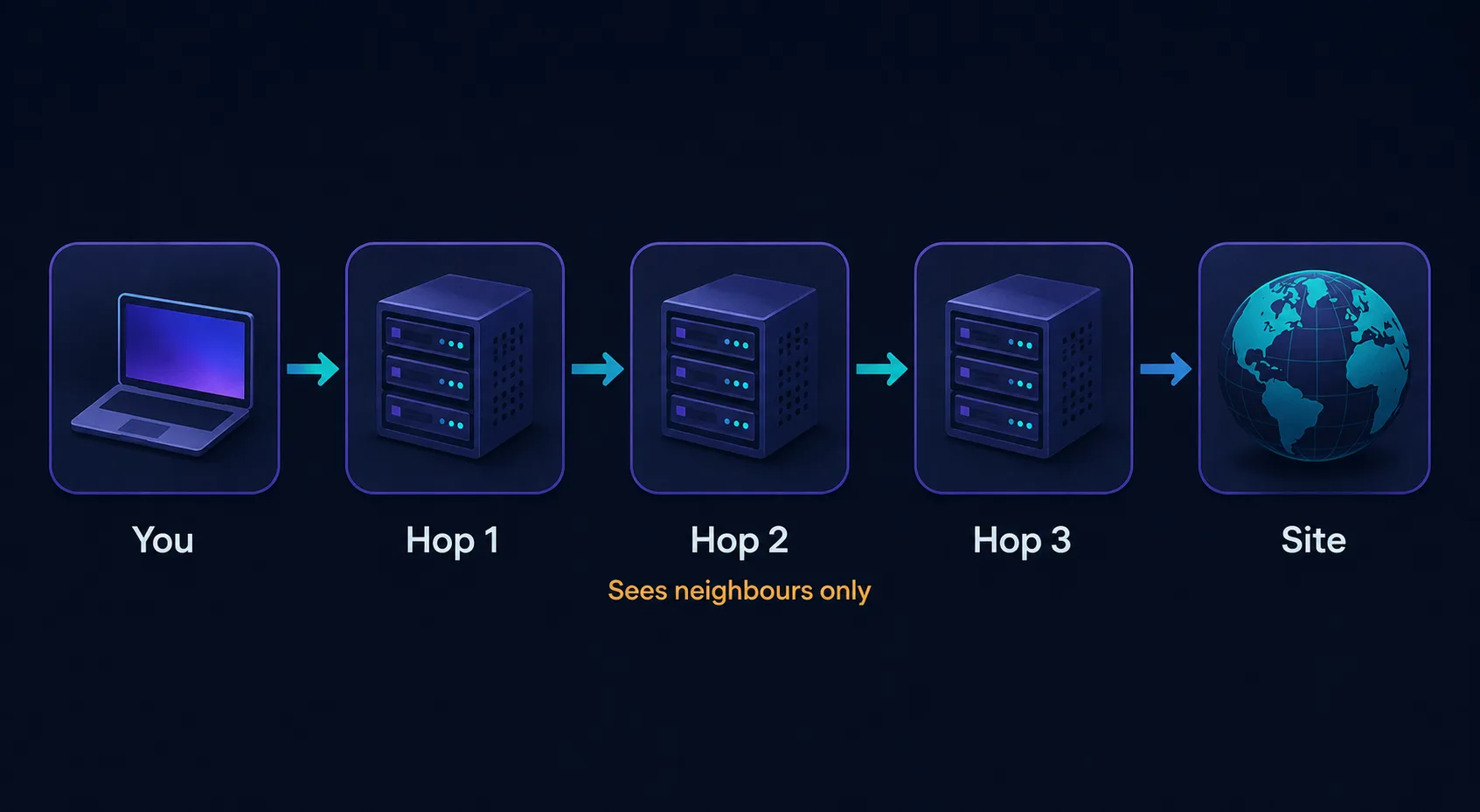
Critically, each hop only ever sees its immediate neighbours. Proxy 2 receives a connection from Proxy 1, not from you — as far as it's concerned, Proxy 1 is the client. The website at the end sees only the exit node's IP. Your real address appears exactly once, in the connection to the very first hop, and never travels further down the chain.
Why the first hop still matters
The entry proxy is the only server in the chain that sees your real IP, which makes it the most sensitive link. Use a provider you actually trust for hop one — ideally one on a different network, in a different jurisdiction, and under different ownership from the rest of your chain.
Single proxy vs proxy chain
The trade-off between one hop and several is straightforward: you buy resilience with latency.
| Aspect | Single proxy | Proxy chain |
|---|---|---|
| Who knows both ends | The proxy operator | Nobody (if hops are independent) |
| Single point of failure | Yes | No — needs every hop compromised |
| Latency | One added round trip | Multiplied by hop count |
| Speed | Near-native | Noticeably slower |
| Setup complexity | Trivial | Moderate to high |
| Failure rate | Low | Compounds with each hop |
Types of proxy chains
Not all chains behave the same way. The configuration you choose changes both the reliability and the anonymity profile.
Static chains
A static chain uses a fixed, ordered list of proxies — always hop A, then B, then C, in that exact order. It's predictable and easy to debug, which makes it the right default for most use cases. The downside is that if any single proxy in the list goes down, the entire chain fails until you fix it.
Dynamic chains
A dynamic chain uses the same ordered list but skips any hop that's unreachable, routing through whichever proxies are currently alive. This is far more resilient for real-world use — one dead proxy doesn't break your connection — at the cost of some predictability about exactly how many hops you're using at any moment.
Random chains
A random chain picks a random subset of proxies from your pool, in random order, for each connection. This maximises unpredictability and makes traffic correlation substantially harder, since no two sessions take the same path. It's the most anonymous option and the least consistent — expect variable latency and occasional failures. This pairs naturally with proxy rotation, which varies the exit IP rather than the path itself.
Which protocols support chaining
Chaining isn't a feature you switch on so much as a property of certain protocols. What you can chain depends on what each hop supports:
- SOCKS5 — the best option by a wide margin. SOCKS5 is protocol-agnostic, handles TCP and UDP, supports authentication, and can pass DNS requests through the proxy rather than leaking them locally. Nearly every serious proxy chain is built on SOCKS5.
- SOCKS4 — workable but dated: no UDP, no authentication, and no remote DNS resolution, which risks a DNS leak revealing your lookups.
- HTTP CONNECT — HTTP proxies can chain using the
CONNECTmethod to tunnel arbitrary TCP, but support is inconsistent and many providers block chained CONNECT requests outright. - SSH tunnels — an SSH server with dynamic port forwarding (
ssh -D) acts as a local SOCKS proxy, and SSH tunnels can be nested through one another. Encrypted per hop and very reliable if you control the servers. - VPN + proxy — a common hybrid: connect to a VPN first, then route through one or more proxies on top. The VPN encrypts the first leg, and the proxies add hops beyond it.
Chaining is not encryption
A plain SOCKS or HTTP proxy chain adds hops but does not encrypt your traffic between them. Each operator can read anything that isn't already protected by TLS. Chaining protects against any single hop linking you to your destination — it does not protect the content of unencrypted traffic. Always use HTTPS, and layer a VPN or SSH if you need the transport itself encrypted.
The speed cost: doing the latency math
Every hop you add contributes its own round-trip time, and those delays stack additively. This is the single biggest practical reason people abandon proxy chains.
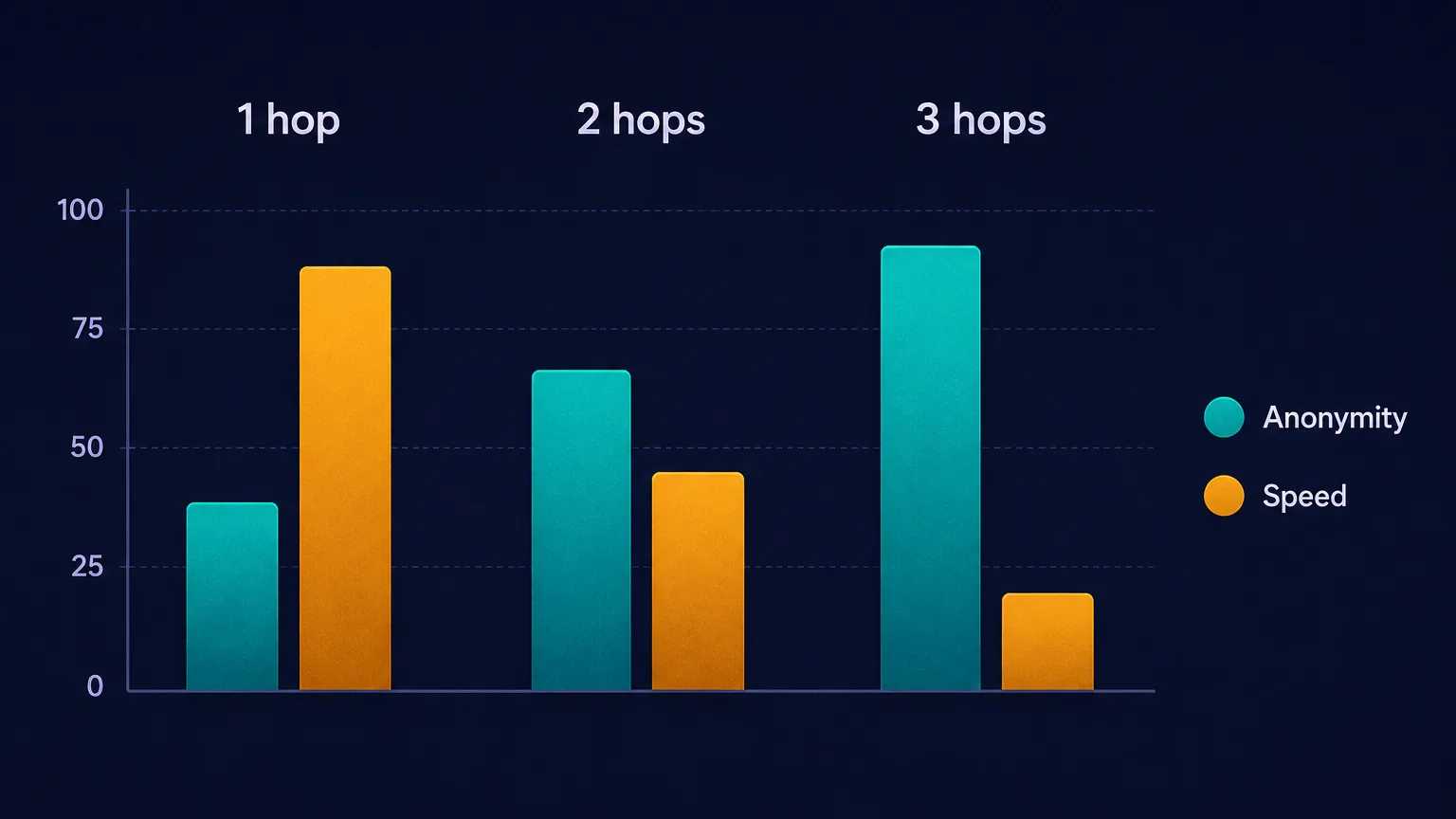
Consider a concrete example. Suppose your baseline latency to a website is 30 ms. Add one proxy in a nearby region at 40 ms and you're at roughly 70 ms — barely noticeable. Add a second hop on another continent at 120 ms and you're near 190 ms. Add a third at 90 ms and you're pushing 280 ms, nearly ten times your baseline, before the server even starts responding.
That compounds badly for anything interactive. Page loads involve dozens of sequential requests, so a 280 ms round trip can turn a one-second page into eight or nine seconds. Reliability degrades the same way: if each hop has 99% uptime, a three-hop chain is about 97% — which sounds fine until you're running thousands of requests and three in a hundred fail.
Diminishing returns after three hops
Two hops give you most of the anonymity benefit — no single operator sees both ends. Three is a reasonable maximum for serious threat models. Beyond that, you're multiplying latency and failure rates for anonymity gains that are largely theoretical against realistic adversaries.
Why chain proxies? The real use cases
Chaining is a specialist tool, and it's worth being honest about when it earns its cost:
- Removing the single point of trust. The core benefit. No individual provider — or anyone who subpoenas, hacks, or operates them — can link your identity to your activity on their own.
- Jurisdictional diversity. Placing hops in different legal jurisdictions means no single court order can compel the full picture. A chain spanning three unfriendly-to-each-other jurisdictions is genuinely hard to unwind.
- Defeating basic correlation. Traffic entering hop one and leaving hop three at different times, mixed with other users' traffic, complicates naive timing analysis.
- Reaching restricted networks. Sometimes a chain is simply necessary plumbing — hopping through a bastion host to reach an internal network, then out through another proxy.
- Layering different proxy types. Combining, say, a datacenter proxy for speed with a residential exit for trust gives you properties neither type has alone.
The drawbacks you need to weigh
Chains are not free, and the costs are real:
- Compounding latency, as covered above — the dominant practical drawback.
- Compounding failure. Every hop is another thing that can go down, rate-limit you, or change its behaviour without warning.
- Difficult debugging. When a chained request fails, isolating which hop broke is genuinely painful compared to a single proxy.
- Cost multiplication. You're paying for bandwidth at every hop, so the same gigabyte gets billed two or three times over.
- False confidence. The most dangerous drawback. A chain does nothing about browser fingerprinting, cookies, or a logged-in account. Three hops and a signed-in session still identifies you perfectly.
Proxy chaining vs multi-hop VPN vs Tor
Multi-hop routing exists in three main forms, and they're optimised for different things:
| Proxy chain | Multi-hop VPN | Tor | |
|---|---|---|---|
| Encryption | Usually none between hops | Encrypted every hop | Layered encryption |
| Hop operators | You choose them | One company | Volunteers, random |
| Speed | Slow | Moderate | Slowest |
| Setup | Manual, technical | One click | One click |
| Trust model | Distributed, your choice | Single provider | Trustless by design |
| Best for | Custom routing, scraping | Everyday privacy | Maximum anonymity |
The key distinction: with a multi-hop VPN, both hops usually belong to the same company, so the fragmentation is weaker than a chain of independent providers — but you get real encryption at every hop and a setup that takes one click. For most people, that's the better trade. Just be aware that a VPN can still leak your real IP through WebRTC or DNS regardless of how many hops it uses.
NordVPN's Double VPN routes you through two servers with encryption at each:

Proton VPN's Secure Core sends traffic through hardened servers in privacy-friendly jurisdictions first:

Privacy-first, from the makers of Proton Mail.
Surfshark's Dynamic MultiHop lets you pick both the entry and exit country yourself:

How to set up a proxy chain
The most common approach on Linux and macOS is proxychains (or the maintained fork proxychains-ng), which forces any application's traffic through your configured chain:
- Install it. Available through most package managers as
proxychains-ng. - Open the config at
/etc/proxychains.conf(or the path your install reports). - Pick a chain mode. Uncomment exactly one of
strict_chain,dynamic_chain, orrandom_chainto match the type you want. - Enable remote DNS. Make sure
proxy_dnsis enabled so lookups resolve through the chain rather than leaking to your local resolver. - List your proxies under
[ProxyList], one per line, in order — format issocks5 host port user pass. - Run your app through it:
proxychains4 curl https://example.comand confirm the IP returned is your exit node, not yours.
For browser-only chaining, tools like FoxyProxy plus an upstream SOCKS proxy work, and most antidetect browsers let you assign a proxy per profile that can itself point at a chain. On the server side, SSH dynamic forwarding (ssh -D 1080 user@host) gives you a free SOCKS hop on any box you control.
Always verify before you trust it
After building any chain, check what the internet actually sees with our IP address lookup tool. If your real IP appears, or if the exit country doesn't match your final hop, the chain isn't routing the way you think it is.
Sourcing proxies for a chain
A chain is only as trustworthy as its hops, and free public proxy lists are the worst possible foundation — many are honeypots run specifically to harvest the traffic of people who think they're being clever. Use paid providers with real infrastructure, and deliberately spread your hops across different providers so one company doesn't quietly own your whole chain.
SOAX offers flexible targeting and solid SOCKS5 support for chain hops:

Clean, ethically-sourced residential & mobile IPs.
IPRoyal is a budget-friendly option that works well for adding intermediate hops:

Flexible proxies with true pay-as-you-go.
Is proxy chaining legal?
In most countries, yes — routing your own traffic through servers you're authorised to use is legal, and chaining is standard practice in security research, penetration testing, and journalism. What matters is what you do through the chain: the illegality attaches to the underlying activity, not the routing. Using a chain to access systems you don't have permission to access is illegal regardless of how many hops you used.
Worth noting separately: many commercial services' terms of service prohibit proxy use entirely, so a chain may violate a contract even where it breaks no law. And some jurisdictions with heavy internet restrictions do regulate circumvention tools directly — check your local rules if that applies to you.
Best practices for building a chain
- Cap it at two or three hops. Past that, latency and failure rates outgrow the anonymity benefit.
- Use different providers per hop. A chain of three servers from one company is barely better than one hop.
- Spread jurisdictions. Choose countries with poor mutual legal assistance between them.
- Prefer SOCKS5 with remote DNS so lookups don't bypass the chain.
- Keep HTTPS everywhere, since the hops themselves aren't encrypting anything.
- Test after every change and re-verify periodically — proxies change behaviour silently.
- Address fingerprinting separately. Pair the chain with a hardened or antidetect browser if identity separation is the actual goal.
The bottom line
Proxy chaining routes your traffic through multiple proxies in sequence so no single hop knows both who you are and where you're going — solving the single-point-of-trust problem that a lone proxy can't. It's built most reliably on SOCKS5, comes in static, dynamic, and random flavours, and costs you latency that compounds with every hop you add. Two hops capture most of the benefit; three is a sensible ceiling; beyond that you're paying real speed for theoretical gains. For everyday privacy, a multi-hop VPN is easier and encrypts every leg; for maximum anonymity, Tor is purpose-built. Chains earn their place when you need control over exactly which operators and jurisdictions carry your traffic. Whatever you build, source your hops from providers you trust, spread them across companies and countries, and verify the result with our IP lookup tool before you rely on it — and remember that no amount of hops fixes a fingerprint or a logged-in session.
Frequently asked questions
Proxy chaining routes your traffic through two or more proxy servers in sequence before it reaches the destination. Each hop only sees its immediate neighbours, so the first proxy knows your real IP but not your destination, and the last knows the destination but not you. This removes the single point of trust that a lone proxy creates.
It significantly improves anonymity by ensuring no single operator can link you to your destination, but it is not complete anonymity. A chain does nothing about browser fingerprinting, cookies, or logged-in accounts — three hops and a signed-in session still identifies you perfectly.
Two to three hops is the practical sweet spot. Two hops already deliver most of the benefit since no single operator sees both ends, and three is a reasonable maximum for serious threat models. Beyond that, latency and failure rates compound faster than the anonymity gains justify.
Yes, significantly. Each hop adds its own round-trip time and those delays stack. A 30 ms baseline can become roughly 280 ms across three hops — nearly ten times slower — which compounds badly on page loads that involve dozens of sequential requests.
They solve different problems. A proxy chain lets you pick independent operators across different jurisdictions, giving stronger trust fragmentation, but usually offers no encryption between hops. A multi-hop VPN encrypts every leg and takes one click, though both servers typically belong to the same company.
In most countries yes — routing your own traffic through servers you are authorised to use is legal, and it is standard practice in security research and journalism. Legality attaches to what you do through the chain, not the routing itself. Note that many services' terms of service prohibit proxy use regardless.