










You need a pile of IPs that are fast, cheap, and boring to set up.
Someone on a forum just told you to buy residential instead. That advice is half right, and half a sales pitch.
For most scraping, SEO checks, and bulk API work on soft targets, the best datacenter proxy providers win on speed and cost.
As of October 2026, 14 of the 44 published providers in our proxy directory list a datacenter product.
Our usual starting pick is Webshare for self-serve volume. Step up to Oxylabs or Bright Data when you need enterprise scale.
Why do so many lists still push residential first? And when does a cheap datacenter IP quietly burn your whole pool?
We'll answer both. First, you need a clear picture of what you're actually buying.
What is a datacenter proxy, in plain words?
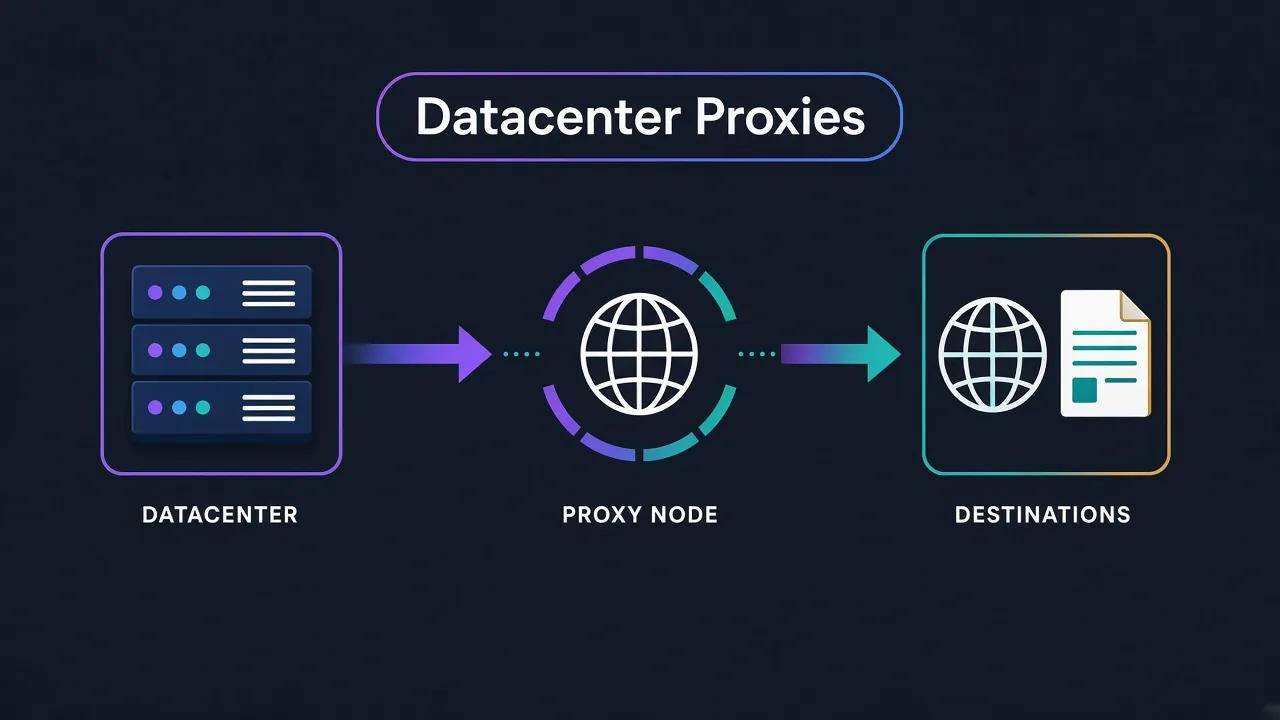
A datacenter proxy is an IP that lives in a hosting rack, not a household modem.
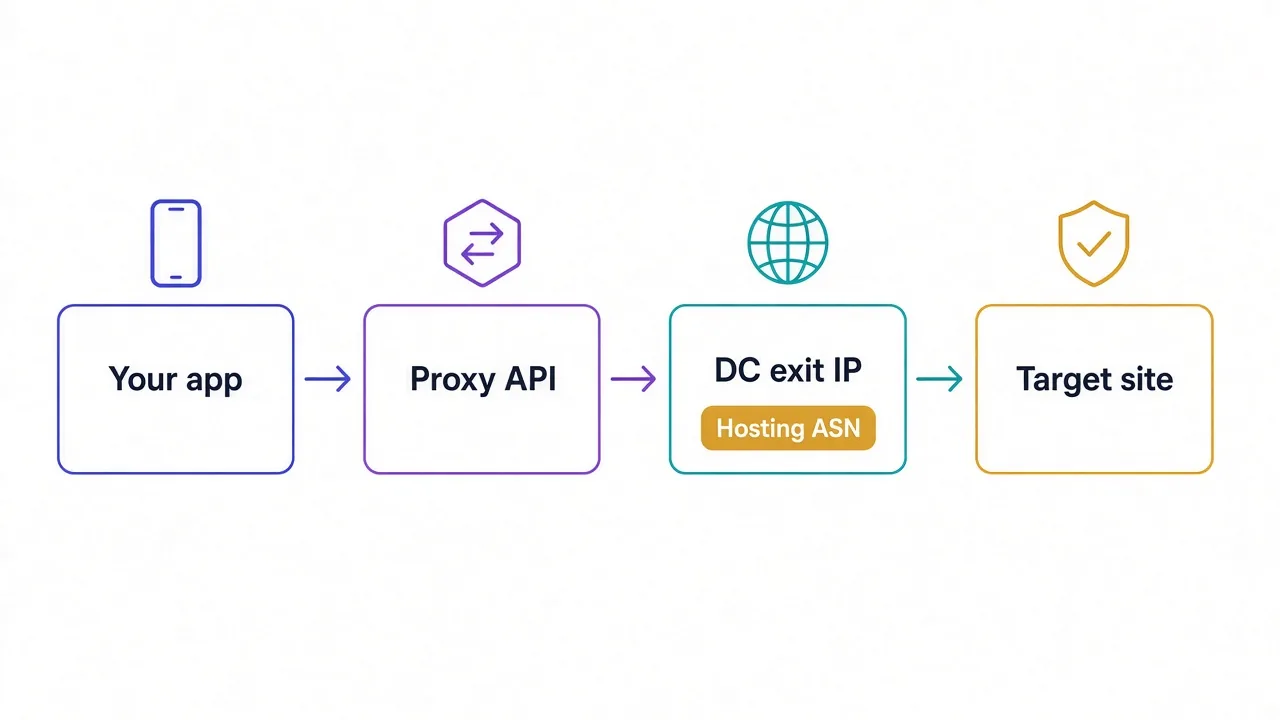
Cloud providers and hosting companies assign these ranges. Your request exits through that server, so the target site sees the hosting company's network, not your home ISP.
That's why they're fast. Packets skip the mess of consumer last-mile links.
It's also why they're cheap. Bandwidth and IPs in a data center cost a fraction of ethically sourced residential traffic.
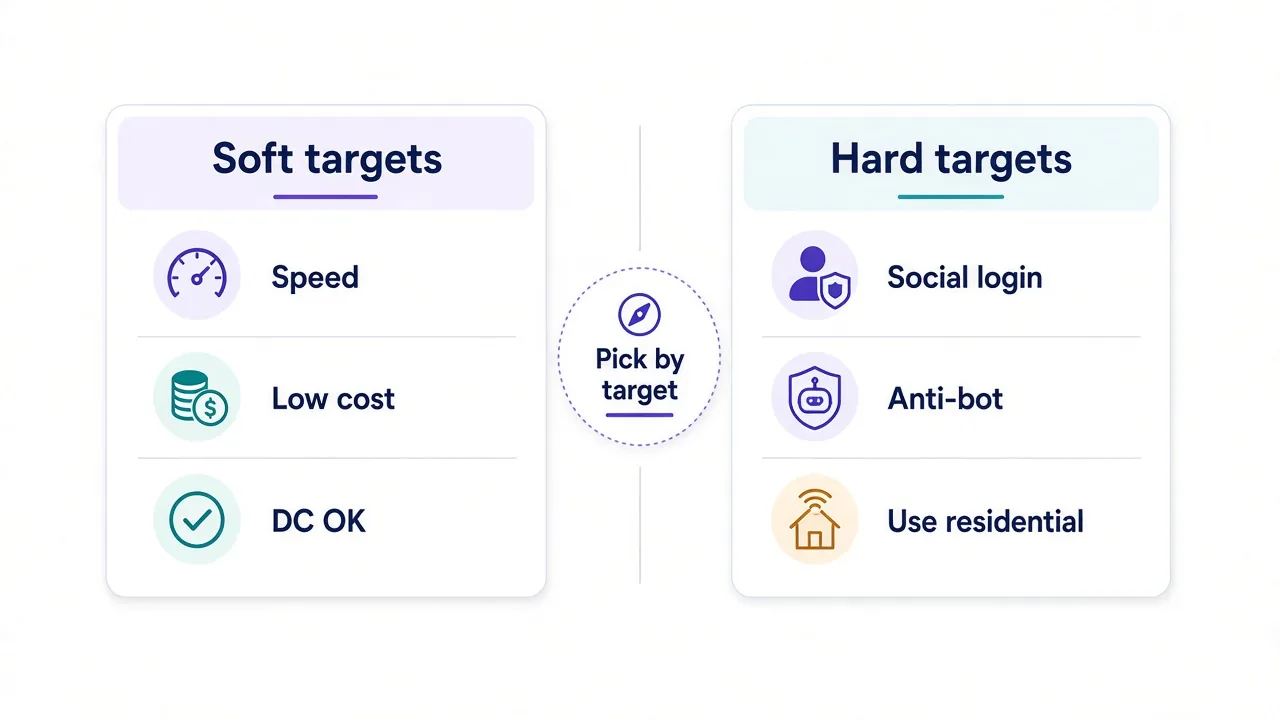
The trade-off is visibility. WHOIS and ASN data make many datacenter ranges easy to spot. Soft targets shrug. Hard targets (banks, big social apps, some retailers) often treat "AWS / DigitalOcean / Hetzner" as a yellow flag.
Quick rule of thumb
If a site barely fights bots, datacenter is usually enough. If it fingerprints sessions and challenges every new ASN, budget for residential or ISP instead. Our residential vs datacenter guide walks through that fork.
When do datacenter proxies actually win?
They win when three things line up.
- The target has light or mid anti-bot controls.
- You care more about throughput and cost than looking like a home user.
- You can rotate cleanly and drop bad exits without drama.
Classic fits include public price pages, open APIs, and SEO rank checks.
Also ad verification on loose sites, internal QA, and high-volume crawls of docs or listings.
Where they struggle: account logins on major social platforms, sneaker drops, ticket queues, and anything that already blocks known hosting ASNs.
So which one should you buy for your stack?
That depends less on "millions of IPs" marketing. Pool hygiene, session controls, and a free sandbox matter more.
There's also a third reason pools get burned that most buyers miss. We'll get there after the picks.
How we ranked the best datacenter proxy providers
We used the live listings in our directory: ratings, editor notes, pool sizes, and published datacenter pricing units. Not invented benchmark scores.
Each pick had to:
- Offer a real Datacenter product type in the directory (not just a vague "proxies" claim).
- Show a clear strength for datacenter work: free tier, huge pool, developer API, or enterprise tooling.
- Come with an honest catch we would tell a friend.
We prefer reputable names with published editor verdicts. Newer budget brands can still make the list when the fit is clear, with the usual "test on your target first" caveat.
Prices drift. Treat the figures below as directory snapshots as of October 2026, and confirm on the provider card before you buy.
Our picks at a glance
| Provider | Best for | Why it stands out |
|---|---|---|
| Webshare | Most people starting out | Free tier + huge datacenter pool |
| Smartproxy | Teams that want a clean UI | Polished dashboard, fair mid-tier DC |
| Oxylabs | High-volume enterprise crawls | 2M+ DC pool, serious support |
| Bright Data | Platform + compliance needs | Deep tooling around the proxies |
| ProxyScrape | Testing and light paid DC | Free lists plus cheap paid tiers |
| LunaProxy | Budget multi-type stacks | Low entry DC with APAC depth |
| GoProxy | One vendor, many proxy types | DC plus residential/ISP/mobile |
| Geonode | Predictable heavy traffic bills | Concurrency-style thinking, DC option |
Webshare: the best starting datacenter proxy for most people
If you want to stop debating and start sending requests, start here.
Best for: developers, indie scrapers, and anyone who wants self-serve datacenter IPs without a sales call.
Webshare's editor notes call out what actually matters for this job.
Datacenter from about $0.99 per IP. A genuine free tier of 10 proxies. A large ~30M datacenter pool. And a developer-friendly API.
Average response on datacenter workloads sits around half a second in their published stats. That speed makes crawl loops feel snappy.
Setup is the quiet superpower. You sign up, export a list or hit the API, and you're rotating in minutes. No "book a demo" wall.
The honest catch? Tough sites still spot hosting ranges.
Webshare doesn't pretend to be an unblocking platform.
If Instagram or a major retailer is the target, you'll outgrow pure datacenter fast. Their residential success rates also trail the premium giants on those fights.
Support is more self-serve than hand-held. For many teams, that's a feature.
Choose Webshare when cost, speed, and a free sandbox matter more than enterprise SLAs.

The most affordable way to start with proxies.
Smartproxy: polished datacenter without the enterprise headache
Hate dense dashboards? Smartproxy (also rolling out under the Decodo name) is the all-rounder we often send newcomers to.
Best for: small teams that want residential and datacenter in one clean account, with docs that don't fight you.
Their datacenter tier starts around $0.50 per IP with a 500K+ pool in our directory.
The bigger story is the product surface. Fast onboarding, sub-users, scraping helpers, and a UI that doesn't feel like a 2014 admin panel.
Is the datacenter pool the largest on this list? No. Oxylabs and Webshare dwarf it on raw DC size.
So why keep it here? Because many buyers aren't optimizing for maximum ASN count. They're optimizing for "my junior can provision this without Slack-paging me." Smartproxy wins that race often enough to earn a shortlist slot.
The catch: the Decodo rebrand can confuse invoices and docs for a while.
The hardest anti-bot targets may still want a heavier residential or unlocker stack.

Powerful proxies without the enterprise price tag.
Oxylabs: enterprise datacenter when volume is the job
Need to move serious traffic and keep ops calm at 2 a.m.?
Best for: high-volume crawls, compliance-minded teams, and buyers who want a large dedicated-style datacenter footprint.
Oxylabs lists a 2M+ datacenter network in our directory.
That is the largest DC pool among the providers we feature here, with starting prices around $0.65 per IP.
Editor notes also call out SOC 2 posture and strong support. Tooling like AI-assisted proxy management and scraper APIs cuts the babysitting.
That combination matters when a bad weekend of blocks costs more than the invoice.
The catch is the rest of the platform. Oxylabs builds for teams with real volume. Casual scrapers will feel overserved, especially on residential pricing. You're paying for reliability and process, not coupon-code vibes.
Pick Oxylabs when datacenter is a production dependency, not a weekend experiment.

Premium proxies built for enterprise scraping.
Bright Data: when you need a data platform, not just IPs
Bright Data shows up on every "enterprise" shortlist for a reason.
Best for: companies that want proxies plus unlockers, SERP tools, and compliance theater that security teams recognize.
Their datacenter product sits around $0.60 per IP with a 770K+ pool in our listings. The differentiator is less "cheapest IP" and more "we can surround the proxy with products that survive hostile sites."
KYC and a dense dashboard slow casual buyers. Pricing sits at the premium end. If you only need a static list for QA, this is overkill.
Do your legal and security folks ask awkward questions about sourcing and audit logs?
Bright Data's posture is often the path of least resistance.

ProxyScrape: free lists to learn, paid datacenter to ship
Want to poke a workflow before you spend?
Best for: experiments, teaching a pipeline to rotate, and light paid datacenter once free lists prove the idea.
ProxyScrape is honest about the split. Free lists are a sandbox: refreshed often, unreliable for production.
Paid residential and datacenter tiers are where you actually ship. Datacenter starts about $0.50 per IP with a 40K+ pool.
Here's the trap most beginners hit: they judge "datacenter proxies" by free list quality, then swear the whole category is useless.
That's the wrong lesson. Free exits are noisy, overloaded, and often already abused. A paid pool from a real provider is a different product that happens to share a name.
Use ProxyScrape's free layer to wire auth and rotation. Graduate to their paid DC, or jump to Webshare, before you measure success rates on a real target.

Free proxy lists plus affordable residential and datacenter proxies
LunaProxy: budget datacenter with APAC reach
Chasing cost and Asia-Pacific coverage in the same invoice?
Best for: budget crawls and teams that already mix residential with cheaper datacenter exits.
LunaProxy lists datacenter from about $0.50 per IP with a 50K+ pool, plus stronger APAC notes on the residential side.
Unlimited-style residential plans exist for heavy steady loads. That helps if your stack spans proxy types.
The catch: it's a younger brand versus Oxylabs or Bright Data. Treat advertised pool headlines with normal skepticism and validate on your own targets before you scale spend.
If your traffic is mostly North America on soft sites, Webshare may still be simpler. If APAC routes matter and price is tight, LunaProxy belongs on the shortlist.
Large residential pool with unlimited plans, SOCKS5 and budget per-GB rates
GoProxy: one account when you outgrow a single proxy type
Your week isn't only datacenter.
Monday is a soft catalog crawl. Wednesday needs sticky ISP for a login flow. Friday is a mobile check.
Best for: teams that want residential, ISP, datacenter, and mobile without juggling four vendors.
GoProxy's datacenter tier lands around $0.60 per IP with a 50K+ pool in our directory. City and ASN targeting show up across the platform, which helps when "just any US IP" stops being enough.
It's not the cheapest pure-DC play, and the brand is newer than the enterprise incumbents. The win is operational simplicity: one dashboard when your mix of jobs keeps changing.

Broad residential, ISP, datacenter and mobile proxies at competitive rates
Geonode: think about concurrency, not only per-IP stickers
Per-IP pricing is easy to compare. It isn't always how your bill actually grows.
Best for: developers who think in concurrent workers.
Also teams that want predictable high-volume economics, with datacenter beside residential.
Geonode is better known for unlimited-bandwidth residential billed by concurrency. Their datacenter option starts around $0.80 per IP with a smaller 30K+ pool. Don't buy it expecting the biggest ASN catalog.
Buy it when your mental model is "how many parallel exits can I keep healthy?" rather than "how many IPs are on the marketing page?"
The catch: tooling feels less polished than Smartproxy, and fine geo targeting trails the giants. Test before you commit a quarter's budget.

Unlimited-bandwidth residential proxies priced by concurrency
What about the ultra-cheap options?
Our directory also lists budget names like Thunder Proxy (datacenter from about $0.40 per IP), ABCProxy, and Proxy-Cheap.
They can work for hobbies and throwaway tests. Pools are smaller, consistency varies, and support is thinner.
If you're learning rotation logic, a cheap paid tier beats a free list. If a client invoice depends on uptime, pay for Webshare, Smartproxy, or an enterprise pool instead.
Price isn't the same as cost
A $0.40 IP that dies every ten minutes can cost more in retries than a $0.99 IP that stays boring.
Measure successful requests per dollar on your target, not the sticker alone.
Shared vs dedicated: the detail that decides your burn rate
Remember the third reason pools get burned?
It isn't only "the site blocked datacenter ASNs." It's who else is on your subnet.
Shared datacenter exits are affordable because many customers reuse the same ranges. If a noisy neighbor scrapes a fragile site from the same /24, your "innocent" SEO check can inherit the reputation hit.
Dedicated or less-crowded allocations cost more and cut that risk. Neither is magic. Both still look like hosting to a strict firewall.
Practical move: start shared for soft targets.
If block spikes hit without code changes, ask about quieter subnets or IP refreshes. Try a dedicated tier before you leap straight to residential.
Also match sticky sessions to the job. Logging in? Hold the IP. Crawling public pages? Rotate and drop bad exits quickly.
Mistakes that waste a datacenter budget
These show up in support tickets more than product pages admit.
- Buying residential first out of fear. If the site doesn't fight, you just paid 5–10× for comfort.
- Judging the category by free proxies. Free lists are a teaching tool, not a production pool.
- One giant sticky session for a crawl. You're asking one IP to look like a thousand users.
- Ignoring protocol fit. Many stacks want HTTP(S); some tools prefer SOCKS5. Match the client. Our HTTP vs SOCKS5 post helps.
- Skipping a small proof run. Ten minutes on 50 URLs beats a surprise on 50,000.
Chrome setup still confusing? See how to set a proxy in Chrome before you blame the provider.
A simple decision rule for choosing a provider
Use this when the comparison table gets loud.
- Soft target + you want speed/cost: Webshare first; ProxyScrape if you're still wiring the client.
- Team needs a clean UI and mixed proxy types: Smartproxy.
- High volume, support, compliance paperwork: Oxylabs or Bright Data.
- Budget multi-type with APAC lean: LunaProxy or GoProxy.
- You bill in concurrency more than IPs: Geonode's model may fit. Validate DC size for your geos.
- Hard anti-bot or social logins: stop forcing datacenter; move to residential/ISP and read the use-case guides.
Directory tip
Filter the live proxy directory for datacenter, then open two or three cards side by side. The cards carry current pricing and ratings so this article never has to pretend a screenshot stays true forever.
So, which datacenter proxy should you actually buy?
Start with the target, not the marketing pool size.
If the site barely fights, Webshare is the default we'd hand a friend.
Free tier, huge datacenter footprint, and an API that respects your time.
Need polish for a small team? Smartproxy.
Running production volume with enterprise expectations? Oxylabs or Bright Data.
You don't need the most expensive residential plan to fetch a public price list. You need clean exits, sane rotation, and a provider that won't vanish when one subnet gets noisy.
Compare datacenter listings in the directory, run a short proof on your real URLs, then scale the one that stays boring.
Boring is the goal.
Frequently asked questions
Webshare is the usual starting pick: a free tier of 10 proxies, a large datacenter pool, and self-serve signup. Use it for soft targets; move up if you need enterprise SLAs or residential stealth.
Use datacenter when the site has light anti-bot controls and you care about speed and cost. Prefer residential or ISP for social logins, sneaker drops, and sites that block hosting ASNs.
No. Free lists are fine for wiring auth and rotation, but they are noisy and often abused. Measure production success rates on a paid pool from a real provider.
In our directory as of October 2026, many datacenter plans start well under $1 per IP, with budget tiers near $0.40–$0.99. Confirm live prices on each provider card before buying.
Yes for soft and mid targets like public pages, SEO checks, and open APIs. They struggle on platforms that fingerprint sessions and block known hosting ranges.
Start shared on soft targets to save money. Switch toward dedicated or quieter subnets if block spikes track noisy neighbors rather than your code.