








Your recruiter account worked fine from the office.
Then you logged in from home, and LinkedIn asked you to verify. Same person. Same laptop. Different IP. Suddenly you're "suspicious".
Sound familiar?
If you run outreach, manage client pages, or research public profiles at scale, LinkedIn watches the path you arrive on.
The usual fix people shout is "buy residential proxies." For most LinkedIn work, that's close. The type and the session setting matter more than the brand on the box.
For multi-account agency work and careful public-data research, sticky residential or ISP proxies are the picks that usually hold up. Below is how to choose, what to skip, and which providers in our directory fit each job.
Why does LinkedIn care about your IP?
LinkedIn is a network of real professionals. It treats odd login patterns as risk.
When you sign in, the platform sees more than your password. It sees the IP and the region. It also notices how often that IP hops, and whether the same browser shows up from five cities in an hour.
That's useful for stopping account takeovers. A sales team sharing one office Wi‑Fi can look fine. The same team bouncing through random free proxies looks like a bot farm.
So what are you actually solving for?
- Keeping each client or brand account on a stable exit IP
- Matching the country (or city) where that account "lives"
- Collecting public profile or company data without lighting up every request from one datacenter range
Notice what's missing: tricks to spam InMail, fake identities, or dodge a ban you earned. Those aren't on the menu here, and good proxy providers don't want them either.
Stay on the right side of the line
Use proxies for legitimate agency work, recruiting, and public research that respects LinkedIn's rules and local law. If the plan is mass fake accounts or ToS-breaking automation, stop. No proxy list fixes a bad use case.
Residential, ISP, or datacenter: which fits LinkedIn?
Not every proxy type belongs next to a LinkedIn login.
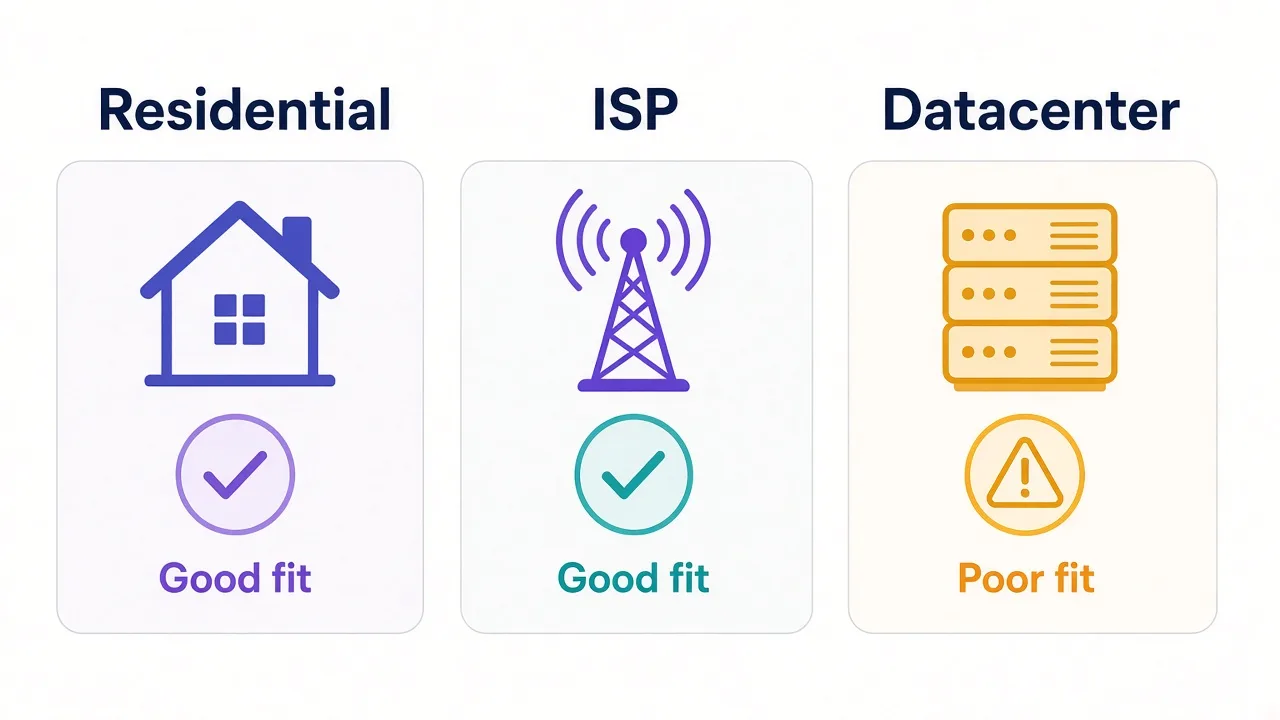
Residential proxies exit through real ISP connections. Sites see a household-style IP. They're the default for social platforms when you need trust more than raw speed.
ISP proxies (sometimes called static residential) put a residential-looking IP on more stable infrastructure. You keep the same address for weeks or months. For long-lived LinkedIn sessions, that stability is often the whole point.
Datacenter proxies are fast and cheap. They're also easy to fingerprint as cloud ranges. For LinkedIn account work, they're usually the wrong tool.
Here's the short decision rule.
| Job | Prefer | Usually skip |
|---|---|---|
| Daily login for a few accounts | Sticky residential or ISP | Rotating datacenter |
| Agency multi-account (one IP per profile) | ISP / static residential | Shared rotating pools |
| Public page research at volume | Rotating residential | One sticky IP for everything |
| Quick API tests, non-login scrapes of soft targets | Datacenter can work | Relying on it for LinkedIn logins |
Want the deeper type comparison? Read our residential provider roundup and the upcoming sticky-vs-rotating guide on the blog. For now, keep one idea in your head: LinkedIn rewards boring, stable paths.
Sticky sessions: the setting most people miss
Here's the loop we teased up top.
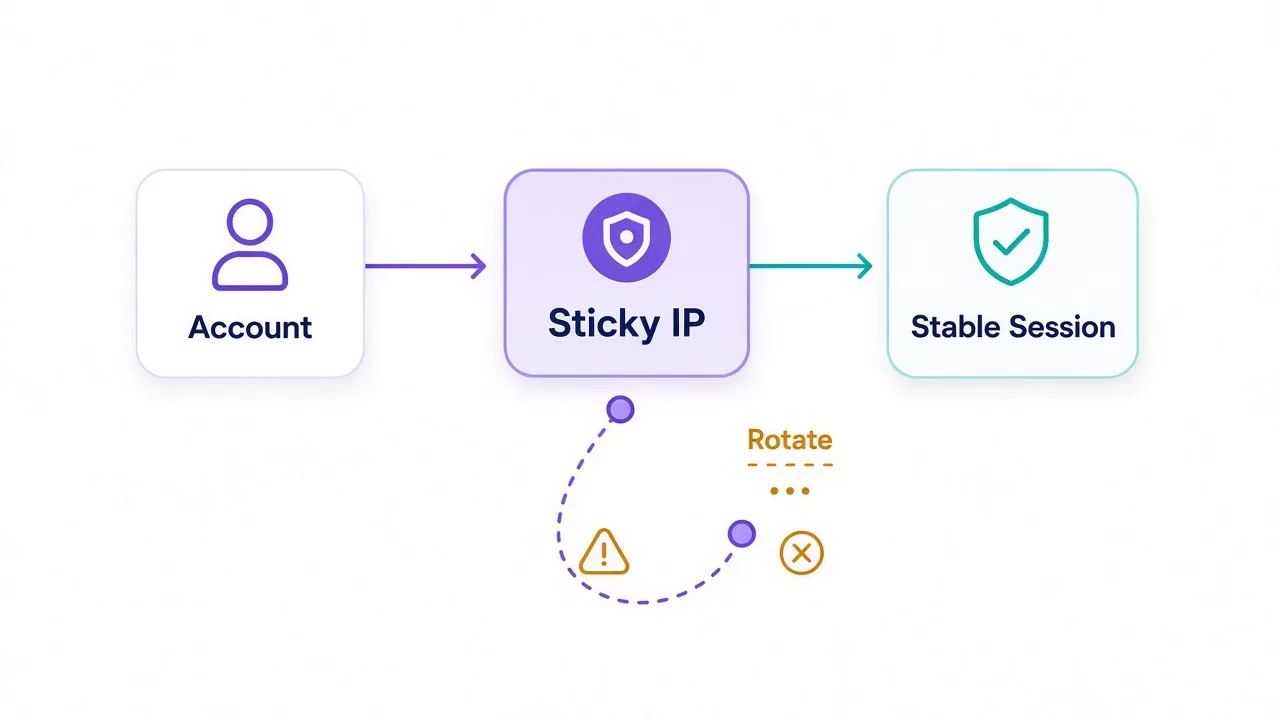
People buy a "good" residential plan, flip rotation to every request, then wonder why LinkedIn keeps challenging them. The IP isn't the only signal. The rhythm of the IP is.
A sticky session keeps the same exit IP for a set window , ten minutes, thirty minutes, or longer, depending on the provider. Your browser looks like one person on one connection, not a tourist hopping cities mid-scroll.
Rotating every request is great for crawling public pages. It's a poor default for anything that holds a login cookie.
So which should you use?
- Logging into LinkedIn, Sales Navigator sessions, posting as a brand → sticky or static
- Paging through public company directories or open profiles without a login → rotating can be fine
- Mixing both jobs on one IP → you'll confuse yourself and the platform
Remember that "one setting" from the intro? It's session type. Pick sticky for accounts. Rotate only when you're not trying to look like a single user.
Pro tip
Pair one sticky IP with one browser profile. Don't share that exit across five LinkedIn logins. Isolation beats clever routing every time.
Multi-account LinkedIn work without painting a target
Say you run a small agency. Three clients. Three company pages. Maybe a few recruiter seats.
If every account logs in from the same home IP and the same Chrome profile, LinkedIn can treat them as one operator. Sometimes that's fine. Sometimes a risk score on one account spills onto the others.
The cleaner pattern looks like this:
- One LinkedIn identity per browser profile (antidetect or carefully separated Chrome profiles)
- One sticky or ISP proxy assigned to that profile
- Geo that matches where the account claims to work
- Human pacing , no overnight blast of identical actions
Proxies are only one layer. Fingerprints, cookies, and behavior still matter. If you're deep in that stack, our guide to proxies for antidetect browsers is worth a detour.
And yes, there's a catch: sticky IPs cost more than a free list. You're paying for boring reliability. That's the product.
Public data research: rotate carefully, stay ethical
Not every LinkedIn job is a login.
Researchers and growth teams sometimes collect public profile fields, job titles, or company pages that anyone can see in a browser. Even then, volume and politeness matter.
Rotating residential proxies help you avoid hammering one IP. They do not make aggressive scraping legal or allowed. Check LinkedIn's terms, robots rules where they apply, and privacy law in your region before you collect anything at scale.
Practical habits that keep projects alive longer:
- Prefer official APIs and approved partner tools when they cover the data you need
- Throttle requests; bursty floods look like abuse even on residential exits
- Cache what you already fetched instead of re-hitting the same URLs
- Skip private or logged-in-only surfaces you have no right to automate
If your real goal is SERP-style monitoring rather than LinkedIn itself, see best proxies for SEO tracking. Different target, different pool pressure.
Our LinkedIn proxy picks at a glance
Here's the short list before the write-ups. Cards below pull live ratings and pricing from the DriftProxy directory.
| Provider | Best for |
|---|---|
| Smartproxy | Most teams starting sticky residential on LinkedIn |
| Bright Data | Enterprise controls, targeting, and compliance paperwork |
| Oxylabs | Large, steady workloads with sticky sessions |
| Live Proxies | Private-feeling US/UK/EU pools for account work |
| NodeMaven | Sticky residential and mobile when you need long holds |
| IPRoyal | Pay-as-you-go sticky traffic without a big monthly commit |
| NetNut | ISP-backed stability when static exits matter |
Prices drift. Features ship. Always confirm sticky duration, country coverage, and auth method in the live listing before you buy.
Smartproxy: the default for most LinkedIn teams
If you want one provider that covers sticky residential without an enterprise sales maze, start here.
Smartproxy sits in that middle lane: big enough pool for social work, simple enough dashboard for a two-person ops team.
Sticky sessions exist for logins. City and ASN targeting help when a client "lives" in a specific market. Browser extensions make quick manual checks less painful.
Best for: agencies and freelancers who need sticky residential without a custom contract.
Watch for: heavy enterprise compliance reviews may still want Bright Data or Oxylabs paperwork. Also, shared pools mean you're not alone on every IP , keep profiles isolated.

Powerful proxies without the enterprise price tag.
Bright Data and Oxylabs: when you need enterprise muscle
Some teams don't fail on IP quality. They fail on procurement.
Bright Data brings a huge network, sticky sessions, city/ASN targeting, and the compliance story large vendors ask for. Oxylabs plays in the same league with strong sticky support and tooling aimed at serious collection workloads.
For LinkedIn specifically, you'd use these when:
- Legal or security needs SOC 2 style answers
- You need precise geo for many markets
- Volume is high enough that cheaper pools get noisy
Honest downside? You'll often pay for power you might not use on day one. If you only run five recruiter seats, a lighter sticky plan is usually smarter.


Premium proxies built for enterprise scraping.
Sticky, static, and budget options that still fit
Account work hates surprise IP changes. Not every project ships with an enterprise budget either.
Live Proxies leans into curated, private-feeling residential and static ISP options with a Western geo focus. That shape fits social workflows where crowded mega-pools feel risky.
NodeMaven focuses hard on sticky residential and mobile holds with filtering that helps you keep a session put. Pick Live Proxies when you want fewer strangers on your subnet. Pick NodeMaven when sticky duration matters more than the biggest IP marketing number.
IPRoyal's pay-as-you-go residential traffic helps when work is bursty: a recruiting sprint this month, quiet next month. Sticky sessions are available, and traffic that does not expire helps irregular workloads.
NetNut pushes ISP-backed residential stability for teams that care more about steady exits than the cheapest rotating GB. Use IPRoyal to test without a fat retainer. Use NetNut when static-feeling ISP paths are the priority.
The trade-off: you may not get the lowest headline price, and niche country coverage varies. Validate the exact market you need before you point a client account at it.

Curated, private residential pools for US, UK and EU targets
Sticky residential and mobile IPs with strong filtering and clean pools.

Flexible proxies with true pay-as-you-go.

ISP-backed residential proxies built for speed and stability at scale
What you should skip for LinkedIn
Some "deals" cost more in locked accounts than they save in invoices.
- Free public proxy lists , slow, shared, often already burned. Fine for a connectivity test. Terrible for a real LinkedIn login.
- Raw datacenter exits for account sessions , great for soft targets; noisy on LinkedIn risk models.
- One rotating residential endpoint for every brand account , you'll cross-contaminate trust signals.
- VPN-as-proxy shortcuts , a consumer VPN hop can help privacy on a coffee shop Wi‑Fi. It is not the same as per-profile sticky proxies. See HTTP vs SOCKS5 if you're still sorting protocols for browser tools.
Don't buy a proxy to "unban" yourself
If LinkedIn restricted an account for spam or fake engagement, a new IP is not a reset button. Fix the behavior. Proxies help separation and research; they don't erase enforcement history.
One more mistake shows up a lot. Teams buy sticky residential, then share that same exit across a personal profile and a client page.
LinkedIn does not need perfect proof to raise friction. Related cookies and overlapping device signals are enough. Keep personal browsing off the proxy you assign to client work.
If a challenge still appears after a clean sticky setup, slow down for a day. Fresh IPs plus frantic clicking is how a solvable check turns into a longer restriction.
A simple LinkedIn proxy setup checklist
Before you point traffic at a provider, walk this list once.
- Name the job. Login sessions, or public research? Split them.
- Pick the type. Sticky residential / ISP for accounts. Rotating residential for polite public collection.
- Match geo. Account in Berlin? Don't exit in Dallas every day.
- Isolate profiles. One account, one browser profile, one sticky IP.
- Auth cleanly. User/pass or IP allowlist , not a password pasted into five tools.
- Test the path. Check IP, country, and that the session stays put for your sticky window.
- Pace like a human. Proxies don't make robotic timing look natural.
Still choosing a pool size? Browse the full proxy directory and filter by residential or ISP features rather than chasing a single marketing claim.
For social work adjacent to LinkedIn, the Facebook and Instagram proxy guide covers similar sticky patterns on Meta's stack.
So, which LinkedIn proxy should you actually buy?
Start with the job, not the biggest IP count.
Most small teams doing legit multi-account or recruiting work are fine on Smartproxy sticky residential.
Need paperwork and precision at scale? Look at Bright Data or Oxylabs. Want calmer, more private-feeling exits for account seats? Try Live Proxies or NodeMaven.
Bursty budget points to IPRoyal. ISP-backed stability points to NetNut.
You don't need the most expensive plan. You need one sticky IP per important LinkedIn identity, geo that matches the story, and habits that won't get you restricted.
Compare sticky residential and ISP listings side by side in our directory. Assign proxies before you create the next browser profile. Don't wait until LinkedIn already waved a challenge screen at you.
Frequently asked questions
Sticky residential or ISP proxies fit most LinkedIn account work. Smartproxy is a strong default; Bright Data and Oxylabs suit enterprise needs.
For logins and multi-account agency work, yes, prefer residential or ISP over datacenter. Datacenter exits are easier for LinkedIn risk models to flag.
Use sticky or static exits for logged-in sessions. Rotate only for polite public-page research where you are not holding a login cookie.
No. A new IP does not erase enforcement history. Fix the behavior that triggered the restriction; proxies help separation, not pardon.
Only stay within LinkedIn's terms, applicable law, and ethical public-data limits. Prefer official APIs when they cover your need; proxies do not grant extra rights.
Don't share. Assign one sticky IP per LinkedIn identity and browser profile so trust signals stay isolated.