










Your automations ran fine for months. Then someone switched on the company VPN "for security", and the trouble started.
CAPTCHAs on every run. A bot locked out of its own account. A nightly job that died overnight and never came back.
So, are VPNs safe for business automation? Yes. A reputable VPN won't leak your data or weaken your security.
But safe and suitable aren't the same thing. One question decides whether a VPN protects your automation or quietly sabotages it. And it isn't the one in the title.
Why do VPNs and bots get along so badly?
Because a VPN is built for a person reading the web, not a machine making thousands of requests.
Think about what a typical consumer VPN does (our plain-English VPN guide covers the basics). It parks you on an IP address shared with many other customers. It can land you on a different server every time you connect, and it drops the connection whenever your network hiccups.
When you're reading the news, none of that matters. For a bot that needs to look like the same user every single time, all of it is poison.
That's the root of nearly every problem in this post. It doesn't mean VPNs and automation never mix, though. It depends on what your automation is talking to.
The one question that decides it
Here it is: does your automation talk to systems that expect it, or to websites that are watching for it?
That single split explains almost everything. Expected traffic cares about security and a stable address. Watched traffic cares about reputation and identity, and that's exactly where VPNs struggle.
Expected traffic goes to systems that know your automation is coming:
- Nightly exports, backups and file syncs
- Scripts that query your own databases or admin panels
- Integrations that call official APIs with your keys
- RPA bots working inside your internal tools
Watched traffic goes to websites that are actively looking for bots:
- Web scraping and price monitoring
- Running social media or ad accounts
- RPA bots that click through third-party web apps
- Anything that logs into a platform you don't own
A VPN can be a great fit for expected traffic. For watched traffic, it usually makes things worse. Let's take them one at a time.
When is a VPN exactly the right tool?
For expected traffic, a VPN earns its keep in three situations.
Your bots run on networks you don't trust
Scripts on a laptop that travels. A runner in a co-working space. A field device on hotel Wi-Fi.
Anyone on those networks could try to read or tamper with the traffic. A VPN encrypts everything between the device and your systems, and for credentials and customer data in transit, that's a real safeguard.
Your jobs need to reach private systems
Plenty of automations need a database, a file server or an admin panel that should never face the open internet.
A business VPN or zero-trust access tool lets those jobs in through an encrypted tunnel. Your infrastructure stays hidden from everyone else.
Notice the word "business". A consumer VPN app can't do this at all.
An API only accepts calls from known addresses
Many services let you lock API access or admin logins to specific IP addresses. That's great for security, as long as your automation always comes from the same place.
A VPN with a dedicated IP gives it one fixed address to allowlist. A shared VPN IP defeats the point, because strangers would be using your "trusted" address too.
There's also a simpler option that often beats a VPN here. We'll get to it in the setup rules further down.
Consumer VPN or business VPN: which one do you have?
"VPN" covers two very different products. For automation, which one you have matters more than the brand.
| Consumer VPN | Business VPN / zero-trust access | |
|---|---|---|
| Main purpose | Privacy and location change for individuals | Secure access to company systems |
| Exit IP | Shared with other customers | Dedicated, or your own gateway |
| Central management | Minimal | User, device and access policies |
| Access to internal systems | No | Yes, it's the core feature |
| Business terms & DPA | Usually not | Typically available |
| Best automation fit | Protecting remote runners on public Wi-Fi | Jobs reaching internal infrastructure |
The practical split is simple. Use a business VPN or zero-trust product for anything that touches internal systems. Keep a consumer VPN for one job: encrypting a remote device's traffic.
Where does a VPN break automation?
Now for the watched side, where a VPN stops protecting your automation and starts sabotaging it.
It happens in four ways. Oddly enough, one of them is a safety feature.
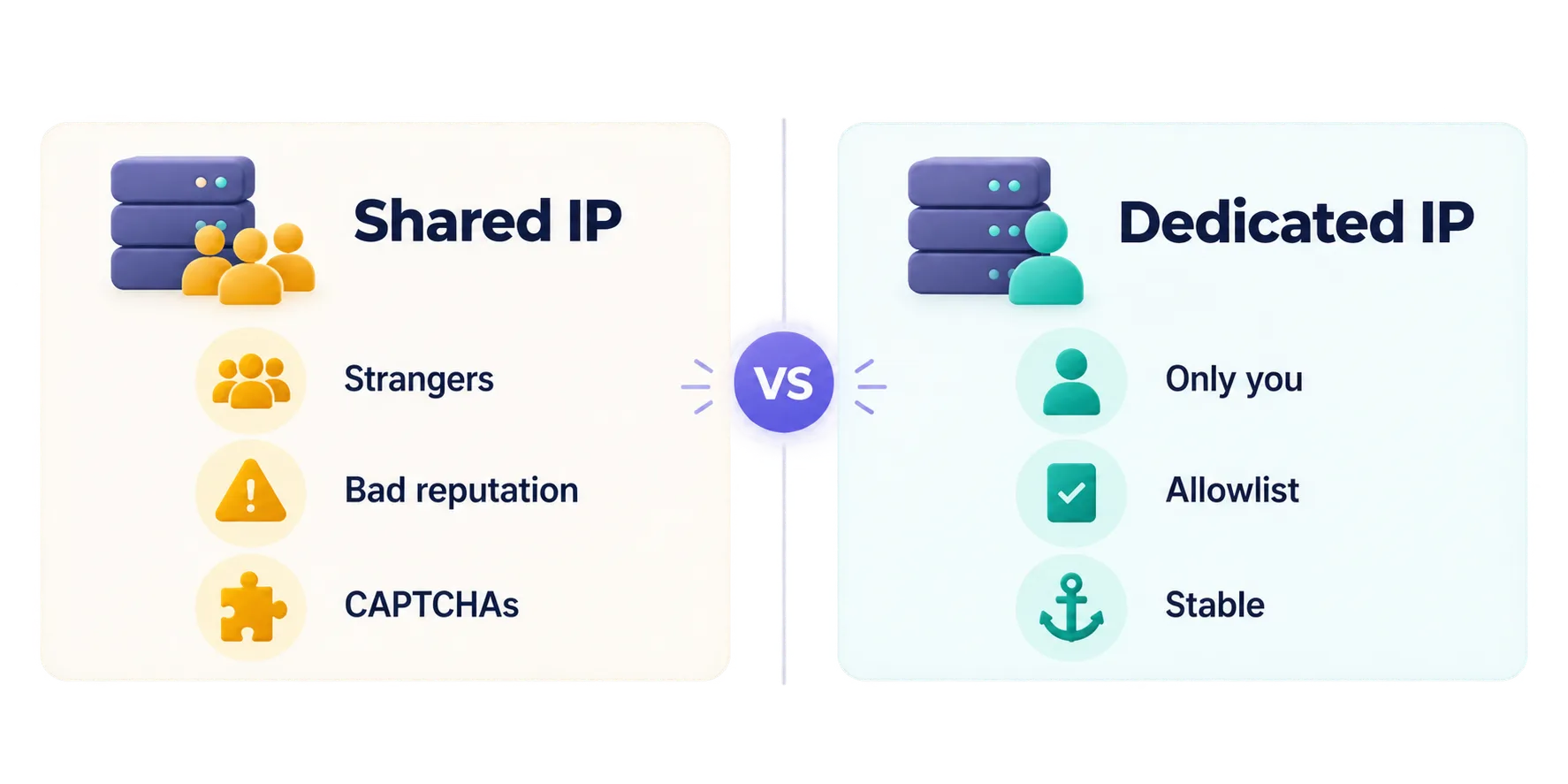
You inherit strangers' reputations
On a consumer VPN, your bot shares its exit IP with hundreds or thousands of other customers. Some of them are scraping, spamming or abusing services.
Websites remember. Many treat known VPN ranges with suspicion by default. So your perfectly legitimate job gets CAPTCHAs, 403 errors and blocks it did nothing to earn.
Your logins look like impossible travel
Platforms protect accounts by watching where logins come from. Now picture your bot signing in through a VPN server in London, then an hour later through one in Singapore.
To the platform, that's "impossible travel". Nobody flies that fast, so it assumes the account has been stolen.
Expect a verification code, a forced password reset or a temporary lock. A person can sort that out in a minute. An unattended bot just fails.
The safety feature that stops every job at once
VPN connections drop and reconnect as networks change. You'd barely notice. A long-running job fails halfway through.
Then there's the kill switch. It blocks all traffic whenever the tunnel is down, which is exactly what you want on a laptop.
On a production machine, though, one dropped tunnel stops every job until the connection comes back. Remember that nightly job that died and never came back? A dropped tunnel behind a kill switch can do exactly that.
You share rate limits with strangers
Lots of APIs and websites cap how many requests one IP address can make. Behind a shared VPN IP, other customers are eating into that same cap.
So you can get throttled even when your own traffic is tiny.
VPN or proxies: which fits your automation?
For watched traffic at any real volume, proxies beat a VPN almost every time.
They look alike, since both change the IP address a site sees. But they're built for opposite jobs. Our proxy vs VPN guide covers the fundamentals, and for automation the differences come down to this:
| VPN | Proxies | |
|---|---|---|
| Scope | Whole device | Per app or per request |
| IPs available | One at a time | Thousands to millions |
| Rotation | Manual server switching | Automatic, per request or session |
| One IP per account | Impractical | Built in |
| Encryption | Yes, full tunnel | Usually not by itself |
| Best for | Securing a device's connection | Scraping, multi-account, geo-testing |
A VPN gives your whole machine one IP at a time. Scraping needs many IPs that change automatically, which is what proxy rotation does for you.
Multi-account work needs the opposite: one stable IP per account. Proxies handle both out of the box, which is why data teams use them instead of VPNs.
If that sounds like your world, start with our roundup of the best residential proxy providers.
Which tool fits which job?
Start from the job, never from the tool you already pay for.
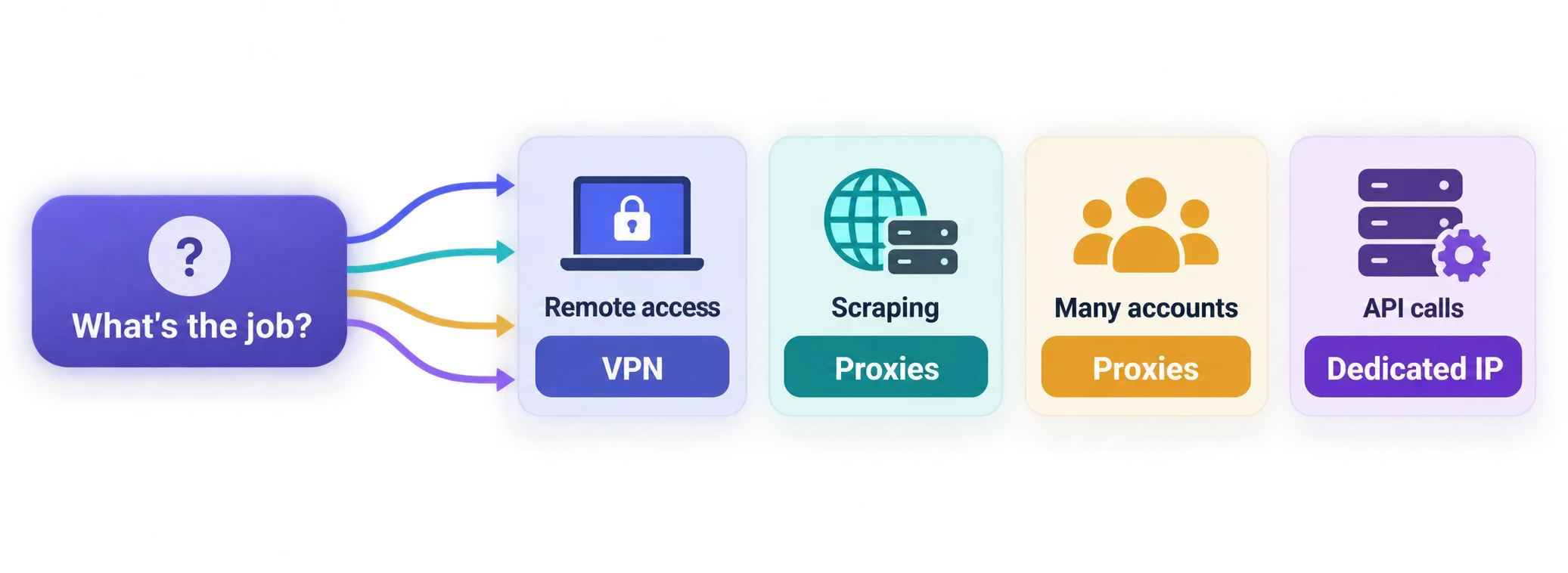
- Bots reaching your own databases or admin panels? A business VPN or zero-trust access.
- Scripts running on café or hotel Wi-Fi? Any reputable VPN is a sensible default.
- An API that only accepts allowlisted IPs? A fixed, dedicated IP, from a VPN add-on or your own cloud server.
- Scraping public data? Rotating proxies. Never a shared VPN.
- Running many social or marketplace accounts? One dedicated proxy per account, plus a separate antidetect browser profile for each.
- Calling official APIs from your own server? Often nothing at all. Your server's fixed address is already ideal.
Running automation over a VPN anyway? Seven rules that keep it alive
Sometimes a VPN really is the right call. When it is, these seven rules stop it from turning on you.
- Get a dedicated IP. It ends the shared-reputation problem and makes allowlisting possible.
- Pin one server location. Your bot should log in from the same region every time, so it never looks like impossible travel.
- Build retries around tunnel drops. Treat a dropped connection as normal and recoverable, not as a fatal error.
- Decide on the kill switch on purpose. Keep it on where sensitive data is involved, and add retries. On other runners, accept that it can stall every job.
- Use a modern protocol. WireGuard-based connections recover faster after network changes, as our WireGuard vs OpenVPN comparison explains.
- Check the exit address before you allowlist it. Our IP lookup tool shows the IP your jobs actually present, so check again after any config change.
- Keep official API traffic off the tunnel. Split tunneling sends only the traffic that needs protection through the VPN.
The setup that often beats any VPN
Remember that simpler option for API work? It's a small cloud server with a fixed IP. Nothing to drop, nothing shared, and an address you control.
So reach for a VPN when you need to protect a device or reach private systems. Just don't make it the default.
Is it legal to automate through a VPN?
In most countries, yes. Using a VPN is legal, and so is automating tasks with your own accounts and data.
The real risk is contractual, not criminal. Some platforms ban automated access, VPN use, or both in their terms. Break those terms and you can lose the account or your API access.
Scraping public data is more nuanced. It depends on the country, the data and how you collect it. And once your automation touches personal data, data-protection rules apply, whatever network tool you use.
Consumer VPNs aren't written for business data
Routing business data through a VPN means the provider handles it in transit, and consumer terms were written for individuals. If your automation moves customer or regulated data, look for business terms and a data processing agreement (DPA). Then bring in whoever owns compliance before any traffic flows.
The practical approach? Read the terms of every service your automation touches, use official APIs where they exist, and keep request rates polite.
Still getting blocked? The cause is often behavior, not tech. Our guide to why proxies get banned covers the patterns, and they apply to VPN traffic too.
What a VPN won't protect: your bots' passwords
A VPN protects the road your data travels on. It does nothing for the keys your bots carry.
And automation keys are often a mess. Credentials sit in plain text, get shared across scripts, or come with far more access than the job needs.
A few habits fix most of it:
- Store secrets in a proper secrets manager, not in the script.
- Give every automation its own account with the smallest permissions that work.
- Rotate API keys on a schedule.
- Log what your bots do, so you'd notice if one started doing something new.
Why bother? As we explain in does a VPN protect against hackers?, most real break-ins target credentials and devices, not network traffic. Bot accounts are a favorite target precisely because nobody watches them.
Which VPNs suit business automation?
If a VPN fits your job, pick one with independently audited privacy practices. A dedicated IP option is a big plus. Three stand out for automation work.
TorGuard is the one to look at for allowlisting. Its dedicated and residential IP add-ons keep bots off blacklisted shared ranges.
You also get fine control over ports and protocols. The catch? Those IPs cost extra, and setup takes more effort than one-click rivals.

Highly configurable VPN built for torrenting and power users
Proton VPN is the pick when trust in the provider matters most. Its apps are fully open source and independently audited, with an audited no-logs policy under Swiss privacy law. One tip: keep bots off its Secure Core servers, which route through extra hops and slow connections noticeably.

Privacy-first, from the makers of Proton Mail.
NordVPN suits runners that hop between networks. Its diskless, RAM-only servers sit behind an audited no-logs policy, and its WireGuard-based protocol reconnects quickly after network changes. The apps are packed with features, though, which is overkill if all you need is a simple tunnel.

So, should your automation use a VPN?
Go back to the one question. Does your automation talk to systems that expect it, or to sites that are watching for it?
Expected traffic? A VPN is safe and often smart, especially a business VPN or one with a dedicated IP. Watched traffic? Skip the shared VPN and use proxies built for the job.
You don't have to rebuild everything today. Sort your automations into those two groups, and you'll know which ones to move first.
Still weighing up providers? Compare the VPNs we've reviewed side by side.
Frequently asked questions
Yes, a reputable VPN is safe for business automation: it encrypts your traffic and won’t expose your data. Suitability is the real question. It’s great for reaching internal systems, but shared VPN IPs often trigger blocks and lockouts on third-party sites.
Use proxies for web scraping, not a VPN. A VPN gives your whole machine one IP at a time, while scraping needs many IPs that rotate automatically. Rotating residential or datacenter proxies are built for exactly that.
Because the platform sees your bot logging in from unexpected places, often from IPs with a bad reputation. VPN servers in different countries can look like “impossible travel”, and shared IPs carry other users’ history. Pin one location and use a dedicated IP to fix both.
You need one if any API, admin panel or partner system allowlists your automation’s IP address. A shared VPN IP is used by strangers, so it can’t be safely allowlisted. A dedicated IP add-on or a small cloud server with a fixed address solves it.
A consumer VPN protects one person’s traffic through shared servers, while a business VPN connects your people and jobs to company systems. Business products add central user and access management, dedicated gateways, and usually business terms with a data processing agreement.
Yes, a kill switch can stop every automated job on the machine whenever the VPN tunnel drops. It blocks all traffic until the connection returns, which protects privacy but stalls production work. Keep it on where sensitive data is involved, and build retries around drops or route only sensitive traffic through the VPN.