










Someone told you to "put it behind a proxy." Someone else told you to "buy a proxy." Same word, completely different jobs.
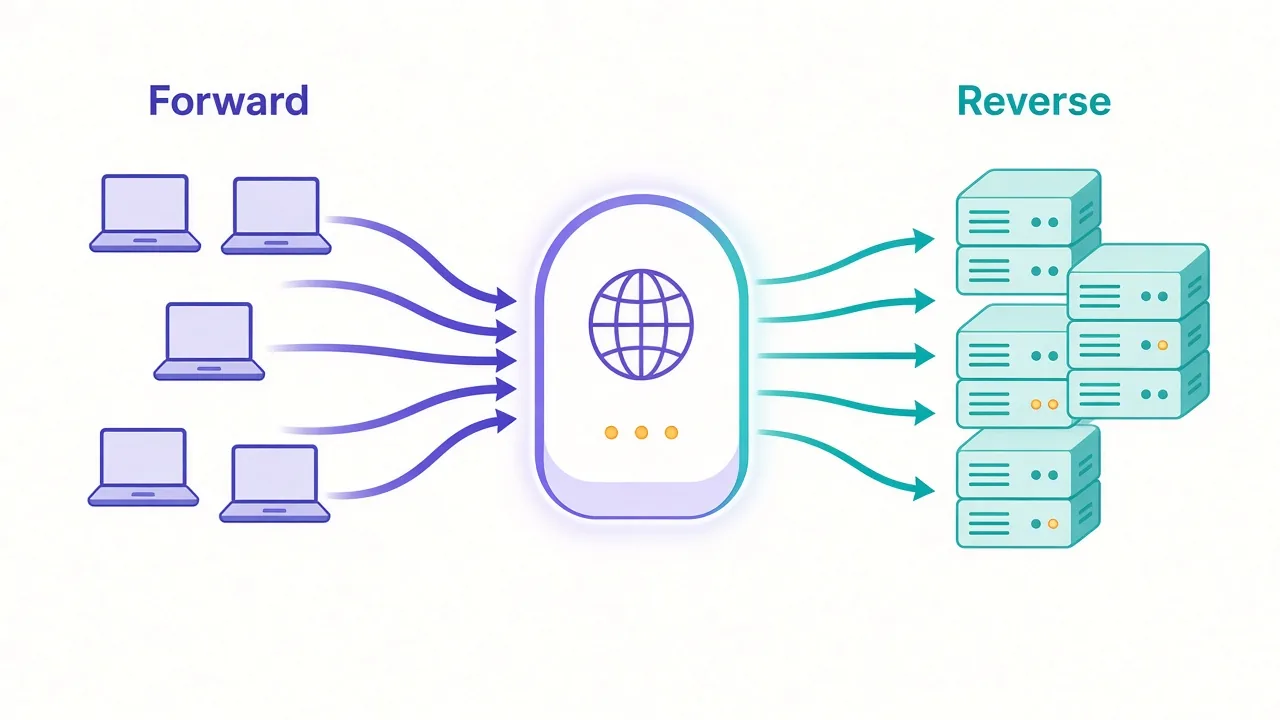
Confusing? It trips up developers, marketers and sysadmins alike. Here's the one-line version: a forward proxy works for the client, and a reverse proxy works for the server.
That's the what. The more useful part is which side you're on, because that decides which one you need. There's also one setup where you end up using both at once without noticing. We'll get to it.
First, let's follow a single request and watch who stands in the middle.
What does a proxy actually do with your request?
A proxy is a middleman. Your request goes to it, and it passes the request on to someone else.
That's true for both types. The difference is who hired the middleman and who it's hiding.
Think of two kinds of assistants. One is a personal shopper you send into a store so the store never sees your face. The other is a receptionist at the store's front desk who decides which staff member handles your question.
The personal shopper is a forward proxy. Meanwhile, the receptionist is a reverse proxy. Both stand in the middle. They just face opposite directions.
Keep that picture in mind. Every difference in this post grows out of it.
Forward proxies: the middleman that works for you
A forward proxy sits in front of clients. That means you, your browser, your scraper or your office laptop.
You send your request to the proxy. The proxy sends it to the website. The website replies to the proxy, and the proxy hands the answer back to you.
What does the website see? The proxy's IP address, not yours. That single fact explains most of what people use forward proxies for.
- Hiding your real IP from the sites you visit.
- Looking like you're in another country to see local prices or search results.
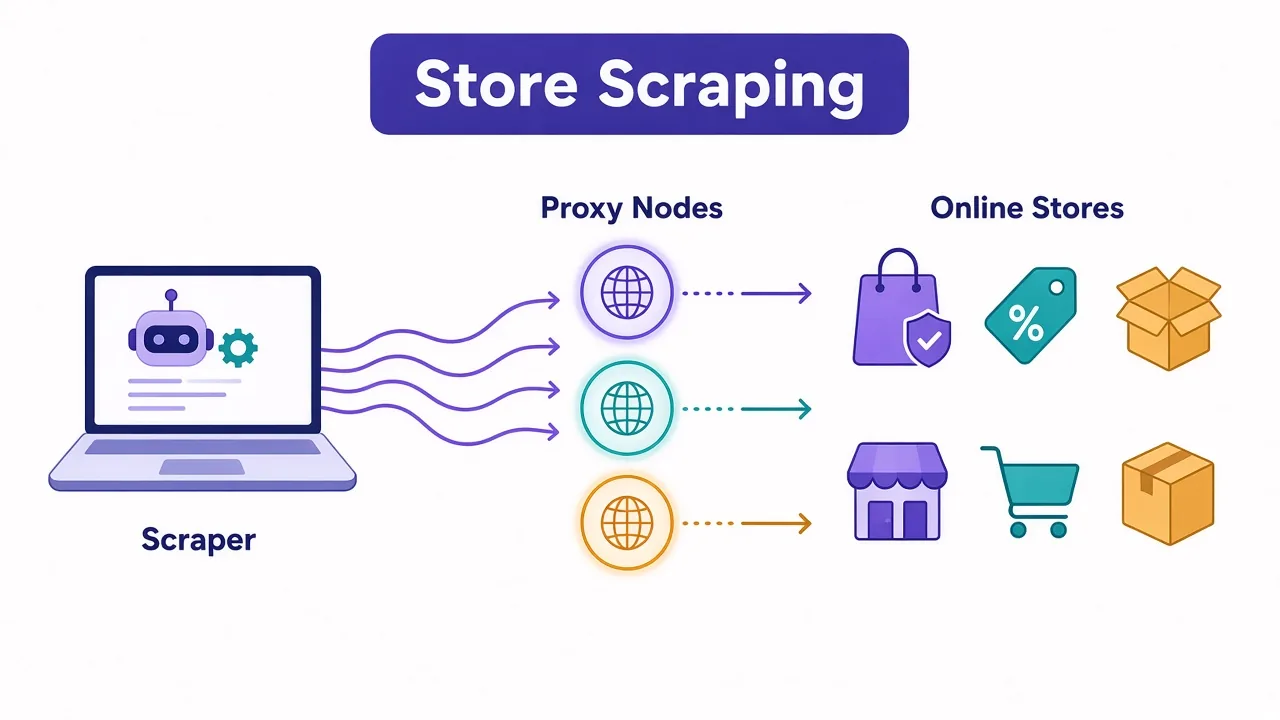
- Spreading scraping traffic across many IPs so no single one gets blocked.
- Running several social or marketplace accounts without linking them by IP.
- Filtering or logging what staff can reach on a company network.
Every residential proxy, datacenter proxy or mobile proxy you can buy is a forward proxy. When people say "I bought proxies," this is what they mean.
The client has to know about it, though. You point your browser, script or operating system at the proxy's address and port. The website doesn't get a say.
Quick way to tell
If you configure it on your own device or in your own code, it's a forward proxy. If you'd never touch it as a visitor, it's probably a reverse proxy.
Reverse proxies: the middleman that works for the website
A reverse proxy sits in front of servers. Visitors never configure it, and most never know it's there.
You type a domain into your browser. DNS points that domain at the reverse proxy, not at the real server. The reverse proxy takes your request and decides which backend server should answer it.
So what does the visitor see? Only the reverse proxy. The real servers stay out of sight, often on a private network with no public IP at all.
That's the mirror image of a forward proxy. One hides the client from the server. The other hides the server from the client.
You've used reverse proxies thousands of times today. Popular sites rarely let traffic hit their application servers directly. Something like Nginx, HAProxy, Envoy or a CDN such as Cloudflare usually answers first.
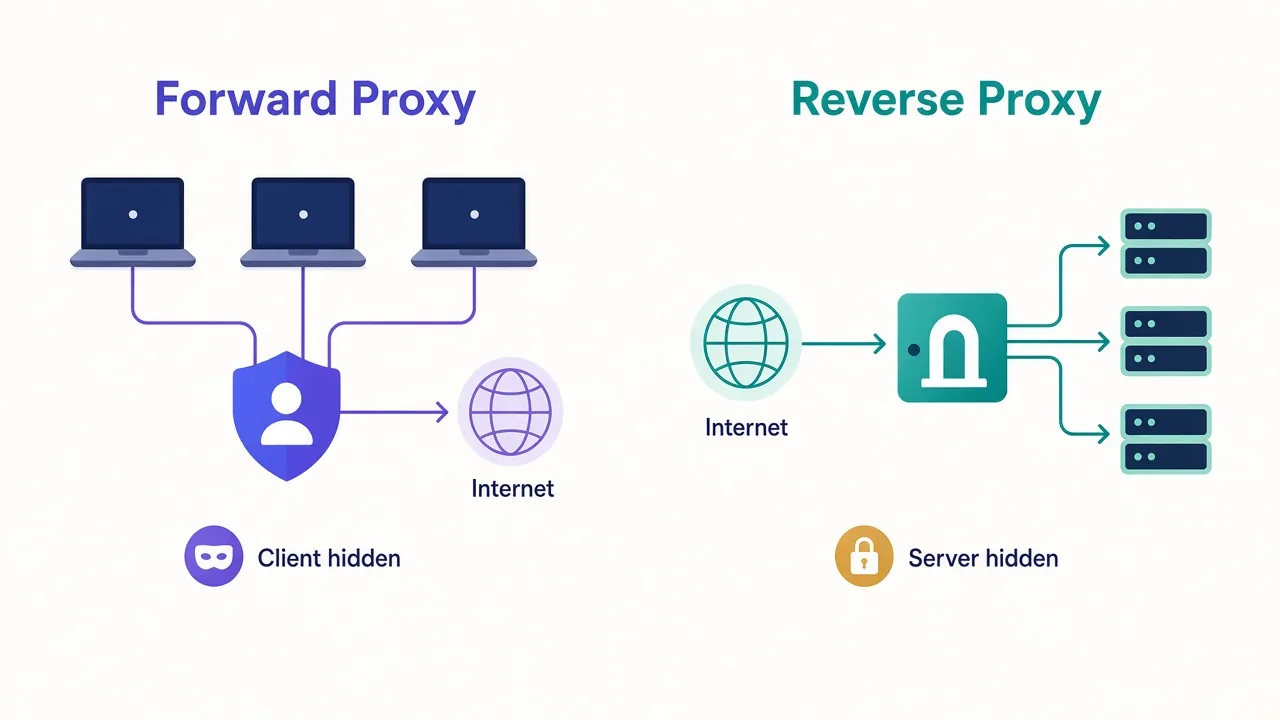
Forward vs reverse proxies side by side
Here's the whole comparison in one place. Skim it, then we'll dig into the rows that cause the most confusion.
| Question | Forward proxy | Reverse proxy |
|---|---|---|
| Who sets it up? | The client or their company | The website owner |
| Who does it protect? | The client's identity | The servers behind it |
| Whose IP gets hidden? | The client's | The server's |
| Does the client know? | Yes, they configured it | Usually not |
| Typical jobs | Privacy, geo access, scraping, filtering | Load balancing, caching, TLS, security |
| Common examples | Squid, residential and datacenter proxy services | Nginx, HAProxy, Envoy, CDNs |
Notice the pattern? Every row flips. That's not a coincidence. It's the same machine pointed the other way.
Why would a website want a reverse proxy?
If you're a reader who buys proxies, you might wonder why you'd care. Here's why: the reverse proxy is often the thing blocking you.
But first, the reasons site owners run them. There are five big ones.
Load balancing
One server can only handle so many visitors. A reverse proxy spreads incoming requests across many servers, so a traffic spike doesn't knock the site over.
If one server dies, the proxy stops sending traffic to it. Visitors keep loading pages and never notice.
Caching
Plenty of pages look the same for everyone. A reverse proxy can store a copy and serve it without bothering the backend at all.
That's most of what a CDN does. It keeps cached copies on servers close to visitors, so pages load faster wherever they are.
TLS termination
Encrypting and decrypting HTTPS traffic costs CPU. Many setups let the reverse proxy handle the TLS certificate and talk to the backend over a private network.
It also means you renew certificates in one place instead of on every server.
Security and hiding the origin
Attackers can't hit what they can't find. When the origin server's IP stays hidden, a flood of junk traffic lands on the reverse proxy instead.
That's also where a web application firewall (WAF) usually lives. It inspects requests and drops the ones that look like attacks or bots.
One front door for many apps
A single domain can route /api to one service, /blog to another and /shop to a third. The reverse proxy reads the path and sends each request to the right place.
To visitors, it all looks like one site.
The setup where you use both at once
Remember the setup we teased at the start? Here it is.
Say you run a price-monitoring scraper through a rotating residential proxy. Your request leaves your machine and goes to your proxy provider. That's the forward proxy, working for you.
The provider passes it to the target store. But the store's domain points at a CDN with bot protection. That's the reverse proxy, working for the store.
So your request crosses two middlemen, and they're on opposite teams. One is trying to make you look like an ordinary shopper. The other is trying to spot exactly what you are.
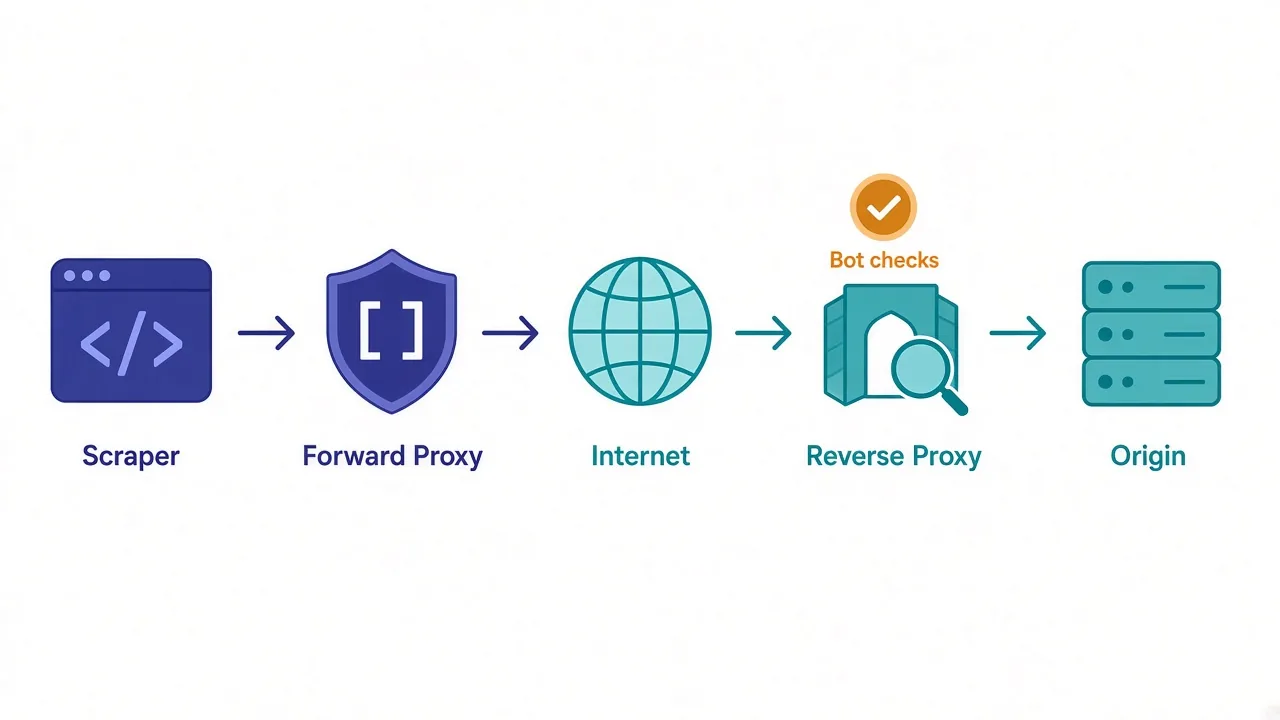
This is why "just use a proxy" doesn't always work. The block you're hitting usually comes from the reverse proxy's bot checks, not from the origin server.
And those checks look at more than your IP. They also look at request rate, headers, TLS fingerprints and how your browser behaves.
The honest catch
A better forward proxy fixes IP reputation problems. It won't fix a bot fingerprint. If your headers and browser behavior look automated, a clean residential IP only delays the block.
Does a reverse proxy hide who you are?
No. This is the most common mix-up we see.
A reverse proxy protects the website. It does nothing for your privacy as a visitor. In fact, it usually sees your real IP and passes it to the backend in a header such as X-Forwarded-For.
Want to keep your IP away from a site? Then you need a forward proxy or a VPN on your side. Our proxy vs VPN guide covers which one fits which job.
What about the reverse? Does a forward proxy protect the website? Not really. It might filter what its own users can reach, but the site gets no shield from it.
Each one only covers the side that set it up.
Can the same software be both?
Yes, and that's part of why the terms get blurry. The label describes the job, not the program.
Squid is best known as a forward proxy for offices and schools. It also has a mode where it sits in front of web servers and caches their pages.
Nginx is the opposite. Most people run it as a reverse proxy, though it can be bent into forwarding simple traffic too.
So don't ask "is this tool a forward or reverse proxy?" Ask which way it faces in your setup. Is it working for the people sending requests, or for the servers receiving them?
That one question settles every case.
What about transparent proxies?
There's a third term that muddies the water. A transparent proxy is a forward proxy the client didn't configure.
The network intercepts your traffic on its own. Hotel Wi-Fi, school networks and some company firewalls work this way. You connect, and your requests quietly route through a filter.
It's still a forward proxy, because it sits on the client side. It's just invisible to the user instead of chosen by them.
Why does that matter for you? A transparent proxy usually doesn't hide your IP from websites. Some even add headers that reveal it. Don't count on one for privacy.
Which one do you actually need?
Start with one question: are you the visitor or the site owner?
If you're the visitor, you want a forward proxy. That covers scraping, ad checks, price tracking, multi-account work and geo testing. Then the real decision is which kind of IP you need.
- Cheap, fast work on lightly protected sites: datacenter proxies.
- Sites with serious bot checks: residential proxies.
- Mobile apps and the strictest social platforms: mobile proxies.
- Long sessions where the IP must stay put: ISP or static residential proxies.
Our breakdown of residential vs datacenter proxies goes deeper on that choice.
If you're the site owner, you want a reverse proxy. For one small app, Nginx or a managed CDN is usually plenty. For many services, a dedicated load balancer such as HAProxy or Envoy gives you more control.
Running a scraper against your own site for testing? Then you're both. That's fine. Just keep the two configs separate in your head.
Setting up a forward proxy without the headaches
Most forward proxy problems are setup problems, not provider problems. A few habits save hours.
- Pick the right protocol. HTTP proxies handle web traffic. SOCKS5 can carry other traffic too. See HTTP vs SOCKS5 proxies if you're unsure.
- Use the right port. Providers often run different ports for different protocols or session types. Our guide to proxy ports lists the common ones.
- Choose your session type on purpose. Logging in needs the same IP for a while. Crawling many pages usually wants rotation. The trade-offs are in sticky vs rotating proxies.
- Test before you scale. Confirm the proxy works and shows the IP you expect. Here's how to check a proxy is working.
Get those four right and most "the proxy doesn't work" tickets disappear.
Pro tip
Test against a site that echoes your IP and headers back to you. You'll see exactly what a target's reverse proxy sees, including any header that leaks your real address.
Setting up a reverse proxy: what to get right first
On the server side, the mistakes are different. They tend to break things quietly instead of loudly.
First, pass the real client IP to your app. Without it, your logs show every visitor as the proxy's address. Rate limits and analytics both break.
The usual fix is the X-Forwarded-For header, or the newer standard Forwarded header. Only trust it when the request came from your own proxy, or anyone can fake it.
Second, lock down the origin. If the backend still accepts traffic from the whole internet, attackers can skip your reverse proxy entirely. Allow only the proxy's addresses through.
Third, be careful with caching. Cache a logged-in page by accident, and one user can see another user's account. Mark private pages so they never get stored.
None of this is hard. It's just easy to skip on day one.
So, which proxy is right for you?
Ask whose side you're on.
If you're sending requests and want to control how you appear, you need a forward proxy. If you're receiving requests and want to protect and speed up your servers, you need a reverse proxy.
Most readers here are on the visitor side. If that's you, the next step is picking the right IP type for your target.
Compare the providers in our proxy directory side by side. You'll know which one fits your job in a few minutes.
Frequently asked questions
A forward proxy works for the client and hides the client's IP, while a reverse proxy works for the website and hides its servers. Both sit in the middle of a request, just facing opposite directions.
A VPN does a similar job to a forward proxy because it sits on your side and hides your IP from websites. The difference is that a VPN usually encrypts and routes all your device's traffic, while a proxy is often set per app.
Nginx is mostly used as a reverse proxy in front of web servers. It can handle simple forwarding too, but it isn't designed as a full forward proxy for client browsing.
No, a reverse proxy protects the website, not the visitor. It usually sees your real IP and passes it to the backend in a header such as X-Forwarded-For.
Yes, a CDN works as a distributed reverse proxy. It answers visitor requests from servers close to them, caches content and keeps the origin server's address out of view.
For web scraping you need a forward proxy, such as residential or datacenter IPs. The reverse proxy belongs to the target site and is often what runs the bot checks you're trying to pass.