







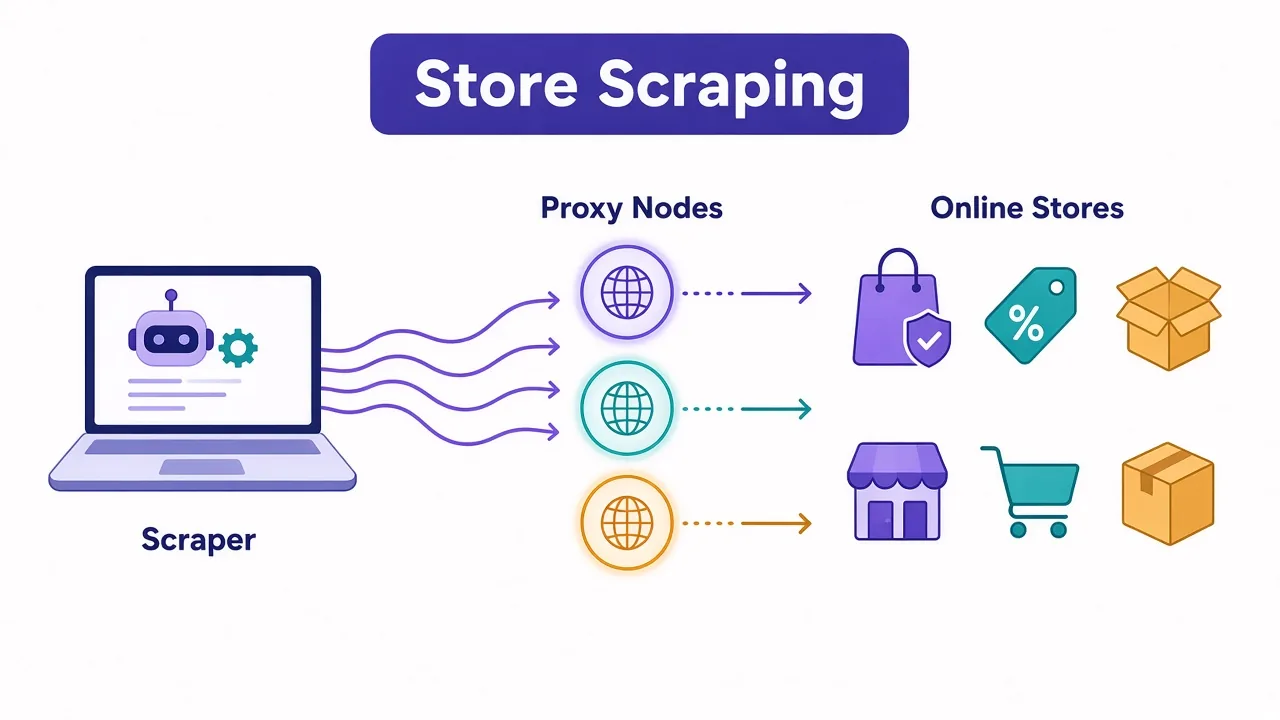
Your price tracker watched 40 Shopify stores without a hitch on Monday.
By Thursday, half of them answered with 429 errors. Nothing in your code changed. You just asked too often, from too few IPs.
So what are the best proxies for Shopify scraping? For most trackers, cheap datacenter or ISP proxies from Webshare or Decodo (formerly Smartproxy) do the job. Rotating residential IPs from Oxylabs or IPRoyal only earn their price when a store adds extra bot protection.
That's a cheaper answer than most guides give. There's a reason it works, and it comes down to one setting most scrapers ignore. We'll get there right after the picks.
Which proxies work best for Shopify scraping?
Here's the short list. Each pick gets a full write-up further down, with the honest catch.
| Provider | Best for |
|---|---|
| Webshare | Cheap datacenter IPs for light catalog checks |
| Decodo (Smartproxy) | A balanced mix of datacenter, ISP and residential |
| Oxylabs | Large residential pools for stores that fight back |
| IPRoyal | Pay-as-you-go residential traffic on a budget |
| Bright Data | Teams that want every proxy type plus compliance paperwork |
| SOAX | Fine country and city targeting for local pricing |
| Zyte | Skipping proxy management with an API |
Notice what's missing from that table? Mobile proxies. You almost never need them for storefront data, and they cost far more per GB.
Why does Shopify scraping feel easy, then suddenly break?
Shopify stores are some of the friendliest targets on the web. Product data is public by design, because merchants want it found.
Most stores even expose a clean JSON feed of their catalog. You don't need to parse messy HTML at all.
The trouble is scale. Every store runs on the same platform, behind the same edge network. That network watches request rates, and it doesn't care that each store is a different brand.
So a scraper that's polite to each single store can still look loud overall. Hit 200 stores from one IP in a burst, and the platform sees one very busy visitor.
When that happens, you get an HTTP 429 "Too Many Requests" response. Keep pushing, and some stores start serving challenge pages instead.
What can you actually pull from a Shopify store?
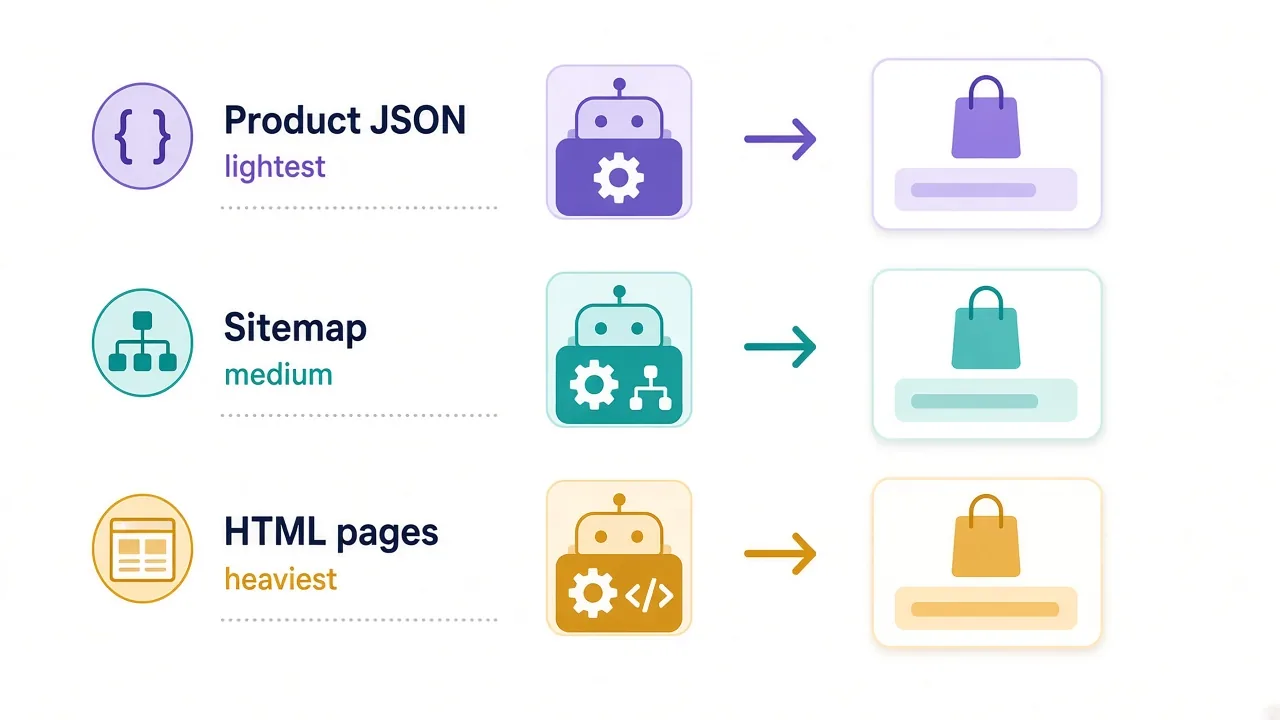
More than you'd expect, and most of it without touching a product page. A typical Shopify store gives you three ways in.
/products.jsonlists the catalog a page at a time, with titles, variants, prices and stock flags./products/<handle>.jsonreturns one product in full./sitemap.xmlpoints to product sitemaps, handy for finding new handles.- Regular HTML pages carry anything the theme adds, like reviews or badges.
The JSON routes are the lightest option by far. One request can return dozens of products, so you need far fewer calls and far less bandwidth.
Not sure a site runs on Shopify? View the page source and look for cdn.shopify.com in the asset links. If it's there, try the JSON feed first.
Some stores lock the feed down
A few merchants block or trim /products.json with apps or custom setups. If it returns an error or an empty list, fall back to the sitemap plus product pages.
Datacenter, ISP or residential: which type fits Shopify?
Pick the cheapest type that the store will tolerate. For Shopify, that's usually the cheap end.
Here's how the three main types compare for storefront work.
| Type | Cost | Block risk on Shopify | Use it when |
|---|---|---|---|
| Datacenter | Lowest | Low to medium | You poll JSON feeds at a calm pace |
| ISP (static residential) | Medium | Low | You want stable IPs that look like home broadband |
| Rotating residential | Highest per GB | Lowest | A store adds bot protection or blocks your ranges |
A datacenter proxy comes from a cloud server. It's fast and cheap, and its IP range is easy to look up. For JSON feeds at a calm pace, that rarely matters.
An ISP proxy sits in a data center but is registered to a consumer internet provider. You get datacenter speed with a home-looking label. Our guide to what ISP proxies are covers the trade-offs.
A residential proxy routes through a real household connection. It's the hardest to block and the priciest per GB. Save it for the stores that earn it.
The one setting that decides whether you get blocked
Remember that setting from the start? It isn't the proxy type. It's request pacing per store.
Most scrapers set one global speed, like 20 requests a second. Then they point that firehose at whichever store is next in the queue.
Flip it around. Cap how often you hit each single store, then run many stores side by side. Your total speed stays high, but no single store sees a burst.
Say you track 300 stores. Instead of crawling them one by one at full speed, you crawl 30 at once, each at a slow, steady pace. Same total throughput, far fewer 429s.
Add two more habits and you're most of the way there:
- Back off when you see a 429. Wait, then retry with a longer gap.
- Spread stores across your proxy pool, so one IP doesn't touch hundreds of stores in a minute.
Get the pacing right, and a small datacenter pool often holds up fine. Get it wrong, and no residential plan will save you for long.
Pro tip
Cache what doesn't change. Product descriptions and images rarely move, so pull them once a week and poll only prices and stock daily.
Webshare: the cheap starting point
If you're tracking a handful of stores through their JSON feeds, start here. Webshare sells low-cost datacenter proxies. It also has a free plan with a small set of IPs, so you can test first.
It also offers static residential and rotating residential plans, so you can step up later without switching vendors.
The catch? Datacenter IPs are the first thing a stricter store blocks. If a target starts throwing challenge pages, you'll need a pricier plan for that store.

The most affordable way to start with proxies.
Decodo (formerly Smartproxy): the balanced all-rounder
Decodo is the pick when you want one account that covers every case. It sells datacenter, ISP and rotating residential proxies, with a dashboard that's easy for small teams.
That mix suits Shopify work well. Run most stores on datacenter IPs, and switch the stubborn ones to residential without new code.
The downside is that residential traffic is billed per GB. If you scrape full HTML pages through it, costs climb fast. Stick to the JSON feed where you can.

Powerful proxies without the enterprise price tag.
Oxylabs: for stores that really fight back
Some large Shopify Plus brands add extra bot protection on top of the platform. That's where Oxylabs earns its spot.
It runs one of the biggest residential pools in the industry and offers scraper APIs built for e-commerce data. Its tooling is aimed at teams running serious volume.
Is it overkill for 20 indie stores? Honestly, yes. Its entry plans cost more than budget providers, so it makes sense once your target list includes the hard ones.

Premium proxies built for enterprise scraping.
Want the full comparison with its biggest rival? See our Bright Data vs Oxylabs breakdown.
IPRoyal: residential on a pay-as-you-go budget
IPRoyal fits the tracker that only needs residential IPs now and then. Its residential traffic doesn't expire, so a small top-up can last months.
That suits Shopify well. You might run 95% of stores on cheap IPs and send only the tricky few through residential.
The trade-off is a smaller toolset than the enterprise players. You'll handle retries and pacing in your own code, which you should be doing anyway.

Flexible proxies with true pay-as-you-go.
Bright Data: every proxy type under one roof
Bright Data covers datacenter, ISP, residential and mobile proxies, plus ready-made datasets and scraping tools. It also puts a lot of weight on compliance reviews.
That makes it a fit for agencies and brands that need a paper trail for how they collect data.
The catch is price and complexity. The dashboard has a lot of knobs, and costs add up if you don't watch them. Our Bright Data pricing guide explains where the money goes.

SOAX: when local prices matter
Do your target stores show different prices by country? Many Shopify merchants use Shopify Markets to set local currencies and prices.
To see what a shopper in Germany or Canada sees, you need IPs in those countries. SOAX lets you target by country, region, city and even ISP.
The downside is that its residential plans aren't the cheapest. Use it for the geo-specific checks, not as your bulk crawler.

Clean, ethically-sourced residential & mobile IPs.
Zyte: skip proxy management entirely
Some teams don't want to tune pools, retries and headers at all. Zyte API takes a URL and handles the unblocking for you, charging per successful request.
It's a good fit when your scraper is a side project inside a bigger product and engineering time costs more than requests.
The trade-off? Less control, and costs that scale with page count. For lightweight JSON feeds, a plain proxy is usually cheaper. Our guide to scraping APIs vs proxies helps you decide.

Enterprise web scraping API and proxy management from the team behind Scrapy
How do you know when to upgrade your proxies?
Start cheap and let the stores tell you when to spend more. The signals are easy to read once you know them.
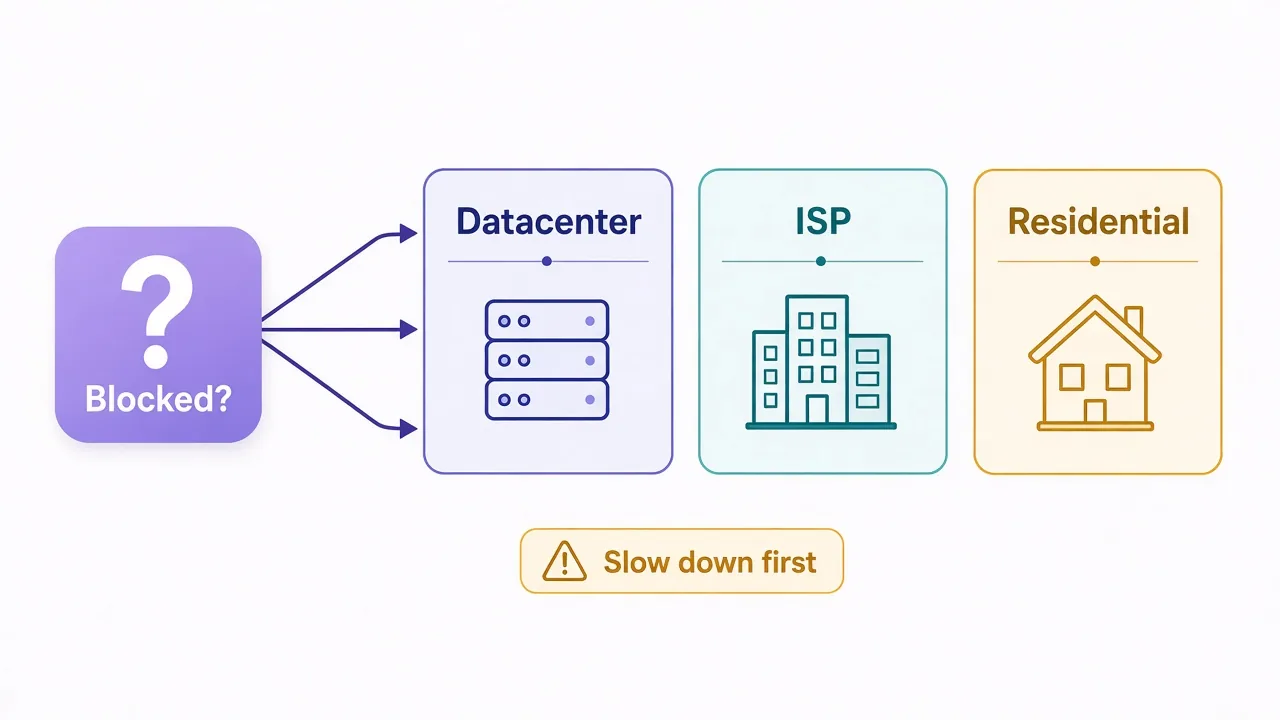
Seeing 429s? That's a pacing problem first. Lower the per-store rate and add backoff before you buy anything.
Seeing 403s or challenge pages on a few stores, even at a calm pace? Those stores likely flag your IP range. Move just those stores to ISP or residential proxies.
Seeing blocks everywhere at once? Check your headers and user agent. A bare script with a default library user agent stands out on any site. Our guide on why proxies get banned walks through the usual causes.
Keep it tidy
Log the status code per store. A simple table of 200s, 429s and 403s tells you exactly which stores need better IPs.
Which mistakes waste the most proxy budget?
Most overspending on Shopify scraping comes from a few habits. None of them is about the provider.
Scraping HTML when JSON exists.
A full product page pulls scripts, styles and theme markup you'll never use. The JSON feed carries the same prices in a fraction of the bytes. On a per-GB residential plan, that gap shows up on your bill.
Re-crawling the whole catalog every hour.
Prices on most indie stores change a few times a month, not every hour. Poll the feed on a schedule that matches how often the store really updates. Then increase it for the stores that move fast.
Retrying instantly after a block.
A 429 is the store asking you to wait. Firing the same request again a second later only digs the hole deeper. Wait, then retry with a growing gap between tries.
Buying residential for every store.
It feels safe, but you'll pay residential rates for stores that would happily serve a datacenter IP. Route by store, not by habit.
Sticky or rotating sessions for product data?
For catalog and price checks, rotate. Each request stands alone, so there's no reason to keep one IP.
A sticky session keeps the same IP for a set time, like 10 minutes. You only need that if you're walking a store like a shopper, keeping a cart or a selected currency in cookies.
Even then, keep sessions short. A single IP hanging on one store for an hour looks less like a shopper and more like a bot. Our sticky vs rotating proxies guide goes deeper.
Is scraping Shopify stores allowed?
We're not lawyers, so treat this as a practical note, not legal advice.
Public product data is generally the safest thing to collect. Prices, titles and stock flags are shown to every visitor.
Stay away from anything behind a login, customer data and the checkout. Read each store's terms, keep your request rate gentle, and don't republish copied descriptions or photos as your own.
Being polite is also good practice. A scraper that never strains a store rarely gets noticed in the first place.
So, which proxy should you buy for Shopify?
Start with the JSON feed and a pacing rule, not the priciest plan.
Tracking a few dozen stores? Webshare or Decodo datacenter IPs will likely cover it. Hitting big brands with extra protection? Route just those through Oxylabs or IPRoyal residential. Checking local prices? Add SOAX for the countries you care about.
Still weighing them up? Browse the proxy providers we list side by side, or read our pick of the best proxies for price monitoring.
Spend on IPs only where the stores make you.
Frequently asked questions
Datacenter or ISP proxies are enough for most Shopify scraping if you use the JSON feed and pace requests per store. Switch individual stores to rotating residential IPs only when they block your ranges.
A 429 means you sent too many requests too quickly. Lower your request rate per store, add backoff between retries and spread stores across more IPs before buying pricier proxies.
Yes, most stores expose a /products.json feed with titles, variants, prices and stock flags. Some merchants lock it down, so fall back to the sitemap and product pages when it fails.
Usually not. Residential IPs help with stores that add extra bot protection, but most indie Shopify stores serve their JSON feed to datacenter IPs at a calm pace.
Use proxies in the shopper's country, because many merchants set local currencies and prices by location. Providers with country and city targeting, like SOAX, make this easier.
Collecting public product data is generally lower risk, but it depends on your country and each store's terms. Avoid logins, customer data and checkout pages, and get legal advice for commercial projects.