












You ran one curl command through your new proxy. It hung for 30 seconds, then printed an error you've never seen.
Sound familiar? The good news is that using a proxy with cURL takes one flag: -x, followed by the proxy address. Most problems come from what you put after it.
There's one tiny letter in the proxy URL that decides whether your DNS lookups leak past the proxy. Most people never notice it. We'll get to it in the SOCKS section. First, the command that works.
What's the one command you need?
Here it is. Swap in your own host, port and target.
curl -x http://proxy.example.com:8080 https://api.ipify.orgThe -x flag (long form --proxy) tells curl to send the request through that proxy. The target, api.ipify.org, replies with the IP address it sees.
So if the proxy works, you'll see the proxy's IP. If you see your own home or office IP, the proxy isn't in the path.
That check matters more than it looks. A request that "works" tells you nothing. A request that returns the right IP tells you the proxy is doing its job.
Two defaults are worth knowing before you go further:
- If you leave out the scheme, curl assumes
http://. - If you leave out the port, curl assumes 1080, which is rarely what your provider uses.
So always write the full thing: scheme, host and port. It saves you from a whole class of confusing timeouts.
New to proxies in general? Our guide on checking whether a proxy is working covers the same test from a few other angles.
How do you pass a username and password?
Most paid proxies ask for credentials. curl gives you two ways to send them.
The first puts them right in the proxy URL:
curl -x http://user123:secretpass@proxy.example.com:8080 https://api.ipify.orgThe second keeps them in a separate flag, -U (long form --proxy-user):
curl -x http://proxy.example.com:8080 -U user123:secretpass https://api.ipify.orgBoth do the same thing. We'd lean toward -U, because it keeps the proxy address clean and easier to reuse in scripts.
The catch? Special characters. Many providers generate passwords with symbols like @, : or #. Inside a URL, those break the parsing.
If your password contains them, percent-encode the symbols, so @ becomes %40. Or switch to the -U flag and wrap the value in single quotes.
Watch your shell history
Credentials typed on the command line land in your shell history. On a shared machine, put them in an environment variable or a config file with tight permissions instead.
Some providers also pack session or country settings into the username, like user123-country-us-session-abc. That's normal. curl just passes the whole string along, so copy it exactly as your dashboard shows it.
Hit a 407 error here? That means the proxy rejected your login. We'll decode that and the other common errors in a later section.
HTTP, HTTPS or SOCKS: which proxy scheme do you write?
The scheme at the start of the proxy URL tells curl how to talk to the proxy itself. It has nothing to do with the website you're visiting.
That confuses a lot of people. You can fetch an https:// site through an http:// proxy, and that's the most common setup there is.
| Proxy URL starts with | What curl does | When to use it |
|---|---|---|
http:// | Plain connection to the proxy, then a CONNECT tunnel for HTTPS sites | Most residential and datacenter plans |
https:// | Encrypts the hop between you and the proxy too | Only when your provider offers a TLS proxy port |
socks5:// | SOCKS5, but your machine resolves the hostname | Rarely the right pick |
socks5h:// | SOCKS5, and the proxy resolves the hostname | Almost always, if you use SOCKS5 |
socks4:// | Older SOCKS, no auth, IPv4 only | Legacy setups |
For an HTTPS site, curl asks the HTTP proxy to open a tunnel. Your TLS session then runs end to end with the website, so the proxy only sees the hostname, not the page.
Not sure which protocol your plan uses? Check the port list in your dashboard. Providers often run HTTP and SOCKS5 on different ports. Our breakdown of HTTP vs SOCKS5 proxies explains when each one is worth it.
Why does SOCKS5 sometimes leak your DNS?
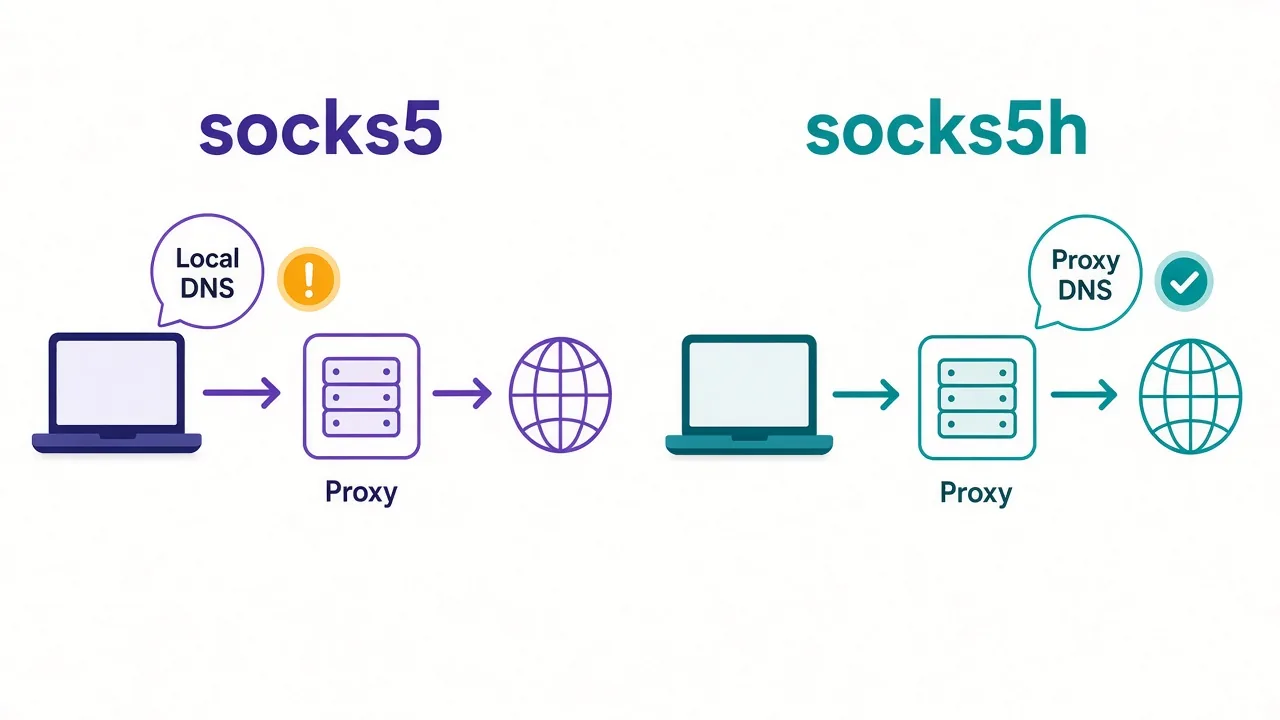
Remember the tiny letter from the start? It's the h in socks5h://.
With plain socks5://, curl looks up the website's IP address on your own machine first. Then it hands that IP to the proxy.
That means your local DNS resolver, often your ISP, sees every hostname you visit. The traffic goes through the proxy, but the lookup didn't.
With socks5h://, curl sends the hostname to the proxy and lets the proxy resolve it. Your machine never asks.
curl -x socks5h://user123:secretpass@proxy.example.com:1080 https://api.ipify.orgWhy does that matter beyond privacy? Geo results.
If the proxy sits in Germany and your laptop resolves the domain in India, some sites hand you an Indian server. You'll get the wrong prices, the wrong language or the wrong search results.
There's a flag version too. --socks5-hostname does the same job as socks5h://, while --socks5 matches plain socks5://.
Rule of thumb
If you use SOCKS5 with curl, write socks5h. There's almost no case where you want your own machine doing the lookup.
HTTP proxies don't have this problem. When curl talks to an HTTP proxy, it sends the hostname and the proxy does the lookup by default.
Tired of typing -x every time? Use environment variables
If you run dozens of commands through the same proxy, typing the flag gets old fast. curl reads proxy settings from environment variables instead.
export http_proxy="http://user123:secretpass@proxy.example.com:8080"
export https_proxy="http://user123:secretpass@proxy.example.com:8080"
curl https://api.ipify.org
Notice the lowercase names. That's on purpose.
curl only reads http_proxy in lowercase. It ignores the uppercase HTTP_PROXY, a guard that the curl docs explain blocks a known attack on CGI scripts. For the others, like HTTPS_PROXY and ALL_PROXY, either case works.
Here's what each one covers:
http_proxyhandles requests tohttp://sites.https_proxyhandles requests tohttps://sites.all_proxyis the fallback for any protocol without its own variable.no_proxylists hosts that skip the proxy, separated by commas.
The trap most people fall into is setting only http_proxy. Then every HTTPS request, which is nearly all of them now, goes out directly from your real IP.
A -x flag on the command line always wins over the environment. That's handy for one-off tests with a different proxy.
To clear the variables when you're done, run unset http_proxy https_proxy all_proxy. Otherwise every tool in that terminal, not just curl, keeps using the proxy.
How do you skip the proxy for some hosts?
Say your script calls both an outside website and an internal API on localhost. You want the first through the proxy and the second direct.
That's what no_proxy and the --noproxy flag are for.
export no_proxy="localhost,127.0.0.1,.internal.example.com"
curl --noproxy "localhost,127.0.0.1" -x http://proxy.example.com:8080 http://localhost:3000/health
A leading dot, like .internal.example.com, matches that domain and every subdomain under it.
And --noproxy "*" turns the proxy off completely for one command, even if your environment sets one. It's the quickest way to compare results with and without the proxy.
Why bother? Two reasons. Sending local traffic through a remote proxy is slow, and on metered plans you pay for every byte of it.
Can you set a proxy once and forget it?
Yes. curl reads a config file called .curlrc from your home folder on macOS and Linux. On Windows, it looks for _curlrc or .curlrc in your home folder.
Put the long flag names in it, one per line, without the leading dashes:
proxy = "http://proxy.example.com:8080"
proxy-user = "user123:secretpass"
From then on, every plain curl command goes through the proxy.
That's convenient, and it's also the reason people spend an afternoon debugging. Six weeks later, a curl call to a local service fails, and nobody remembers the config file.
If something behaves oddly, run curl with -q as the very first argument. That tells it to ignore .curlrc for that run, so you can see whether the file is the cause.
Want something more contained? Write separate config files per proxy and load one with -K, like curl -K ~/proxies/de.conf https://example.com. Nothing applies unless you ask for it.
Does it work the same on Windows?
Mostly, with one gotcha that catches almost everyone.
Windows 10 and 11 ship with a real curl.exe. But in the older Windows PowerShell 5.1, typing curl runs an alias for Invoke-WebRequest instead. That command has different flags, so -x throws an error.
The fix is to type the full name:
curl.exe -x http://proxy.example.com:8080 https://api.ipify.orgIn Command Prompt, plain curl already points to the real thing.
Quoting differs too. In Command Prompt, use double quotes around values with special characters. In PowerShell, single quotes stop it from reading $ as a variable.
Setting environment variables looks different as well. In PowerShell, it's $env:https_proxy = "http://proxy.example.com:8080". In Command Prompt, it's set https_proxy=http://proxy.example.com:8080.
Want to route the whole system instead of one tool? Our guide to setting up a proxy on Windows 11 walks through that.
Just know that curl ignores the Windows system proxy setting by default. It goes by its own flags and variables.
What do the common curl proxy errors mean?
curl's error messages are short and a bit cryptic. Here's what the usual ones are telling you.
| What you see | What it usually means | First thing to try |
|---|---|---|
| (5) Could not resolve proxy | The proxy hostname is wrong or your DNS can't find it | Copy the host again from your dashboard |
| (7) Failed to connect | Wrong port, the proxy is down, or a firewall blocks you | Check the port and your IP whitelist |
| Received HTTP code 407 from proxy | The proxy wants credentials, or rejected yours | Re-check the username, password and encoding |
| (28) Operation timed out | The proxy or the target is too slow to answer | Add a timeout and retry with a new IP |
| (35) SSL connect error | The TLS handshake failed, often a scheme mismatch | Make sure you didn't write https:// for a plain HTTP port |
| (97) proxy handshake error | A SOCKS problem, often bad auth or the wrong port | Confirm the SOCKS port and credentials |
The 407 deserves a closer look, because it's the one you'll hit most.
Many providers support two ways to log in: username and password, or an IP whitelist.
With a whitelist, the proxy only accepts traffic from IP addresses you've registered. Run curl from a new network, like a cloud server or a café, and the proxy turns you away. Expect a 407 or a refused connection until you add that IP.
A 403 is different. That comes from the website, not the proxy. The proxy did its job, but the site doesn't like the IP or the request.
So how do you tell those two apart in practice? That's what verbose mode is for.
How do you see what's actually happening?
Add -v to any command, and curl prints every step of the conversation.
curl -v -x http://proxy.example.com:8080 https://api.ipify.orgLines starting with * are curl's own notes. Lines with > are what you sent, and lines with < are what came back.
Here's what to look for:
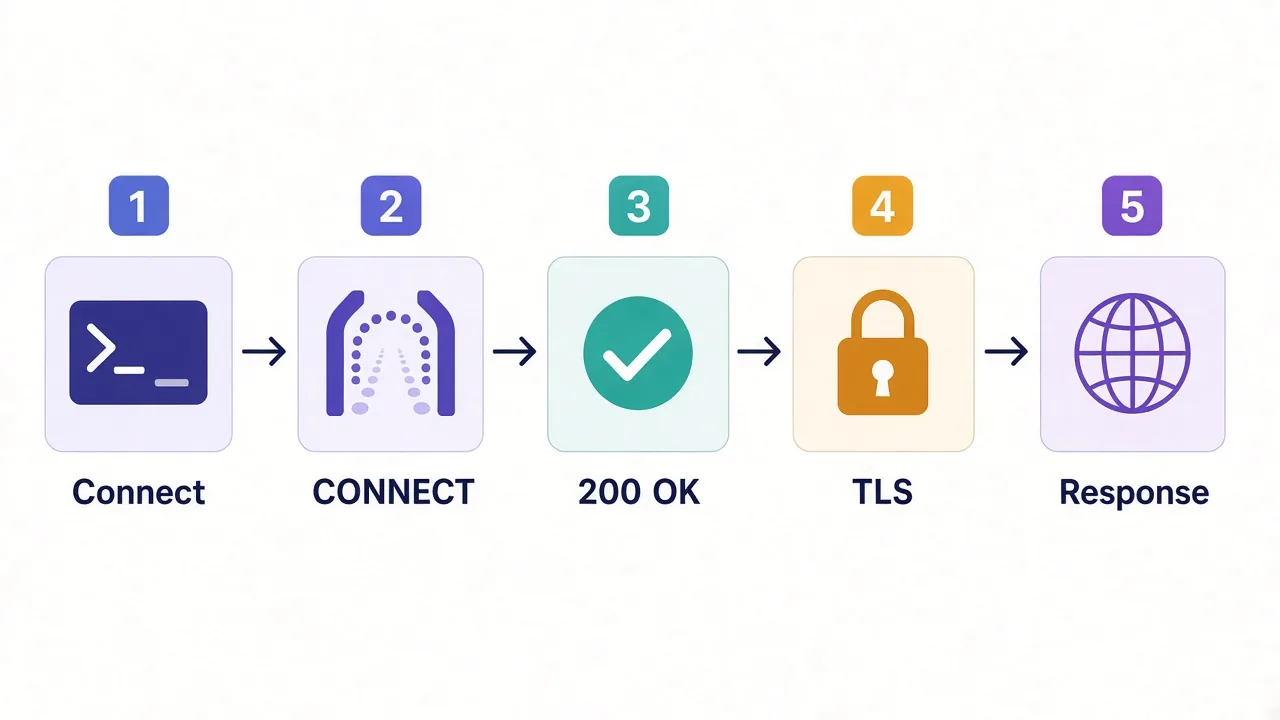
- A line saying it connected to the proxy's host and port. If that's missing, the problem is before the proxy.
- A
CONNECT api.ipify.org:443request. That's curl asking the proxy for a tunnel. - The proxy's reply.
200 Connection establishedmeans the tunnel opened. A 407 means auth failed. - The TLS handshake and then the site's own response.
That order tells you exactly where things broke. Error before the CONNECT? It's the proxy connection. Error after the 200? It's the website.
If you only want the status code and timing, -w prints them without the noise:
curl -s -o /dev/null -w "%{http_code} %{time_total}s\n" -x http://proxy.example.com:8080 https://example.comOn Windows, swap /dev/null for NUL.
How do you rotate IPs or keep a sticky session?
Here's something that surprises people. curl itself doesn't rotate anything.
With a rotating residential plan, the provider rotates for you. You point curl at one gateway address, and each new connection can come out from a different IP. Run the IP check three times, and you may see three answers.
for i in 1 2 3; do curl -s -x http://user123:secretpass@gate.example.com:7000 https://api.ipify.org; echo; doneNeed the same IP for a while, say for a login flow? Most providers handle that with a session ID in the username or a dedicated sticky port. Check your dashboard for the exact format, because every provider spells it differently.
If you aren't sure which one you need, our explainer on sticky vs rotating proxies lays out when each wins.
And if you have a plain list of static proxies instead of a gateway, rotation is up to you. A short shell loop that picks a line at random works for small jobs:
PROXY=$(shuf -n 1 proxies.txt)
curl -x "$PROXY" https://api.ipify.org
For anything bigger than a quick script, move to a real language. Our guides on proxies with Python Requests and rotating proxies in Python pick up where curl stops.
Which flags make proxy requests more reliable?
Proxies add a hop, and every hop can be slow. A few flags stop one bad IP from stalling a whole script.
--connect-timeout 10gives up if the connection takes longer than 10 seconds.--max-time 30caps the whole request, download included.--retry 3retries on errors curl treats as temporary, like timeouts.-Lfollows redirects, which many sites use before showing the real page.-Asets a user agent, because curl's default one is easy for sites to spot.
That last point is worth a pause. A clean residential IP paired with the header User-Agent: curl/8.x still looks like a script. The IP was never the only thing the site checks.
If you're scraping a site that fights back hard, curl alone may not be enough. Headless browsers like the ones in our Playwright proxy guide run JavaScript and look much more like a real visitor.
Don't use -k with real credentials
The -k flag skips certificate checks on the website, and --proxy-insecure skips them on an HTTPS proxy. Both are fine for a quick local test. On a real job, they let anyone in the middle read your traffic.
So, which setup should you actually use?
Start simple. Use -x with the full proxy URL, test against an IP-echo site, and confirm you see the proxy's IP.
If you're on SOCKS5, write socks5h. If you run lots of commands, move the proxy into lowercase environment variables. Reach for .curlrc only when you're sure you want it everywhere.
And when something breaks, add -v before you change anything else.
Still picking a provider? Browse the proxy providers we've reviewed and compare plans side by side.
One flag, a clean URL, and you're done.
Frequently asked questions
Add the -x flag followed by the full proxy URL, like curl -x http://host:port https://example.com. Include the scheme and port, because curl defaults to http:// and port 1080 when you leave them out.
Use -U user:password, or put them in the proxy URL as http://user:password@host:port. If the password has symbols like @ or :, percent-encode them or use -U with single quotes.
With socks5h, the proxy resolves the website's hostname; with socks5, your own machine does. Use socks5h so DNS lookups don't leak to your local resolver and geo results match the proxy's location.
curl only reads the lowercase http_proxy variable for plain HTTP requests. Also set https_proxy, because most sites use HTTPS and won't use the http_proxy setting at all.
A 407 means the proxy wants authentication or rejected your credentials. Check the username and password, their encoding, and whether your plan uses an IP whitelist that doesn't include your current IP.
In Windows PowerShell 5.1, curl is an alias for Invoke-WebRequest, which has different flags. Type curl.exe instead to run the real curl that ships with Windows 10 and 11.