












You bought a 10 GB residential plan on Monday. By Wednesday, the dashboard says you've got 400 MB left.
Your scraper didn't change. Your targets didn't change. So where did all that proxy bandwidth go?
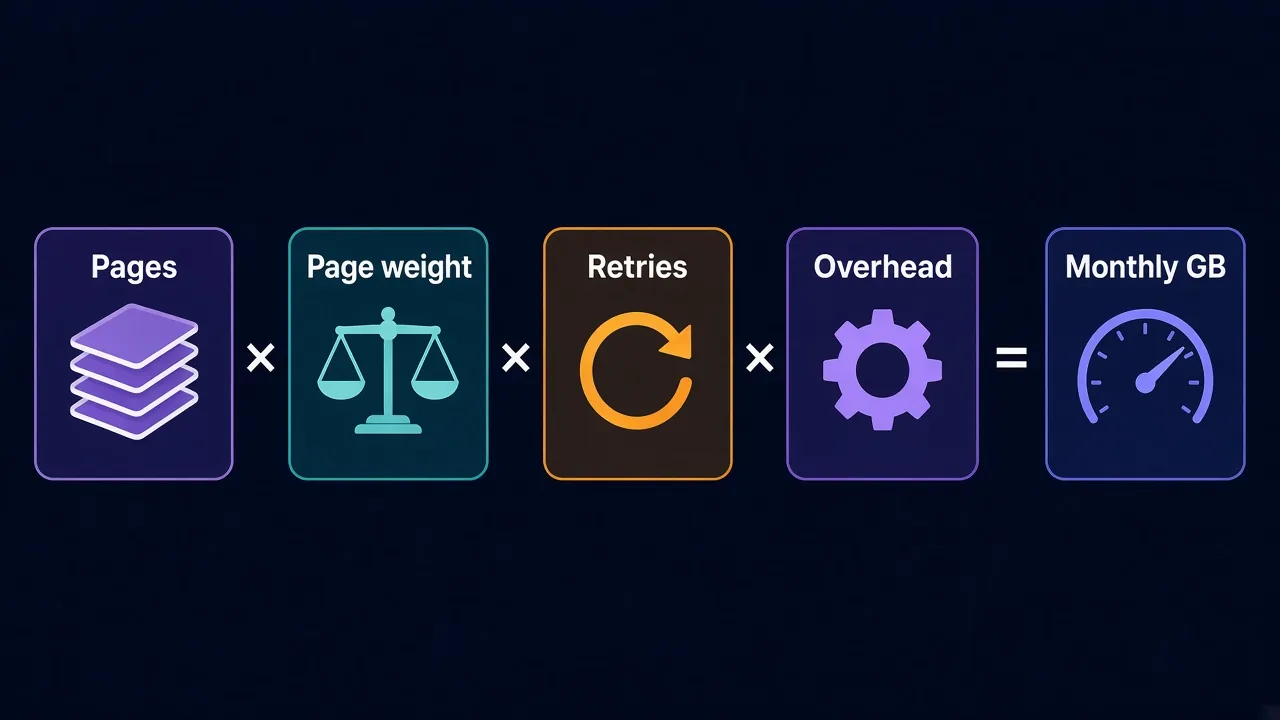
Here's the short answer: you need roughly pages per month × real page weight × a buffer for retries. For HTML-only scraping, that's often a few GB. For a full browser loading every image, it can be ten times more.
The gap between those two numbers mostly comes down to one setting. We'll get to it. First, let's see what a provider actually counts.
What actually counts as proxy bandwidth?
Bandwidth, on a proxy bill, means traffic.
Every byte that passes through the provider's gateway gets counted.
That includes the page you asked for. It also includes everything around it.
- The request you send, with its headers and cookies.
- The response that comes back, including images, scripts and fonts if your client loads them.
- The TLS handshake that sets up each secure connection.
- Redirects, error pages and CAPTCHA pages.
Most per-GB plans count traffic in both directions. Uploads are usually tiny next to downloads, so the response side is where your budget goes. Still, check your provider's billing page, because the rules differ.
One more thing to know before you do any math. Some providers count 1 GB as 1,000 MB and some as 1,024 MB. We'll use 1,000 here to keep the numbers clean.
Why do your GB vanish faster than you planned?
Most people budget from the size of the HTML. That's the first mistake.
A modern page is rarely just HTML. When a real browser opens it, it pulls in images, JavaScript bundles, web fonts, tracking pixels and sometimes autoplay video. The HTML can be the smallest part of the download.
The second mistake is forgetting the requests that fail.
Say a site blocks one request in five. Your code retries it, and the blocked page still came back with a body.
So you paid for the block, then paid again for the retry. That's the request that costs you twice, and it adds up fast on tough targets.
The third leak is background traffic. A headless browser or an antidetect browser can send update checks and telemetry through the same proxy. Unless you route that traffic elsewhere, you pay for it.
Blocks cost you twice
A 403 or CAPTCHA page still has a body, and that body is billed. If your block rate climbs, your bandwidth bill climbs with it.
So before you pick a plan size, you need one real number. How heavy is your target page, really?
How do you measure the real weight of a page?
Don't guess this.
It takes about two minutes to measure, and it's the most useful number in this whole post.
If you'll use a browser, open the target page in Chrome and press F12 to open DevTools. Go to the Network tab and tick Disable cache, then reload.
At the bottom of the panel, Chrome shows two figures: "transferred" and "resources". Transferred is the number you pay for, because it's what crossed the wire after compression.
Do it on five or so pages of the same type, like five product pages. Then take the average. One page can be an outlier.
If you'll scrape with plain HTTP requests, measure with the tool you'll use. With cURL, this prints the bytes downloaded:
curl -s -o /dev/null --compressed -w "%{size_download}\n" https://example.com/product/123Notice the --compressed flag. Without it, cURL doesn't ask for gzip, and the server may send the page uncompressed. That alone can make a page several times heavier.
Python's Requests library asks for gzip by default, so you're covered there. Our guide to using proxies with Python Requests shows the full setup if you're starting from scratch.
The formula: how many GB do you need?
Once you have a page weight, the math is simple. Four numbers, multiplied together.
- Pages per month: how many pages you'll load in a billing cycle.
- Page weight: the average transferred size you just measured.
- Retry factor: 1.1 for an easy site, 1.3 or more for a tough one.
- Overhead: about 1.05 to cover handshakes, redirects and headers.
Multiply them and divide by 1,000 to turn MB into GB.
Here's what that looks like in practice. Say you track 2,000 product pages a day, and each one weighs 150 KB as plain HTML.
That's 300 MB a day, or about 9 GB over 30 days. Add a 1.2 retry factor and 1.05 overhead, and you land near 11 GB a month.
Now say you load those same pages in a full headless browser instead, at 2 MB each. That's 4 GB a day and about 120 GB a month before retries.
Same pages. Same schedule. More than ten times the bill.
Can you see why page weight is the number to get right?
Rough bandwidth estimates for common jobs
Every target is different, so treat the table below as a starting sketch. The assumptions are example numbers, not measurements. Swap in your own page weight and the math still works.
| Job | Example assumption | Rough GB per month |
|---|---|---|
| Price monitoring, HTML only | 2,000 pages a day at 150 KB | About 11 |
| Price monitoring, full browser | 2,000 pages a day at 2 MB | About 150 |
| Rank tracking | 500 keywords a day at 100 KB per results page | About 2 |
| Running social accounts | 10 accounts, 100 MB of browsing each a day | About 30 to 40 |
| JSON API scraping | 50,000 calls a day at 10 KB | About 15 to 20 |
The ranges include the same retry and overhead buffer from the formula. Two rows here deserve a closer look.
Account work is the hardest to estimate, because people browse feeds, and feeds are full of images and video. If you manage accounts through an antidetect browser, measure one real session in DevTools before you commit to a plan size.
JSON scraping is the cheapest. If a site loads its data from an API endpoint, calling that endpoint directly skips the whole page. It's often the biggest saving you'll find, but it isn't the setting we promised. That comes next.
Example numbers
The figures in this table are illustrations for the formula above. Measure your own target pages before you buy.
The one setting that shrinks your bandwidth bill
Remember the setting from the start? It's resource blocking: telling your browser not to download images, fonts and media at all.
For scraping, you rarely need any of it. You want the text and the prices. The pictures of the product are dead weight on your bill.
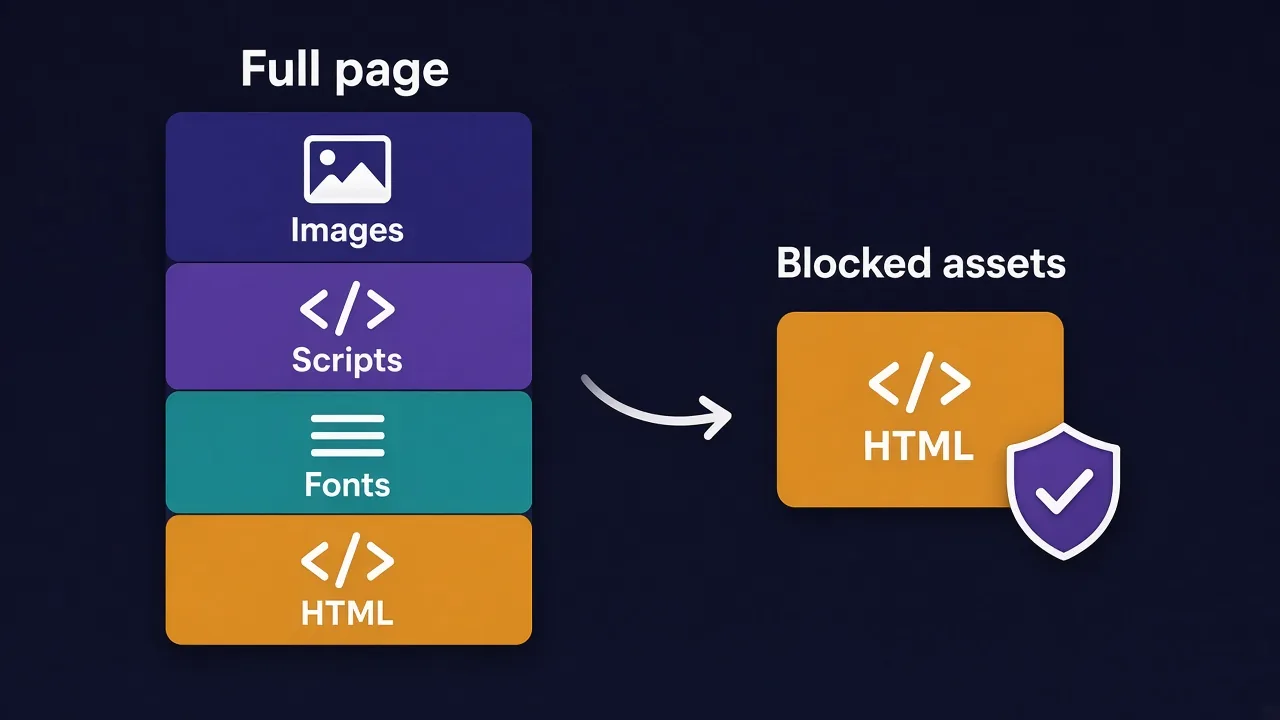
In Playwright, you can abort requests by resource type with a route handler. Here's a Python version:
BLOCK = {"image", "font", "media"}

def handle(route):
    if route.request.resource_type in BLOCK:
        return route.abort()
    return route.continue_()

page.route("**/*", handle)
Puppeteer does the same job with page.setRequestInterception(true) and a request handler. Our guides to Playwright with proxies and Puppeteer with proxies walk through the full setup.
Should you block scripts too? Only if the page still renders the data without them. Many sites build their content with JavaScript, so blocking scripts can leave you with an empty page.
The catch with blocking is detection. A real visitor loads images. Some anti-bot systems notice a browser that never does. On a strict target, test whether blocking raises your block rate before you roll it out everywhere.
Which traffic shouldn't touch your proxy at all?
Here's a habit worth building: send only the requests that need a new IP through the proxy.
The target site needs the proxy. Lots of other traffic doesn't.
- Your own API calls, like writing results to a database.
- Package downloads and browser updates.
- Static files from a public CDN that doesn't block anyone.
- Health checks and test requests while you debug.
In code, this is usually easy. Set the proxy per request or per session for the target, not as a system-wide setting. In Python Requests, pass proxies= only on the calls that need it.
Watch your logging and monitoring tools as well. A tool that pings the target every minute to check it's up is still loading pages through your plan.
Debugging is the sneaky one. Ten test runs against a heavy page can burn through more than you'd think. Test your parsing on a saved copy of the page, then switch the proxy on when the code works.
Not sure whether your proxy is even being used? Our guide on how to check a proxy is working shows a quick test.
Per GB or per IP: when does bandwidth stop mattering?
Everything above assumes you pay by the gigabyte. That's how most residential proxies and mobile proxies are sold.
Datacenter and ISP proxies are different. They're usually sold per IP, often with generous or unmetered traffic. On those plans, the GB math above matters far less.
We checked our own directory. As of October 2026, 26 of the residential listings we track are priced per GB. Their starting prices run from $0.85 to $8 per GB, with a median of $2.50.
Mobile is pricier. The 8 mobile listings priced per GB start between $2 and $8.40, with a median of $5.50. On the other side, 13 datacenter listings are priced per IP, with a median starting price of $0.60.
From the DriftProxy directory
As of October 2026, the median starting price is $2.50 per GB for residential and $5.50 per GB for mobile listings. Starting prices are the lowest tier, so small plans often cost more per GB.
So which one fits you? If your target accepts datacenter IPs, a per-IP plan can make bandwidth worries disappear. Our breakdown of residential vs datacenter proxies covers which targets tolerate which.
If you need residential or mobile IPs, bandwidth is your main cost. That's where the formula earns its keep.
What will your GB estimate cost each month?
Let's put the two price-monitoring examples on a bill, using the $2.50 residential median.
The HTML-only setup at about 11 GB costs around $27.50 a month. The full-browser setup at about 150 GB costs around $375. Same pages, same results.
That's why we measure first and buy second.
A few minutes in DevTools can be worth hundreds of dollars a month.
A few buying habits help too.
- Start with the smallest plan that covers your estimate.
- Run your real workload for a week and read the usage dashboard.
- Check whether unused GB roll over. On many plans they expire at the end of the billing period.
- Only then move to a bigger plan, where the per-GB price usually drops.
Don't buy a big plan up front because the per-GB price looks better. If half of it expires unused, you paid double for what you used.
Does session type change how much bandwidth you use?
A little, yes. Every new connection needs a fresh TLS handshake, and that handshake costs a few kilobytes.
With a rotating proxy, each request can land on a new IP and a new connection. With a sticky session, you keep the same IP and can reuse the connection, so you skip some of that overhead.
The bigger effect is indirect. If rotating every request gets you blocked on a site that expects a steady visitor, your retries balloon. Sticky sessions can cut those retries on login flows and carts.
For a fuller comparison, read our guide to sticky vs rotating proxies. Pick the session type for the target first, then measure what it costs.
Three mistakes that quietly double your usage
We've covered the fixes. Here are the traps that undo them.
The first is letting a scraper loop on a broken page. A parser that fails and retries forever can drain a plan overnight. Cap your retries, and stop the job when the error rate spikes.
The second is crawling the same pages twice. Keep a list of URLs you've already fetched, and skip them unless the content changes.
The third is ignoring blocks. A rising block rate means you're paying for error pages. Our guide on why your proxy gets banned covers what to change before you burn more GB.
So, how many GB should you actually buy?
Measure one page, then do the math.
Multiply your monthly pages by the real transferred weight, add 20% to 30% for retries, and buy the plan that covers it. Block images and fonts where the target allows it, and keep non-target traffic off the proxy.
Ready to pick a provider? Compare the proxy providers in our directory and check their per-GB prices side by side.
Start small. Measure. Then scale.
Frequently asked questions
Multiply pages per month by the average transferred page weight, then add 20% to 30% for retries. HTML-only scraping of a few thousand pages a day often needs around 10 GB a month, while a full browser can need ten times more.
Most per-GB proxy plans count traffic in both directions. Downloads make up nearly all of it, since responses carry the page content, but check your provider's billing page for its exact rules.
Open Chrome DevTools, go to the Network tab, tick Disable cache and reload the page. The transferred figure at the bottom is what your proxy bills, so average it across several pages of the same type.
Block images, fonts and media in your headless browser, and call a site's JSON API directly when it has one. Also keep non-target traffic off the proxy, cap retries and avoid fetching the same URL twice.
Yes, a blocked request usually still returns an error or CAPTCHA page, and that page is counted. A retry then costs you again, so a rising block rate raises your bandwidth bill.
Usually not. Datacenter and ISP proxies are mostly sold per IP, often with generous or unmetered traffic, while residential and mobile proxies are mostly sold per GB.