








Your Google scraper worked fine last year. Then one morning every request came back as a page asking you to turn on JavaScript.
Sound familiar? You swapped in a pile of fresh IPs, and it barely helped. That's because Google now checks more than your address.
So here's the short version. For heavy Google scraping, Bright Data or Oxylabs is the safe pick. Smartproxy is the best value.
But the right choice depends on one question most buyers never ask. We'll get to it after you see what Google checks.
Our picks at a glance
| Provider | Best for |
|---|---|
| Bright Data | Best overall for Google at scale |
| Oxylabs | Enterprise SERP volume |
| Smartproxy | Best value for in-house scrapers |
| ScraperAPI | Simplest drop-in endpoint |
| Scrapingdog | Budget Google SERP API |
| Zyte | Scrapy teams and managed rendering |
| SOAX | City and carrier-level local results |
Prices change too often to print here. Each provider card below shows the live numbers.
Why does Google block your scraper so fast?
Google defends its result pages harder than almost any site on the web.
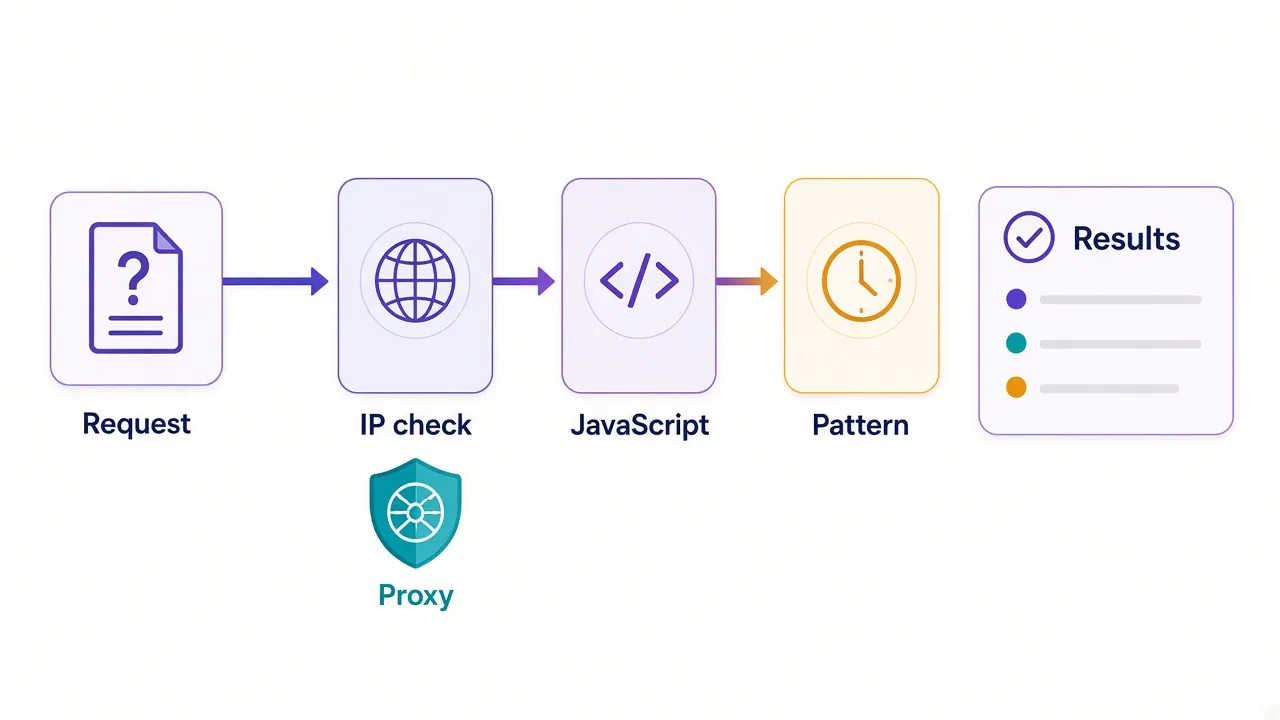
It isn't guarding one thing, either. It looks at three layers at once.
- The IP address your request comes from, and who owns it.
- The client making the request, including whether it runs JavaScript.
- The pattern of your requests over minutes and hours.
A proxy fixes the first layer. It does nothing for the other two.
That's why so many people buy a big residential plan and still see a CAPTCHA on request number fifty. The IP looked like a person. The behavior didn't.
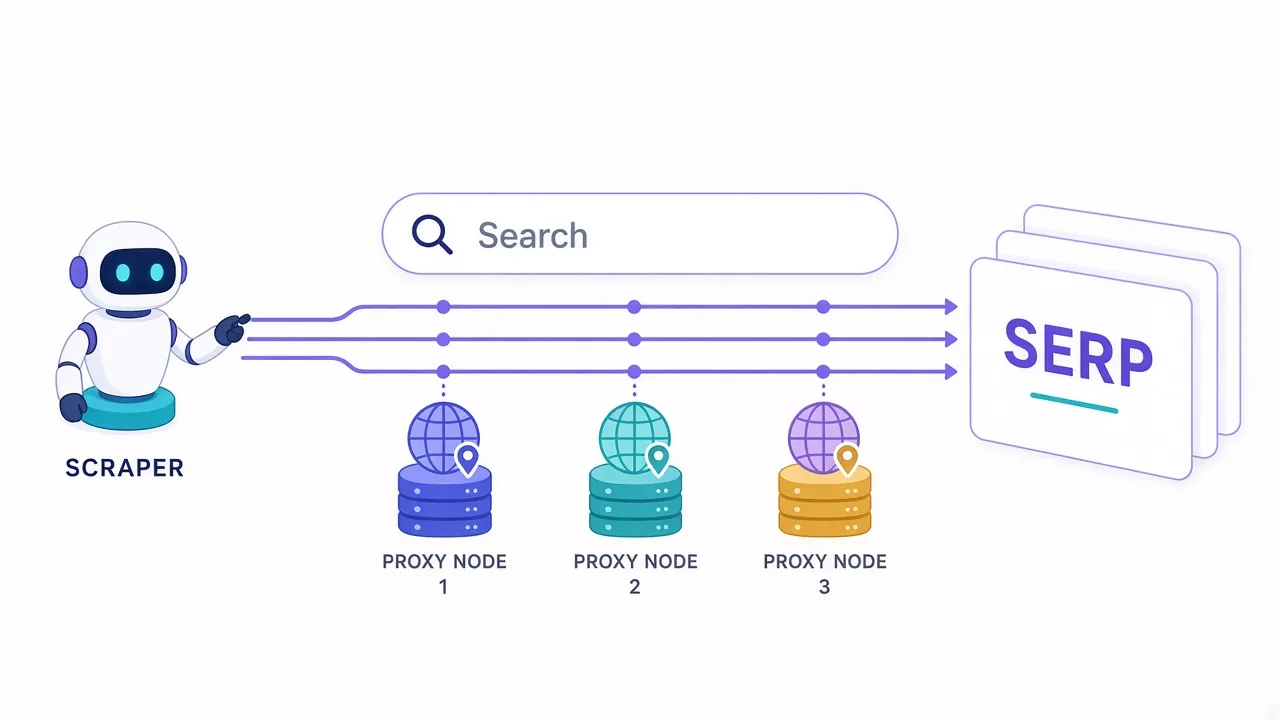
Say you send 2,000 searches an hour from one script. Every request has the same headers, the same timing and no cookies. Even with 2,000 different home IPs, that rhythm is easy to spot.
So think of the proxy as the entry ticket, not the whole plan.
What changed in 2025, and why your old scraper broke
Two changes from Google rewrote the rules for anyone pulling search results.
If your setup is older than that, someone built it for a different Google.
The first came in January 2025. Google began requiring JavaScript to show search results, and a spokesperson said it was to protect the service from bots and spam. Plain HTTP scrapers started getting a block page instead of results.
What does that mean for you? A simple requests plus parser script no longer works on its own. You need a real browser engine, like Playwright or Puppeteer, or an API that renders the page for you.
Rendering costs more than you think
A headless browser downloads scripts, styles and images that a plain HTTP request never touched. On a per-GB proxy plan, that extra weight shows up straight on your bill.
The second change landed quietly in September 2025. It's the one that made every deep scrape cost more.
Google stopped honoring the &num=100 URL parameter, which used to return 100 results on one page. Google told Search Engine Land it's not something it formally supports.
Now the top 100 results take about ten paginated requests instead of one.
That's ten times the requests, ten times the chances to get flagged, and a lot more bandwidth.
If you only need page one, you barely notice. If you need the top 100, your proxy budget just changed shape.
Residential or datacenter: which IPs survive Google?
This is where most of your money goes, so it's worth getting right. The short answer is residential for anything sustained, and datacenter only for small jobs.
| Datacenter | Residential | Mobile | |
|---|---|---|---|
| How Google sees it | A hosting company | A home connection | A phone carrier |
| Block risk on Google | High at volume | Low with good pacing | Lowest |
| Cost | Cheapest | Mid to high | Highest |
| Speed | Fastest | Moderate | Slower |
| Good fit | A few hundred queries a day | Ongoing SERP collection | When residential still fails |
Datacenter IPs come from cloud servers, and their ranges are public. Google can see that a request comes from a hosting company in one lookup.
That doesn't mean they never work. For a light, slow job, they're fine and cheap. Push them hard, and you'll trip rate limits quickly.
Residential proxies route through real household connections, so each query looks like an ordinary person searching. That's why they're the default for Google. Our residential vs datacenter breakdown covers the trade-off in more depth.
Mobile IPs are the heavy option. Many phones share one carrier address, so platforms are slow to block them. For Google search, you rarely need them unless residential keeps failing.
Where you search from changes what you get
Here's the part people skip.
Google doesn't return one set of results. It returns a set for a place.
Search "coffee shop" from Chicago and you get a map pack full of Chicago cafes. Search it from Austin and the whole page changes. Even non-local queries shift by country and language.
So the proxy's location isn't only a way around blocks. It is part of the data you're collecting.
- National keywords need country-level targeting.
- Local queries need city-level targeting, or tighter.
- Mobile and desktop results differ, so pick one per dataset.
- Language settings matter, so set them on purpose.
If you're tracking rankings for clients, location precision matters even more. Our guide to proxies for SEO tracking goes deeper on the rank-tracking side.
Check the exit before a big run
Run one request through the proxy and check where it lands with our IP lookup tool. A wrong city returns real results for the wrong market, and nothing will warn you.
Proxy or SERP API: which should you buy?
Remember that one question from the start? Here it is.
Do you want to own the scraper, or do you want the data?
Your answer decides more than any feature list. Raw proxies and SERP APIs solve different problems.
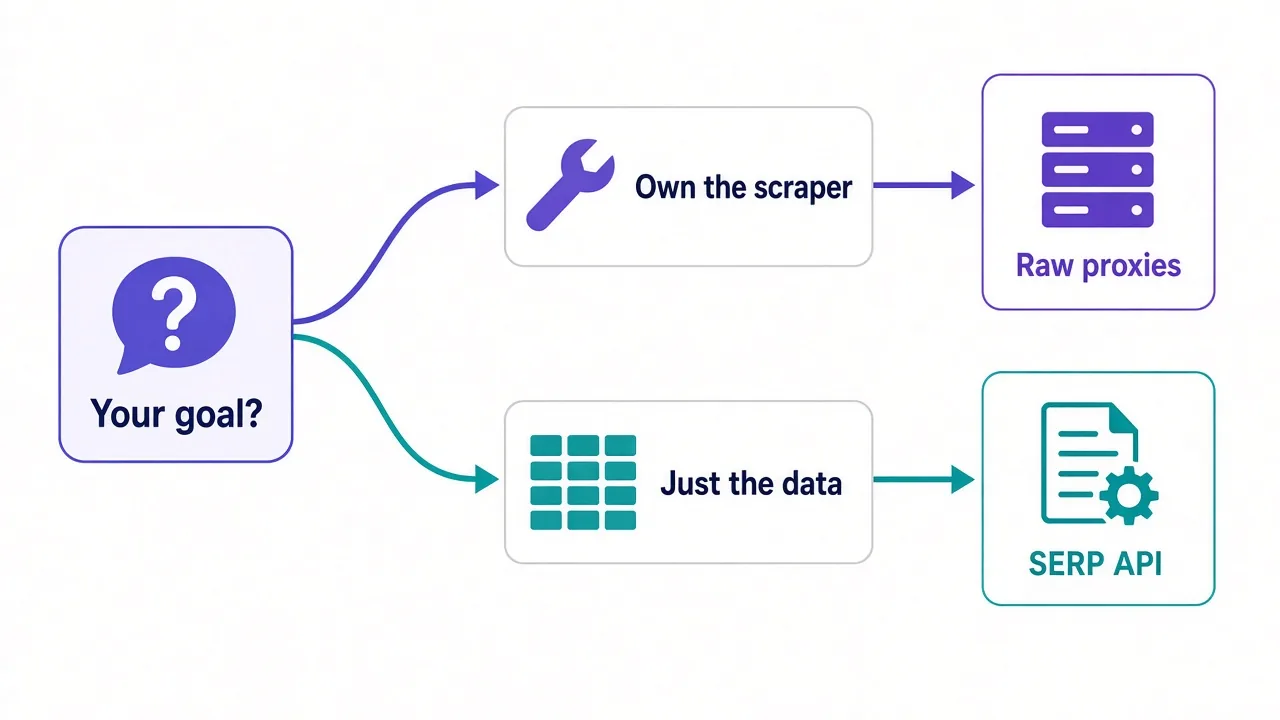
With raw proxies, you get the IPs and nothing else. You run the browser, the retries, the CAPTCHA handling and the parser. It's cheaper per request and you control everything.
The catch? Google changes its result layout often. Each change can break your parser, and someone has to fix it.
A SERP API flips that. You send a query and get back structured results, like positions, titles and URLs. The provider handles rendering and blocks for you.
You pay more per request, and you lose some control.
But you also lose the maintenance.
Here's the rule we'd use. If scraping is part of your product and you have engineers, buy proxies. If Google data is one input to your work, buy an API.
The best proxies for Google search scraping
Seven of the 44 proxy providers in our directory carry our Google tag as of October 2026. This list draws mostly from those, plus one budget API with a dedicated Google endpoint. You can see the full tagged set on our Google proxies page.
1. Bright Data: best overall for Google at scale
Bright Data gives you both routes in one account. There's a 72M+ residential network for your own scraper, and a dedicated SERP API if you'd rather receive parsed results.
Its Web Unlocker and Scraping Browser handle CAPTCHAs and rendering, which is exactly the work Google's JavaScript wall created. Targeting goes down to city and ASN or carrier.
The downside is cost and friction. It's premium pricing, the dashboard has a real learning curve, and KYC checks can slow down small accounts. Our Bright Data pricing guide helps you model it.

2. Oxylabs: best for enterprise SERP volume
If you're pulling millions of Google results a month, Oxylabs makes sense. Its 100M+ residential pool is one of the largest anywhere, and it sells dedicated SERP scraping products alongside raw proxies.
SOC 2 compliance and dedicated account managers help when a client's procurement team asks questions. Success rates on hard targets sit among the best in our directory.
It's priced for that audience, though. Oxylabs bills its scraper APIs separately, so read our Oxylabs pricing breakdown before you commit.

Premium proxies built for enterprise scraping.
3. Smartproxy: best value for in-house scrapers
Smartproxy, now rebranding as Decodo, is the one we'd hand to a small team running its own Playwright scraper. The 55M+ residential pool covers 195 countries with city and ASN targeting.
Its average response of about 0.55 seconds is among the fastest in our directory. That matters when every Google page now needs a full browser load. There's also a free trial, so you can test it against Google before paying.
On the very hardest targets, it can trail the enterprise names. Check our Smartproxy pricing guide to see where the plan tiers land.

Powerful proxies without the enterprise price tag.
4. ScraperAPI: simplest drop-in endpoint
Don't want to touch rotation logic at all? ScraperAPI puts rotation, retries, rendering and CAPTCHA handling behind one endpoint. It also has structured endpoints for Google.
You mostly pay for successful requests, which takes some sting out of blocked attempts. That's a real plus on a target as strict as Google.
The honest drawback is reach. It covers about 50 countries, far fewer than the big residential networks. Rendered requests also burn credits faster than plain ones.
Web scraping API with automatic proxy rotation, retries and CAPTCHA handling
5. Scrapingdog: budget Google SERP API
Scrapingdog is one of the most affordable scraping APIs we list, and it has a dedicated Google SERP endpoint. For a side project or a small SEO tool, that's a lot of value per credit.
Per-request credit pricing keeps your bill predictable. You'll know what 10,000 searches cost before you run them.
It can struggle on the toughest anti-bot targets, and it has fewer enterprise features. Think of it as the starter API, not the long-term platform for huge volume.

Affordable scraping API with SERP and LinkedIn endpoints
6. Zyte: best for Scrapy teams
Zyte comes from the team that built Scrapy, the open-source crawling framework many Python scrapers run on. If your stack is already Scrapy, that integration saves real setup time.
The Zyte API combines proxy management, browser rendering and AI-assisted extraction. Its ban handling has been around longer than most of its rivals.
It isn't a raw per-GB proxy seller, and its pricing leans enterprise. Model your per-request costs carefully before you scale.
Enterprise web scraping API and proxy management from the team behind Scrapy
7. SOAX: best for local results
Remember the coffee shop search? SOAX is the pick when the exact place matters. Its geo-targeting is among the best in our directory, down to city, ISP and carrier.
The pool is clean and regularly refreshed, which helps keep CAPTCHAs down. There's a free trial to check your target cities first.
The trade-off is size. At 8.5M+ residential IPs, the pool can limit very high-volume parallel scraping.

Clean, ethically-sourced residential & mobile IPs.
How do the picks compare?
| Provider | Type | Handles JS rendering | Geo depth | Free trial |
|---|---|---|---|---|
| Bright Data | Proxies and SERP API | Yes, via its tools | City, ASN, carrier | Yes |
| Oxylabs | Proxies and SERP API | Yes, via its API | City | Yes |
| Smartproxy | Proxies and scraping APIs | You run the browser | City, ASN | Yes |
| ScraperAPI | Scraping API | Yes | About 50 countries | Yes |
| Scrapingdog | Scraping API | Yes | About 190 countries | Yes |
| Zyte | Scraping API | Yes | About 100 countries | Yes |
| SOAX | Proxies | You run the browser | City, ISP, carrier | Yes |
Notice the split in the third column. That's the proxy-or-API question again, written as a table.
How to keep your Google scraper unblocked
Good IPs get you in the door. These habits keep you there.
- Use a real browser engine, because plain HTTP requests hit the JavaScript wall. Our Playwright proxy guide shows the setup.
- Rotate the IP on each search. A logged-out SERP has no identity to protect, so rotating beats sticky sessions here.
- Pace your requests with random gaps, not a fixed beat.
- Make each browser look consistent, so the language, timezone and IP location agree.
- Block images and fonts you don't need, to cut bandwidth.
- Only go deep when you need to, since every extra results page is now one more request.
- Watch your success rate, not only your output.
That last one bites people.
A soft block can return a page that parses as "no results". Your dataset looks complete and is quietly wrong.
If your success rate drifts down over weeks, IP reputation is usually the cause. Our guide on why proxies get banned walks through the usual suspects. Fingerprints matter too, and browser fingerprinting explains what Google can read from your client.
Is scraping Google search legal?
We're not lawyers, so take this as context, not legal advice.
Search results are public, and the whole SEO tool industry runs on collecting them. But Google doesn't welcome it. Its robots.txt file disallows /search for crawlers, and its terms restrict automated access.
So the main risk for most people is a broken contract and blocked access, rather than a criminal issue. If you're building a business on this data, talk to a lawyer where you operate.
A few habits keep you on safer ground. Collect public results only, never personal data, and keep your request rates reasonable.
Then pick a provider that sources its IPs with consent, which we cover in our piece on ethically sourced proxy IPs.
So, which one should you actually pick?
Start with that one question: do you want the scraper, or the data?
Want the data? Pick a SERP API. Bright Data or Oxylabs for scale, Scrapingdog or ScraperAPI on a budget.
Running your own scraper? Pick residential proxies. Smartproxy for value, SOAX when the city matters.
You don't need the biggest pool. You need the right route past Google's checks. Compare the providers on our SEO monitoring page and test one on its free trial this week.
Frequently asked questions
For most people, Bright Data or Oxylabs is the safest choice at volume, and Smartproxy is the best value. If you only want parsed results, a SERP API like ScraperAPI or Scrapingdog saves you building the scraper.
They work for small, slow jobs, but Google rate-limits them quickly at volume. Their IP ranges belong to hosting companies, so residential proxies are the usual choice for ongoing SERP collection.
Since January 2025, Google requires JavaScript to show search results. A plain HTTP scraper now gets a block page, so you need a headless browser like Playwright or an API that renders pages for you.
Use rotating proxies for logged-out Google searches. Each query has no account to protect, so a fresh IP per request spreads your traffic and lowers the chance of CAPTCHAs.
A SERP API is better if you want the data without maintaining a scraper. Raw proxies are cheaper per request and give more control, but you handle rendering, retries and parser fixes yourself.
Collecting public search results is common practice, but Google's terms and robots.txt restrict automated access. The usual risk is blocked access or a contract breach, so get legal advice if you build a business on it.