











You've got 40 ad accounts, one teammate, and two tabs open: Dolphin Anty and AdsPower.
Both promise a separate fingerprint for every account. Both have a free plan. Both cost far less than the premium antidetect browsers. So which one should hold your accounts?
Here's the quick answer on Dolphin Anty vs AdsPower. Dolphin Anty fits solo media buyers who want a friendly setup on Windows, macOS or Linux. AdsPower fits anyone scaling past a few dozen profiles, adding teammates, or automating chores.
The price story is where it gets interesting. There's a profile count where the cheaper option flips, and most comparison charts skip it. There's also one thing that matters more than either browser. We'll get to both.
What do Dolphin Anty and AdsPower do, and who are they for?
Both are antidetect browsers. You create browser profiles, and each profile looks like a separate device to the sites you visit.
A profile carries its own browser fingerprint, its own cookies and its own proxy. Log into one ad account per profile, and the platform sees separate people instead of one laptop.
That's the shared job. Where they differ is who they were built for.
Dolphin Anty grew up in affiliate marketing. Its own site pitches it as a browser for affiliate work on Facebook, Google and TikTok. The features follow that crowd, with a cookie robot for warming accounts and bulk actions for campaign work.
AdsPower aims wider. E-commerce sellers, agencies and airdrop farmers use it heavily, and it leans hard on automation. Its RPA robot, Synchronizer and Local API come with every paid plan.
Want the whole field before you pick? Our best antidetect browsers roundup covers the rest.
About the numbers in this post
Prices and limits come from AdsPower's pricing page and Dolphin Anty's plan documentation as of October 2026, on monthly billing in US dollars. Both change plans often, so confirm at checkout.
Dolphin Anty vs AdsPower at a glance
Need the answer before the detail? Here's how they line up.
| What you're comparing | Dolphin Anty | AdsPower |
|---|---|---|
| Free plan | 5 profiles, with a cut to 3 announced | 2 profiles, plus a 7-day full trial |
| Cheapest paid plan | $10/mo for 20 profiles | $9/mo for 10 profiles |
| Price for 100 profiles | $89/mo | $36/mo |
| Extra team member | $10 to $25 each, from the Base plan | $5 each, on any paid plan |
| Browser engines | Chromium-based | Chrome-based and Firefox-based |
| Desktop apps in our directory | Windows, macOS, Linux | Windows, macOS |
| Automation | Scenario Builder, Synchronizer, cookie robot, API | RPA robot, Synchronizer, Local API |
| Longer billing discount | 20% for 6 months, 40% for 12 | Varies with promotions |
See the 100-profile row? That gap is the heart of this comparison. But it isn't the whole story, so let's start where you should start: free.
Which free plan lets you test properly?
Test before you pay. Both let you, and your real target sites are the only test that counts.
Dolphin Anty's Free plan gives you 5 profiles with no time limit. You can run 3 at once, add up to 50 proxies and install 10 extensions. Every fingerprint spoofing option is included.
The catch? That plan keeps shrinking. Dolphin already cut it from 10 profiles to 5, as its own free plan update explains.
Its plan docs now announce another cut, to 3 profiles and only 20 profile re-creations a month. If you go over the new limit, your profiles stay, but you can't work in the app until you upgrade or delete some.
AdsPower's free plan is smaller from the start. You get 2 profiles forever, plus a 7-day trial of every feature when you sign up.
That trial matters more than the profile count. For one week, you can try the RPA robot, the Synchronizer and the API before you decide. Dolphin keeps its API off the Free plan, so you'd pay $10 to test it.
Both free plans share one nasty trap. On Dolphin's Free plan, a deleted profile can't be restored. AdsPower's help center says the same about its free tier.
Keep free plans for experiments
Never park an aged or revenue-earning account on a plan with no trash bin. Delete the wrong profile and that account logs in again from what looks like a brand-new device.

What does each one cost as you grow?
This is where the two split. Dolphin Anty sells fixed plan sizes. AdsPower sells profiles in price bands that get cheaper as you add more.
Dolphin's Starter plan costs $10 a month for 20 profiles and stretches to 60. Each extra 10 profiles adds $10, so 60 profiles cost $50.
Past that, you move to Base at $89 for 100 profiles. Team is $159 for 300, and Enterprise is $299 for 1,000 or more.
AdsPower charges $9 a month for 10 profiles, then lower rates for each extra band. Its own example puts 200 profiles at $61 a month. We walk through that math in our AdsPower pricing guide.
Here's how common sizes compare for one user on monthly billing:
| Profiles you need | Dolphin Anty | AdsPower |
|---|---|---|
| 10 | $10 (Starter, 20 profiles) | $9 |
| 20 | $10 (Starter) | $12 |
| 100 | $89 (Base) | $36 |
| 200 | $159 (Team, 300 profiles) | $61 |
| 300 | $159 (Team) | $86 or less |
The AdsPower figure for 300 profiles is our own math from its published bands, so treat it as a ceiling. The first 200 cost $61, and every profile after that costs $0.25 or less.
Remember the flip we promised? It sits around 20 profiles. Below that, Dolphin's Starter gives you more room for about the same money. Above it, AdsPower pulls ahead, and at 100 profiles it costs less than half as much.
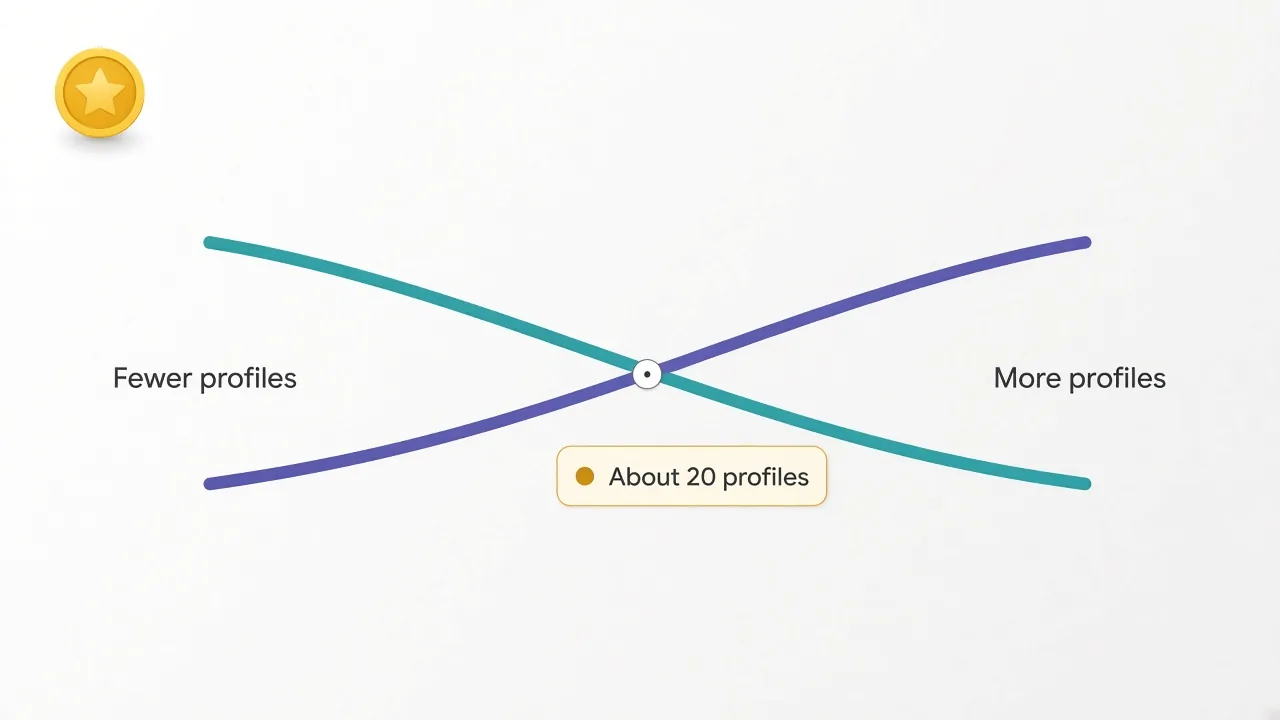
Why such a big jump? Dolphin's Starter tops out at 60 profiles. Need 61, and the next step is the $89 Base plan.
AdsPower has no cliff like that. Each extra profile costs a bit less than the one before, so growth feels gradual.
Longer billing narrows the gap a little. Dolphin's docs list 20% off for 6 months and 40% off for 12. AdsPower's discounts move with promotions, and our directory lists it from $5.40 a month, which matches its 10-profile plan at 40% off.
Why do teams pay so differently?
Two people sharing one login is how accounts get mixed up. So once you hire help, seats start to matter.
AdsPower lets you add team members on any paid plan. Each extra person costs $5 a month, and the account owner is free. You set permissions, so a freelancer only sees the profiles they manage.
Dolphin Anty keeps teamwork behind its Base plan. Starter is a one-person plan. On Base, each added user costs $10 a month, on Team it's $20, and on Enterprise it's $25.
Say you're a two-person shop running 30 ad accounts. On AdsPower, the 50-profile plan plus one member is $21 plus $5. That's $26 a month.
On Dolphin, the second seat forces you onto Base. That's $89 plus $10, or $99 a month.
That's nearly four times the price for the same 30 accounts. If you work alone, skip ahead. If you don't, this section might decide the whole thing.
To be fair, Dolphin's team plans bring real extras. Base adds roles, shared bookmarks, profile creation limits for members and a trash bin for deleted profiles. They're good tools, priced for agencies rather than pairs.
Automation: which one does the boring work for you?
Do you repeat the same clicks across dozens of accounts every morning? Then automation is the part you'll feel every day.
AdsPower ships three tools on every paid plan. The RPA robot lets you build workflows without code, like "open the store, check orders, log out." The Synchronizer mirrors your clicks from one window across many.
The Local API lets scripts in Selenium, Puppeteer or Playwright open and drive profiles. Its rate limit rises with the plan, from 300 to 1,500 requests a minute, so heavy scripters should check their tier.
Dolphin Anty's paid plans include a Scenario Builder, an action Synchronizer, mass actions and a cookie robot. Its local and remote API work with Selenium, Puppeteer and Playwright too.
The cookie robot is the standout. It visits sites you choose to build up browsing history in a profile. If you warm fresh ad accounts before running spend, that's exactly the chore you want handed off.
So which is stronger? For no-code workflows, our directory review rates AdsPower's stack as the deeper one. For account warming, Dolphin's cookie robot was built for the job.
If you write your own scripts, either will do. Our guide to using a proxy with Playwright shows the pattern you'd plug either browser into.
Is one of them harder for platforms to detect?
We'll be straight with you: neither vendor publishes independent detection tests, and we haven't run a lab test of our own. Be wary of any site that crowns a "less detectable" winner without showing its method.
Here's what we can say. AdsPower lists controls for canvas, WebGL, WebRTC, fonts and audio. Dolphin focuses on fingerprints that stay internally consistent, so each piece matches the others.
Our explainer on how browser fingerprinting works walks through each of those signals.
The clearer difference is the engine. AdsPower offers a Chrome-based and a Firefox-based browser. Dolphin Anty runs on Chromium.
Why would you care? Most people browse on Chrome, so Chromium profiles blend in. But if you run hundreds of accounts on one platform, mixing in some Firefox profiles adds variety. Only AdsPower gives you that choice.
The bigger risk is usually the setup, not the engine. A Windows fingerprint on a mobile IP, or a New York time zone on a German proxy, stands out in either browser. You can check what a profile leaks with our fingerprint checker.
Which one feels easier on day one?
You'll live in this app for hours a day. How it feels matters more than a feature grid suggests.
Dolphin Anty is the friendlier of the two. Our directory review calls its interface approachable and great for beginners, and paid plans add one-click profile creation.
AdsPower packs more onto every screen. That's the price of all those automation tools, and our directory review flags the interface as dense for first-time users.
Is that a dealbreaker? Usually not. But if you're handing profiles to an assistant who's never used an antidetect browser, Dolphin's layout will save you a few support messages.
Support works differently too. Dolphin points users to support and a community chat on Telegram. AdsPower lists online customer support on every plan.
Linux, cloud sync and the small stuff that bites later
A few details hide in the fine print until they cost you an afternoon.
- Our directory lists Dolphin Anty on Windows, macOS and Linux, and AdsPower on Windows and macOS. Linux teams should check AdsPower's download page first.
- Both sync profile data across computers on paid plans, so a profile closed on one machine opens with the same cookies on another.
- AdsPower can restore deleted profiles from Trash on every paid plan. Dolphin adds its trash bin only from Base.
- Dolphin caps how often Starter users create and delete profiles, from 1,500 a month on 20 profiles to 5,000 on 60. Base and up remove the cap.
That trash-bin gap is the one we'd watch most. On Dolphin's Starter plan, one wrong click means that account starts over with a fresh profile.

Profiles at scale with strong automation.
What matters more than either antidetect browser?
Here's the second promise from the top. Neither browser includes proxies, and your proxy decides more than your browser does.
An antidetect browser hides your device. It can't hide a bad IP.
If ten profiles share one IP, or sit on a datacenter range the platform already distrusts, perfect fingerprints won't save them. The platform links them by address instead.
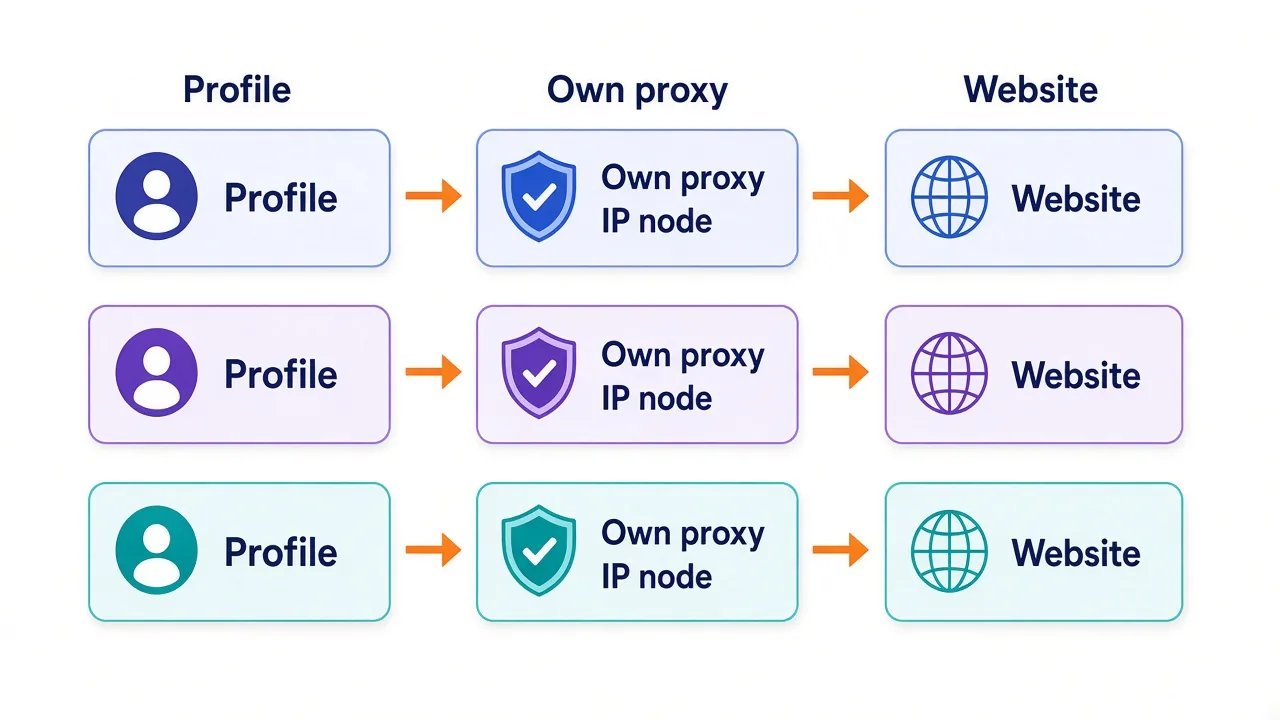
So pair every profile with its own IP and keep that pairing fixed. For accounts that log in daily, a static IP per profile works best, which is why many people use ISP proxies.
For shorter tasks, a sticky residential session can do the job. Just don't let a profile hop between countries.
And budget for it. Ten profiles on AdsPower cost $9 a month. Ten dedicated IPs can easily cost more than that, depending on the provider.
Price it as a pair
Add your proxy cost per profile to the browser's cost per profile. That combined number is what each account really costs, and it often changes which plan looks cheap.
Need a provider? Start with our list of the best proxies for antidetect browsers. If your proxies keep getting flagged anyway, our guide on why proxies get banned covers the usual causes.
Should you pick Dolphin Anty or AdsPower?
By now the pattern is clear. Here's how we'd decide.
Pick Dolphin Anty if most of these sound like you:
- You work alone and need 60 profiles or fewer.
- You run Facebook, TikTok or Google ad accounts and want help warming them.
- Your team works on Linux machines.
- You want the gentlest learning curve.
Pick AdsPower if these fit better:
- You need more than 60 profiles, or will soon.
- Anyone besides you needs their own login.
- You want no-code automation for repeat chores.
- You'd like Firefox-based profiles in the mix.
Stuck in the middle? Say you're solo with 18 accounts. Dolphin's $10 Starter covers 20 profiles, and AdsPower's 20-profile plan is $12.
At that size, price won't decide it. Run both free plans for a week on your main platform, and keep the one that triggers fewer checkpoints.
Still weighing other tools? Our GoLogin alternatives list and GoLogin vs Multilogin comparison cover the next tier up.
So, which one should you download first?
Start with your profile count and your headcount, not the free plan.
Working alone with a few dozen ad accounts? Dolphin Anty is the easier start. Growing past 60 profiles, adding a teammate, or automating chores? AdsPower costs less and does more.
Whichever you choose, test your real platform on the free plan before you pay for a year.
Ready to set it up properly? Compare the antidetect browsers we've reviewed, then give every profile its own clean IP.
That's the setup that lasts.
Frequently asked questions
Dolphin Anty is cheaper for about 20 profiles, and AdsPower is cheaper almost everywhere above that. At 100 profiles on monthly billing, AdsPower costs $36 against Dolphin's $89 Base plan. Team seats widen the gap further.
Dolphin Anty's Free plan gives 5 profiles, and AdsPower's gives 2. Dolphin has announced a cut to 3 free profiles, while AdsPower adds a 7-day trial of every feature when you sign up.
Yes, but only from the Base plan, which costs $89 a month for 100 profiles. Extra users cost $10 each on Base, $20 on Team and $25 on Enterprise. The $10 Starter plan is single-user.
No, neither includes proxies in its plans, so you bring your own. Give each profile its own IP and keep that pairing fixed, or accounts can still be linked by address.
AdsPower is stronger for no-code automation, thanks to its RPA robot, Synchronizer and Local API on every paid plan. Dolphin Anty's cookie robot is handy for warming new ad accounts, and both support Selenium, Puppeteer and Playwright.
Yes, our directory lists Dolphin Anty on Windows, macOS and Linux. It lists AdsPower on Windows and macOS only, so Linux teams should check AdsPower's download page before buying.